What is Nooku?
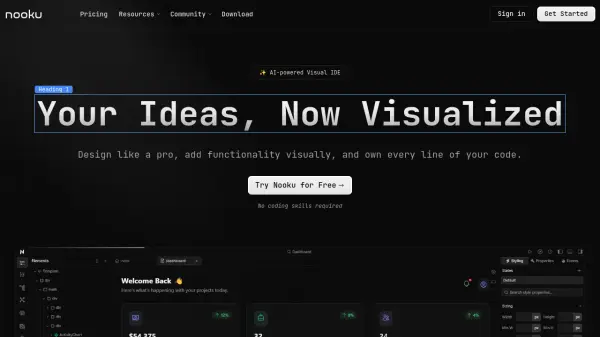
Develop web applications rapidly using an intuitive, AI-enhanced visual interface. This platform empowers users to design responsive layouts by dragging and dropping components and styling with Tailwind CSS. It facilitates the creation of complex application logic through a visual function builder, enabling connections to APIs, state management, and event handling without traditional coding.
Every visual change instantly generates clean, optimized Nuxt code based on Vue, Tailwind CSS, and TypeScript. Users retain complete control as the code resides on their local system, ensuring zero lock-in. The platform supports building fast, SEO-friendly web applications leveraging Nuxt's server-side rendering and static generation, with the final code exportable for deployment on any hosting platform.
Features
- Visual Design Interface: Drag-and-drop components and style with Tailwind CSS for responsive layouts.
- Visual Logic Builder: Create complex functionality, connect APIs, manage state, and handle events without writing code.
- Real-time Code Generation: Generates clean, optimized Nuxt, Vue, Tailwind CSS, and TypeScript code as you build.
- Zero Lock-In: Full access to the codebase stored on your local system.
- Production-Ready Export: Export Nuxt code suitable for deployment on any platform (Paid plans).
- AI-Powered Assistant: Provides AI support within the IDE (Bring Your Own Key - BYOK on paid plans).
- Git Integration: Version control powered by Git (Paid plans).
- Custom Code Support: Integrate custom code alongside visual elements (Paid plans).
Use Cases
- Building web applications visually without extensive coding knowledge.
- Rapidly prototyping and developing Nuxt.js projects.
- Creating SEO-friendly websites and applications.
- Designing responsive user interfaces with Tailwind CSS.
- Developing applications with complex logic using a visual builder.
- Generating clean Nuxt code for further customization or deployment.
FAQs
-
Is there a free version of Nooku?
Yes, there is a Free plan perfect for trying out Nooku and small projects, limited to 2 projects and without Git integration or the AI assistant. -
Can I export the code generated by Nooku?
Yes, you can export production-ready Nuxt code that you can host on any platform (available on paid plans). -
Does Nooku lock me into its platform?
No, Nooku emphasizes zero lock-in. Your code lives on your system, giving you full access and control. -
What technologies does Nooku generate code with?
Nooku generates code based on Nuxt, Vue, Tailwind CSS, and TypeScript. -
What is the AI-powered assistant?
It's a feature available on paid plans (requiring you to Bring Your Own Key - BYOK) to assist within the visual IDE.