What is Nicelydone?
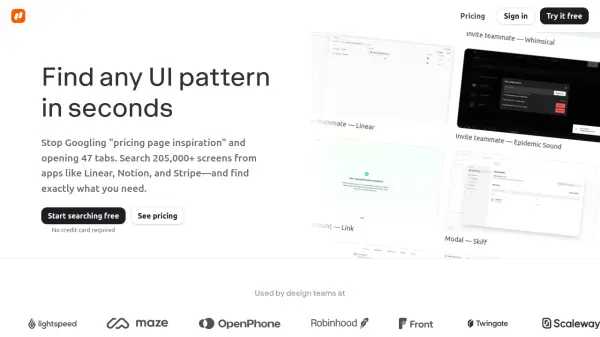
Nicelydone provides designers with access to a comprehensive library of real SaaS user interfaces, featuring over 205,000 screens from more than 500 applications. The platform enables efficient design research by allowing users to search text within screenshots, filter by app, pattern, or page type, and save references to project boards. Users can drag screens directly into Figma without downloading files, streamlining the workflow from discovery to implementation.
The service includes complete user flows and UI components in context, helping design teams build living reference libraries and avoid starting projects from scratch. It offers team collaboration features such as shared collections and the ability to invite teammates with one click, making it easier to share references and maintain organized swipe files.
Features
- Search Text Inside Screenshots: Type specific text like 'Upgrade to Pro' to find matching UI elements
- Filter by App, Category, or Flow: Narrow down results from 205,000+ screens to exactly what's needed
- Drag Straight into Figma: Paste screens directly without downloading or file management
- Team Collections: Build shared reference libraries that everyone can access and use
- See Behind Paywalls and Trials: Access UI screens that are normally hidden behind account requirements
Use Cases
- Finding pricing page design inspiration
- Researching onboarding flow patterns
- Discovering modal window designs
- Exploring dashboard layout options
- Studying form design best practices
- Analyzing navigation menu implementations
- Comparing different UI component styles
FAQs
-
How is Nicelydone different from Dribbble or Behance?
Nicelydone focuses on real SaaS UI screens from actual products rather than design concepts or mockups, providing practical references for working designers. -
Can I share my account with teammates?
The Team plan allows adding teammates with shared collections, while the Solo plan is for individual use with one seat included. -
Can I upgrade from Solo to Team later?
Yes, users can upgrade from the Solo plan to the Team plan at any time to accommodate growing design teams. -
Can I cancel anytime?
Yes, subscriptions can be canceled at any time according to the pricing information provided. -
Does it auto-renew?
The pricing page indicates subscriptions auto-renew but can be canceled anytime.