
What is MenubarX?
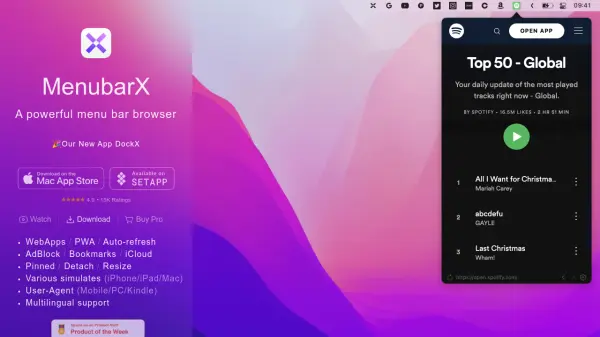
MenubarX is a versatile menu bar browser designed to enhance productivity by providing instant access to web applications and websites directly from the macOS menu bar. It supports WebApps and Progressive Web Apps (PWAs), allowing users to pin frequently used sites for quick launching. The tool includes an auto-refresh feature to keep content up-to-date, an integrated ad-blocker for cleaner browsing, and bookmark management with iCloud synchronization for seamless access across devices.
Users can detach and resize browser windows for flexible multitasking, simulate various devices like iPhone, iPad, and Mac for testing purposes, and switch user-agents to emulate mobile, PC, or Kindle browsers. With multilingual support, MenubarX caters to a global audience while prioritizing privacy and offering a Pro version for advanced features. It integrates with DockX for enhanced app management, making it a comprehensive solution for efficient web navigation.
Features
- WebApps / PWA Support: Access and manage web applications and progressive web apps directly from the menu bar
- Auto-refresh: Automatically refresh web content to keep it current without manual intervention
- AdBlock: Built-in ad-blocker for a cleaner and faster browsing experience
- Bookmarks with iCloud: Sync bookmarks across devices using iCloud for seamless access
- Pinned / Detach / Resize: Pin sites for quick launch, detach windows, and resize them for flexible multitasking
- Various Simulates (iPhone/iPad/Mac): Simulate different devices for testing and compatibility checks
- User-Agent (Mobile/PC/Kindle): Switch user-agents to emulate various browsers and devices
- Multilingual Support: Interface available in multiple languages for global usability
Use Cases
- Quickly accessing web apps like Gmail or Slack from the menu bar without opening a full browser
- Testing website responsiveness on different devices such as iPhone or iPad simulations
- Blocking ads and auto-refreshing news or stock sites for up-to-date information
- Managing bookmarks across multiple Apple devices with iCloud synchronization
- Emulating Kindle or mobile browsers for development or content viewing purposes