Magnus UI favicon

Magnus UI
Utility-First UI Framework for React Native Apps

What is Magnus UI?

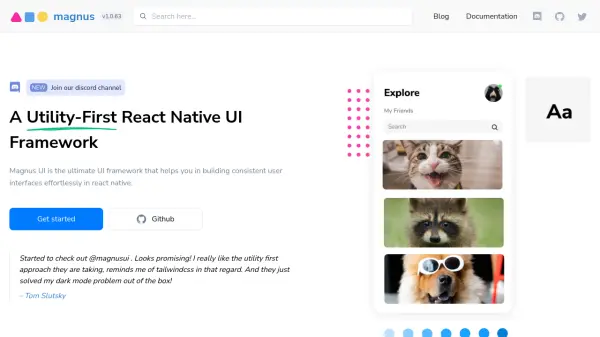
Magnus UI is a specialized UI framework for React Native that prioritizes utility-first design, enabling developers to create visually consistent and modular interfaces with ease. Built on the Atomic Design Methodology, Magnus UI offers access to over 25 polished components and an extensive icon system, simplifying the process of translating design concepts into fully functional apps.

With features such as easy theme customization, support for consistent spacing, and flexibility in color and component styling, Magnus UI offers developers a streamlined workflow. Its composable components and rapid setup reduce development time, while the framework ensures cohesive design throughout React Native applications.

Features

  • Utility-First Approach: Enables rapid development of user interfaces in React Native.
  • Atomic Design: Built on the Atomic Design Methodology for modular UI.
  • Theme Customization: Easy color, border radius, and style modifications.
  • Component Library: Access to 25+ pre-built React Native components.
  • Consistent Spacing: Ensures uniformity in app layouts.
  • Icon System: Thousands of icons available for use.

Use Cases

  • Building new React Native apps with consistent UI components.
  • Customizing application themes for brand consistency.
  • Rapid prototyping of mobile interfaces.
  • Enhancing user experience with modular and reusable components.
  • Solving dark mode interface challenges.

Related Tools:

Blogs:

  • Top 6 AI note-taking tools for 2026: in-person, online, and hybrid use cases

    Top 6 AI note-taking tools for 2026: in-person, online, and hybrid use cases

    Most AI note-taking lists are really lists of meeting bots, which join your video call and transcribe it. That's useful, but it's half the picture. Decisions happen in hallway conversations, client dinners, on-site visits, and hybrid rooms where nobody is on a video link. This guide covers different parts of the note-taking workflow: hardware capture for in-person settings, platform-native tools for online calls, and AI layers for organizing and synthesizing what you've captured. It compares six tools by capture context, workflow fit, pricing, and limitations.

  • Top AI tools for Teachers

    Top AI tools for Teachers

    Explore the top AI tools designed for teachers, revolutionizing the education landscape. These innovative tools leverage artificial intelligence to enhance teaching efficiency, personalize learning experiences, automate administrative tasks, and provide valuable insights, empowering educators to create engaging and effective educational environments.

  • Best text to speech AI tools

    Best text to speech AI tools

    Text-to-speech (TTS) AI tools are designed to convert written or text-based content into natural-sounding spoken audio. These tools utilize various deep learning and neural network architectures to generate human-like speech from textual input.

Didn't find tool you were looking for?

Be as detailed as possible for better results