What is Haystack Editor?
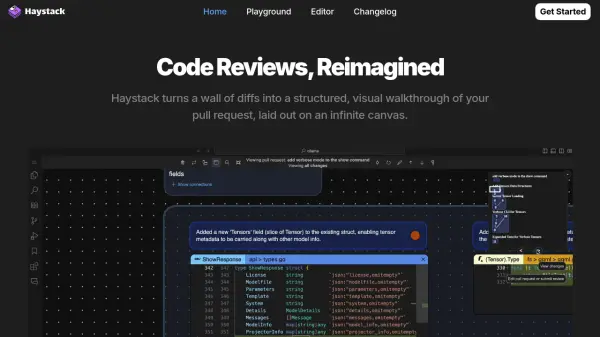
Haystack Editor offers a novel approach to code reviews by converting complex pull request diffs into an intuitive, visual walkthrough presented on an infinite canvas. This structured layout significantly enhances the reviewer's ability to understand changes efficiently. The platform employs AI to determine the optimal sequence for reviewing code diffs, allowing developers to bypass the complexity of puzzling through large pull requests and focus directly on the review process itself.
By transforming pull requests into concise, meaningful sections, Haystack Editor aims to accelerate the review cycle, enabling teams to review, merge, and proceed with their work more rapidly. Collaboration is streamlined as discussions, feedback handling, and review finalization occur directly within the Haystack canvas, minimizing context switching. The tool supports a wide array of popular programming languages, ensuring broad applicability across different development environments.
Features
- Visual Walkthrough: Turns pull request diffs into a structured, visual representation on an infinite canvas.
- AI-Optimized Review Order: Uses AI to suggest the best sequence for reviewing code changes.
- Concise Sections: Transforms pull requests into easily digestible, meaningful sections.
- In-Canvas Collaboration: Allows chat, feedback handling, and review completion directly on the canvas.
- Multi-Language Support: Supports JavaScript, TypeScript, Python, Java, Rust, Ruby, Go, and C++.
Use Cases
- Streamlining complex code reviews.
- Improving understanding of pull request changes.
- Accelerating the code review and merge process.
- Enhancing collaboration during code reviews.
- Reducing context switching for developers during reviews.