Greenify GPT
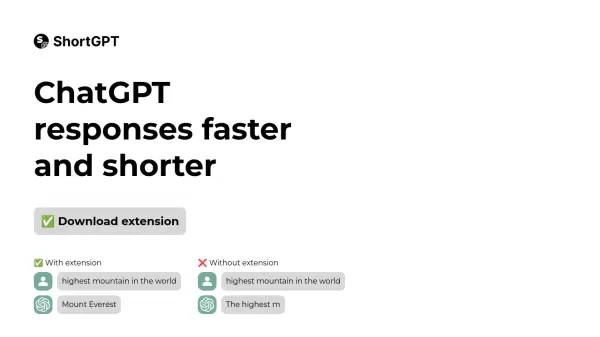
Make ChatGPT responses faster and shorter

What is Greenify GPT?

Greenify GPT is a specialized browser extension designed to enhance the ChatGPT experience by generating more concise and faster responses. This tool streamlines AI interactions by automatically optimizing ChatGPT's output, ensuring users receive precise answers without unnecessary elaboration.

The extension works seamlessly with ChatGPT's interface and demonstrates significant improvement in response time and brevity compared to standard ChatGPT interactions, making it an essential tool for users who value efficiency and directness in their AI conversations.

Features

  • Response Optimization: Generates shorter, more concise answers
  • Speed Enhancement: Delivers faster ChatGPT responses
  • Easy Integration: Simple installation process with Chrome browser
  • Developer Mode Compatible: Works with Chrome's developer features

Use Cases

  • Quick information retrieval from ChatGPT
  • Efficient research and data gathering
  • Time-sensitive AI interactions
  • Streamlined question-answering sessions

FAQs

  • How do I install the Greenify GPT extension?
    Download the extension, unzip the file, go to chrome://extensions, enable developer mode, click on 'Load unpacked', and select the unzipped folder.

Related Queries

Helpful for people in the following professions

Related Tools:

Blogs:

  • Ghibli Art Generator AI tools

    Ghibli Art Generator AI tools

    List of the best AI tools to turn your photos into images that look like Studio Ghibli movies. Easy to use and fun for everyone.

  • Best AI tools for Room Design

    Best AI tools for Room Design

    Discover cutting-edge AI tools that redefine the art of room design. From layout optimization to aesthetic finesse, these top-tier tools enhance your space to new heights.

  • Top 6 AI note-taking tools for 2026: in-person, online, and hybrid use cases

    Top 6 AI note-taking tools for 2026: in-person, online, and hybrid use cases

    Most AI note-taking lists are really lists of meeting bots, which join your video call and transcribe it. That's useful, but it's half the picture. Decisions happen in hallway conversations, client dinners, on-site visits, and hybrid rooms where nobody is on a video link. This guide covers different parts of the note-taking workflow: hardware capture for in-person settings, platform-native tools for online calls, and AI layers for organizing and synthesizing what you've captured. It compares six tools by capture context, workflow fit, pricing, and limitations.

  • Best Content Automation AI tools

    Best Content Automation AI tools

    Streamline your content creation process, enhance productivity, and elevate the quality of your output effortlessly. Harness the power of cutting-edge automation technology for unparalleled results

Didn't find tool you were looking for?

Be as detailed as possible for better results