What is Draw.Chat?
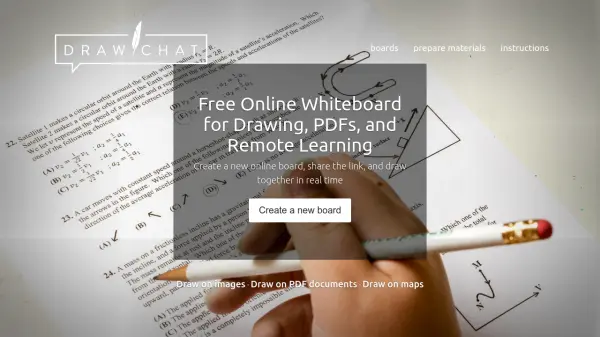
Draw.Chat provides a browser-based whiteboard solution for drawing, note-taking, and collaborative work. It enables users to upload PDF documents, images, and maps, then draw directly on them in real time with others. The tool includes features like pen, highlighter, crayon, nib pen, and eraser, with support for styluses and graphics tablets that respond to pressure and tilt for natural drawing.
Built-in audio-video chat facilitates communication during sessions, while an AI assistant offers help with definitions, task-solving, or examples via the chat panel. Users can configure the whiteboard to their needs, save settings as templates, and embed boards on websites or e-learning systems. The platform works on desktops, tablets, and phones, with no installation or registration required, making it accessible for education, teamwork, and creative projects.
Features
- Real-Time Collaboration: Multiple users can draw, chat, and work together on the same board simultaneously.
- File Drawing Support: Upload and draw on PDF documents, images, and maps directly in the browser.
- AI Assistant: Provides help with definitions, solving tasks, or examples through the chat interface.
- Stylus and Tablet Support: Tools respond to pressure and tilt for natural drawing with styluses and graphics tablets.
- No Account Required: Create and share boards instantly without registration or installation.
- Audio-Video Chat: Built-in communication features for talking with participants during sessions.
- Cross-Platform Compatibility: Works on desktops, tablets, and smartphones via web browsers.
- Configurable Templates: Save and launch custom settings as templates for quick setup and embedding.
Use Cases
- Online tutoring and remote lessons for teachers and students
- Collaborative note-taking and brainstorming in team meetings
- Drawing and annotating on PDFs for educational or professional purposes
- Real-time project collaboration and creative design sessions
- Interactive learning with maps and images in geography or history classes
- Hosting virtual workshops or training sessions with shared whiteboards
- Creating digital notes and highlights on documents before printing
- Embedding whiteboards on websites or e-learning platforms for enhanced interactivity
FAQs
-
Is there a time limit on sessions?
No, there is no time limit on sessions; boards can be used indefinitely during active periods. -
Can I save my drawings or boards permanently?
Boards are temporary and may be deleted after a longer period of inactivity; users can save work as PDF files. -
Does Draw.Chat support multiple languages?
Yes, the website interface is available in multiple languages, including English, Polish, Ukrainian, and many others. -
Is there a newsletter for updates?
Yes, users can sign up for a newsletter to receive information about new features and updates.