CutMP3 favicon

CutMP3
Free Online Audio Trimmer and MP3 Cutter

What is CutMP3?

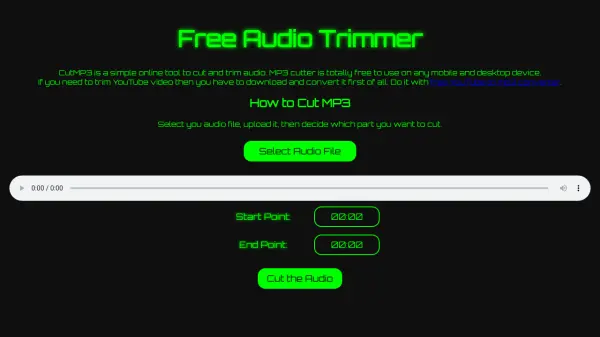
CutMP3 is a free online tool designed for cutting and trimming audio files, specifically MP3 format. It provides a user-friendly interface accessible on both mobile and desktop devices without requiring any downloads or installations. Users can upload their audio files, select precise start and end points for trimming, and download the edited file directly. The tool is completely free to use, making it an accessible solution for quick audio editing tasks.

While primarily focused on audio trimming, CutMP3 also mentions the need to convert YouTube videos to MP3 format before trimming, suggesting compatibility with external conversion tools. The process involves selecting an audio file, setting the desired start and end points, cutting the audio, and downloading the result, ensuring a seamless editing experience for users of all skill levels.

Features

  • Free Usage: Completely free to use on any mobile or desktop device
  • Audio Trimming: Cut and trim MP3 files with precise start and end point selection
  • Online Tool: No downloads or installations required; accessible via web browser
  • User-Friendly Interface: Simple steps for uploading, trimming, and downloading audio

Use Cases

  • Trimming audio clips for podcasts or music projects
  • Editing MP3 files for personal use or presentations
  • Cutting audio segments from recordings for social media content
  • Preparing audio files for use in videos or multimedia projects

Related Tools:

Blogs:

  • Best AI tools for Lawyers

    Best AI tools for Lawyers

    streamline legal processes, enhance research capabilities, and improve overall efficiency in the legal profession.

  • Top 6 AI note-taking tools for 2026: in-person, online, and hybrid use cases

    Top 6 AI note-taking tools for 2026: in-person, online, and hybrid use cases

    Most AI note-taking lists are really lists of meeting bots, which join your video call and transcribe it. That's useful, but it's half the picture. Decisions happen in hallway conversations, client dinners, on-site visits, and hybrid rooms where nobody is on a video link. This guide covers different parts of the note-taking workflow: hardware capture for in-person settings, platform-native tools for online calls, and AI layers for organizing and synthesizing what you've captured. It compares six tools by capture context, workflow fit, pricing, and limitations.

  • AI thumbnail maker tools

    AI thumbnail maker tools

    Automatically generate visually appealing and optimized thumbnails for various digital content, streamlining the design process and enhancing visual engagement

  • Boost Engagement in Ads with AI

    Boost Engagement in Ads with AI

    Discover how AI music and AI SDR agents are reshaping modern advertising. Learn how emotional resonance through AI-generated soundtracks combined with smart, automated sales outreach can turn viewers into loyal customers faster, cheaper, and more personally than ever before.

Didn't find tool you were looking for?

Be as detailed as possible for better results