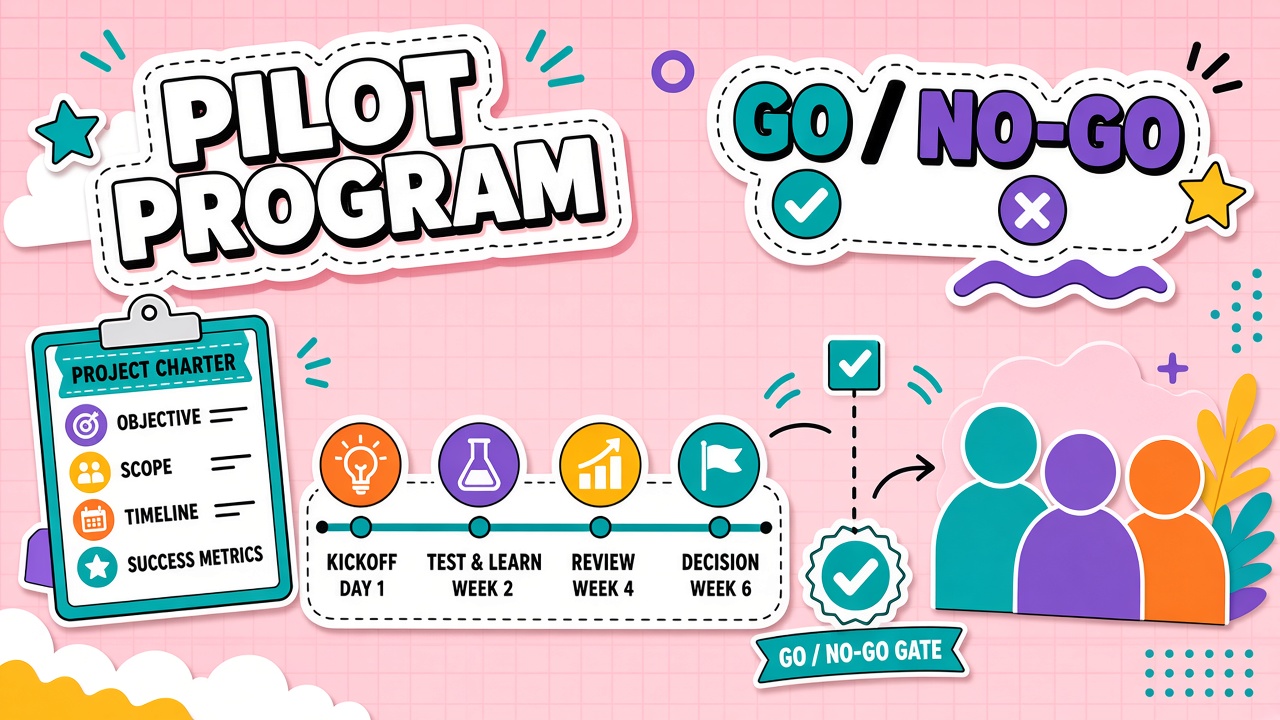
Most AI tool pilots fail quietly. The trial runs for six weeks, produces enthusiastic Slack messages and a handful of impressive demos, then rolls into a paid subscription because nobody scheduled a decision meeting. Six months later, half the team still works the old way and finance asks why the invoice renewed.
An AI tool pilot program fixes that pattern with a written charter: one workflow, named owners, baseline metrics, a fixed duration, and pre-agreed go or no-go criteria. This framework shows you how to design a pilot that produces a real decision, not an endless experiment. When you are ready to compare candidates for the workflow you chose, browse AI productivity tools and AI automation tools after the charter is signed, not before.
What Belongs in an AI Pilot Charter
A pilot charter is a one- to two-page document that defines the business problem, workflow boundary, participants, data rules, success metrics, risks, timeline, and scale or stop criteria before anyone opens a trial account. Without a charter, every stakeholder measures success differently and the pilot cannot end with a clear verdict.
Strong charters answer four questions in plain language: what job are we testing, who performs that job weekly, what evidence would justify rollout, and what would justify stopping. Vague goals like "explore AI for marketing" produce vague results. Verb-first workflow names like "draft weekly newsletter from product release notes" produce testable pilots.
Pilot charter components checklist
- Business problem: The pain point in minutes, errors, or backlog, with a baseline number if known
- Workflow scope: Start trigger, inputs, steps, reviewers, and output destination
- Pilot objective: One sentence on what changes if the tool works
- Participant roster: Practitioners, workflow owner, executive sponsor, IT or security reviewer
- Data classification: What may enter the tool, what is prohibited, and retention expectations
- Success metrics: Quantitative targets plus qualitative acceptance criteria
- Risks and mitigations: Quality, privacy, integration, and change-management blockers
- Timeline and milestones: Kickoff, midpoint review, and decision date
- Exit criteria: Scale, revise, or stop thresholds written before launch
| Charter section | Minimum acceptable detail | Weak charter signal |
|---|---|---|
| Workflow scope | Named task with start and end states | "Anyone who wants to try it" |
| Success metrics | Baseline, target, and measurement method | "Team satisfaction survey only" |
| Decision authority | Named executive who signs go or no-go | "We'll decide together later" |
| Stop criteria | Specific thresholds that trigger halt | No stop plan documented |
Selecting Pilot Participants and Workflows
Pilot participants should include the people who perform the target workflow at least weekly, one skeptical practitioner, and one workflow owner who can change process if results justify it. Early adopters alone produce inflated adoption scores. A skeptic who improves with the tool is stronger evidence that rollout will survive contact with normal workloads.
Choose workflows with measurable outputs and tolerable risk. Internal draft generation, ticket summarization, and research briefs fit well. Client-facing sends, financial approvals, and regulated filings belong in later phases with tighter human review gates. One workflow per pilot keeps causality clear. Testing three jobs at once makes it impossible to know which change drove results.
Duration and Milestone Schedule
Most practical AI tool pilots run six to ten weeks: two weeks for setup and training, four to six weeks of live tasks on real work, and one week for analysis and the decision meeting. Shorter pilots rarely capture rework patterns. Longer pilots without milestones tend to become unofficial production.
- Week 0: Charter approved, accounts provisioned, baseline metrics captured
- Weeks 1 to 2: Training, prompt templates, integration checks, first supervised runs
- Weeks 3 to 6: Live workflow execution with weekly blocker logs
- Week 7: Midpoint review against leading indicators
- Weeks 8 to 9: Complete remaining test cases, gather qualitative feedback
- Week 10: Go or no-go decision meeting with written recommendation
Success Metrics: Quantitative and Qualitative
Quantitative metrics prove whether the workflow changed in measurable ways. Qualitative metrics explain whether practitioners trust the output enough to keep using the tool after the pilot ends. You need both. A fast draft that requires heavy rework is not a win even if cycle time looks better on paper.
| Metric type | Example measure | Why it matters |
|---|---|---|
| Cycle time | Median minutes from trigger to approved output | Shows speed impact on the named workflow |
| First-pass acceptance | Share of outputs approved with minor edits only | Separates useful acceleration from rework tax |
| Repeat usage | Practitioners using the tool weekly without reminders | Signals voluntary adoption beyond the pilot mandate |
| Error or escalation rate | Incidents requiring rollback or manager review | Captures quality and risk during the trial |
| Trust score | Anonymous 1 to 5 rating on output reliability | Explains whether behavior will persist post-pilot |
Set targets before launch. A common pattern for operational workflows is to seek meaningful improvement on the primary metric (often fifteen to twenty-five percent cycle-time reduction or equivalent throughput gain) while holding quality steady or improving it. If the primary metric improves but rework spikes, the pilot outcome is revise, not scale.
Go or No-Go Decision Meeting Agenda
The decision meeting exists to produce one of three outcomes: scale to a broader rollout, revise scope and retest, or stop and document learnings. Schedule it on the charter date. Move it only with executive approval and a written reason.
- Results summary (10 minutes): Baseline vs pilot metrics with data sources named
- Adoption evidence (10 minutes): Who used the tool, how often, and whether skeptics improved
- Blocker review (10 minutes): Open technical, security, and process issues categorized as resolved, fixable, or fatal
- Cost and capacity (5 minutes): Projected spend at scale including integration and training
- Decision (10 minutes): Scale, revise, or stop with named owners and next steps
- Documentation (5 minutes): Archive charter, metrics, and recommendation for future pilots
A go decision should require evidence that adoption will hold beyond the motivated pilot cohort, that unresolved blockers affect less than twenty percent of proposed rollout scope, and that the workflow owner commits to process changes needed at scale. A no-go decision should list what would need to change before a future retest: a different metric target, a vendor capability gap, or a workflow redesign prerequisite.
Common Pilot Charter Mistakes
Charters fail in predictable ways. Vague scope is the most common: "improve productivity with AI" is not a workflow. Undefined baselines make success unmeasurable. Missing stop criteria let pilots run until budget fatigue forces a quiet renewal. Excluding skeptics produces adoption numbers that collapse at rollout.
Another mistake is measuring activity instead of outcomes. Prompt counts and login rates can rise while cycle time stays flat. Tie metrics to the acceptance checklist reviewers already use. If reviewers still rewrite eighty percent of outputs at pilot end, the tool has not earned scale.
Stakeholder roles in pilot programs
The executive sponsor owns the go or no-go decision and removes cross-team blockers. The workflow owner defines acceptance criteria and signs off on process changes. Practitioners execute daily tasks and log friction. IT or security validates data handling before week one. Finance allocates trial budget with a published cap. Each role should appear by name on the charter, not as a department label.
Sample pilot timeline for a writing workflow
Consider a content team testing an AI drafting assistant on weekly newsletter production. Week zero captures baseline: median ninety minutes from release notes to approved draft, with two revision rounds typical. Weeks one to two train four writers on approved prompts and export paths into the CMS. Weeks three to six run live issues with rubric scoring on factual accuracy and brand voice. Week seven reviews midpoint data. Weeks eight to nine complete two additional issues under pressure deadlines. Week ten holds the decision meeting with side-by-side time and quality comparison.
If median time drops below sixty-five minutes with stable rubric scores and at least three of four writers use the tool voluntarily in week nine, scale to the full content team with the same metrics for thirty days. If time improves but rubric scores fall, revise prompts and reviewer checklist before any expansion.
Integrating Security and Legal Early
Security and legal reviews should start in week zero, not week eight. Provide the charter, data classification, vendor terms summary, and integration diagram. Late reviews that block rollout waste pilot calendar and erode sponsor trust. If security cannot approve data classes in scope, narrow scope before practitioners begin, not after they have built habits on prohibited inputs.
Legal input matters when outputs face customers, regulators, or contractual disclosure clauses. A pilot that generates client-visible drafts needs review rules confirmed before the first external send, even if the pilot population is small.
Pilot communications cadence
Weekly stakeholder email: metrics snapshot, blocker list, and decision preview. Midpoint readout to sponsor with honest assessment, including bad news. Final report template attached to calendar invite for the go or no-go meeting so attendees arrive prepared. Silence between updates breeds rumor and scope creep.
Frequently Asked Questions
How should we document a failed pilot?
Archive the charter, baseline, results, blocker log, and no-go rationale in a shared repository. Note which metric missed target, which risks materialized, and whether the failure was tool-specific or workflow-specific. Failed pilots that are documented well prevent repeat spending on the same mismatch six months later.
When should we scale a pilot winner?
Scale after the go decision meeting confirms rollout scope, training plan, security review for expanded data, and budget. Roll out in phases: one additional team first, then department-wide, with the same metrics tracked for thirty days after each expansion. Scaling immediately to the entire company without a phased check often reproduces the shelfware pattern at larger cost.
How is a pilot different from a proof of concept?
A proof of concept tests whether a capability is technically feasible on sample data. A pilot tests whether a named workflow improves on real work with real reviewers under your governance rules. Many teams need a short proof of concept for integration risk, then a bounded pilot for adoption and outcome proof. Keep both time-boxed with separate success criteria.
What if leadership mandated a tool before the pilot finished?
Narrow the mandate to a charter-compliant rollout: one workflow, metrics, and a thirty-day checkpoint. Document that full deployment began before pilot completion and increase monitoring on quality and adoption during the checkpoint. This preserves accountability even when timing was compressed.
Pilot Budget and Vendor Management
Publish pilot spend cap in the charter including seats, API usage, integration labor, and training time. Request vendor success support in writing: office hours, export paths, and escalation contact. Vendors who refuse structured pilots often struggle at enterprise scale anyway.
Compare at least two candidates when feasible using the same workflow and rubric. Single-vendor pilots are acceptable when incumbency or integration depth dominates, but document why alternatives were not tested to defend the decision later.