What is CutList Plus fx?
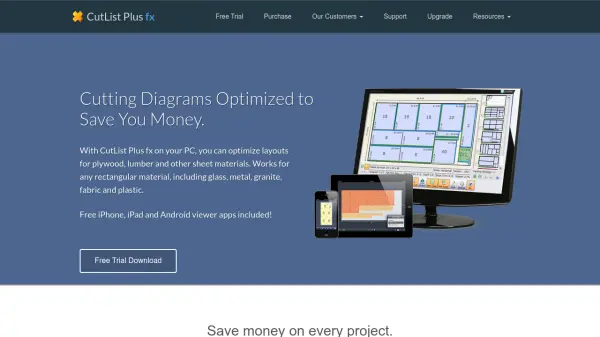
CutList Plus fx is a comprehensive PC-based tool that optimizes layouts for materials such as plywood, lumber, glass, metal, fabric, and more. By entering the dimensions of required parts, users receive efficient, ready-to-use cutting diagrams, ensuring every sheet or panel is utilized with minimal waste.
Designed to streamline workflows for professionals and hobbyists alike, the software provides accurate cost calculations, detailed materials usage reports, and advanced functionalities including edge banding and project merging. With free companion mobile apps and flexible unit support, CutList Plus fx empowers users to save time and money on every fabrication project.
Features
- Optimized Cutting Diagrams: Generates efficient layouts for plywood, lumber, glass, metal, and more.
- Material Cost Estimation: Calculates exact quantities and cost for each project.
- Detailed Usage Reports: Provides comprehensive reports on material usage and savings.
- Multi-Material Support: Works with a wide range of rectangular sheet materials including fabric and plastic.
- Advanced Project Management: Supports part merging, edge banding, and combining multiple projects.
- Flexible Units: Use metric or English units for convenience.
- Mobile Viewer Apps: Free iOS and Android apps to view project files.
- One-Time Purchase: No annual fees; single-user and site licenses available.
- Import/Export Tools: Supports DXF export and integration with other design tools (Gold and Platinum editions only).
- Label Printing: Enables printing of part labels for organized workflows.
Use Cases
- Woodworking project planning with optimal material usage.
- Fabrication of metal, glass, or plastic panels for custom builds.
- Kitchens, cabinetry, and furniture design with minimized waste.
- Cost estimation for build proposals and client presentations.
- Efficient production in small workshops or manufacturing businesses.
- Creating precise cutting diagrams for fabric or granite installation jobs.
- Generating clear material lists and labels for on-site efficiency.
- Educational demonstration of material optimization techniques.
FAQs
-
What types of materials can be optimized with this tool?
It supports plywood, lumber, glass, metal, granite, fabric, plastic, and any other rectangular sheets. -
Are mobile apps available for viewing projects?
Yes, free iPhone, iPad, and Android viewer apps are included with your purchase. -
Do I have to pay annual fees to use the software?
No, the software is available for a one-time purchase with no recurring annual fees. -
Can I print part labels for my projects?
Yes, the software supports printing of part labels to streamline the organization of your materials. -
Which operating systems are supported?
The software runs on Windows 7, 8, and 10, supporting both 32-bit and 64-bit systems.