What is Cushion?
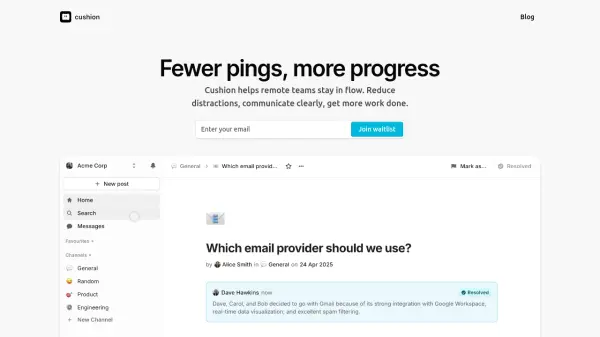
Cushion is an intelligent collaboration tool tailored for remote teams striving to minimize distractions and work more efficiently. The platform leverages AI assistance to keep conversations clear, organized, and actionable, ensuring important information is highlighted and easily accessible. With features such as posts for communication, decision tracking, and status updates, it eliminates the clutter found in traditional work apps and brings clarity to team interactions.
Cushion offers asynchronous, automated check-ins to replace status meetings, integrates with tools like GitHub, and provides reminders to keep everyone on track. Additional capabilities include private and group messaging, favoriting essential channels, snooze-able notifications, and email digests, all structured to enable teams to focus and progress with purpose.
Features
- AI-Assisted Communication: Receive clear, actionable feedback and resolve posts with artificial intelligence.
- Organized Team Posts: Maintain asynchronous, organized conversations with status labels like Urgent, Blocked, or Feedback Requested.
- Decision Tracking: Track who decided what and when to ensure accountability and progress.
- Automated Check-Ins: Replace synchronous status meetings with automated, asynchronous team check-ins.
- GitHub Integration: Automatically link check-ins to GitHub pull requests and issues.
- Snooze-able Notifications: Control notification timing to minimize distractions and increase focus.
- Private and Group Messaging: Communicate via private or group direct messages within your team.
- Public Post Sharing: Share important updates publicly when needed.
- Email Digests: Receive regular summaries of updates and conversations.
Use Cases
- Asynchronous team communication for remote teams
- Streamlining feedback and decision-making processes
- Replacing traditional status meetings with automated updates
- Tracking project decisions and accountability
- Keeping team members updated without communication overload
FAQs
-
How does Cushion differ from tools like Slack or Discord?
Cushion focuses on structured, actionable communication and decision tracking, providing AI-driven feedback and asynchronous check-ins to reduce distractions compared to traditional chat platforms. -
Can I join Cushion's beta program?
Yes, you can sign up for the waitlist, and the team will notify you when your spot becomes available.