Prompt edits look harmless until a production support macro starts promising refunds your policy forbids. Teams treat workflow changes like shared doc edits: no diff, no reviewer, no rollback story. Treating AI workflow version control like a software release cuts regression risk and gives auditors a trail when customer-facing language shifts.
This guide adapts git-style habits for prompt libraries, tool configs, and eval sets. Engineering teams using AI coding assistants and comparing AI code assistants already know pull requests; the same muscle applies to non-code workflows.
What to Version: Prompts, Tools, and Eval Sets
Version anything that changes output shape, tone, or compliance language without a human reread every time. Skip versioning one-off brainstorming unless it becomes production.
- Prompts and system instructions: Including few-shot examples and refusal rules
- Tool configuration: Model name, temperature, max tokens, retrieval index ID
- Integration mappings: JSON schema, CRM field map, webhook URLs (secrets referenced, not pasted)
- Eval sets: Golden inputs and expected rubric scores for regression tests
- Output templates: Markdown or HTML shells the model fills
Tag each artifact with workflow name, owner, and risk tier. High-risk customer workflows get stricter review rules below; internal brainstorming folders can stay looser if outputs never auto-publish.
Review Requirements by Risk Tier
Match review overhead to blast radius. A three-tier model keeps citizen developers moving without bypassing safety on external content.
| Risk | Reviewers | Required checks |
|---|---|---|
| Low (internal drafts) | Peer optional | Diff note in changelog |
| Medium (team production) | Workflow owner | Eval set pass on sample batch |
| High (client or regulated) | Owner plus second reviewer | Eval pass, legal or brand checklist if applicable |
Store prompts in git when engineers already own the workflow; use dedicated prompt SaaS with audit logs when operators lack git comfort. Either way, production means an immutable version ID, not "saved in browser tab."
Changelog Communication to Users
People executing workflows need to know what changed and whether their habits must shift. Changelog entries should be short and operational:
- Version number and date
- Workflow affected
- Behavior change in plain language ("shorter refunds paragraph," "new required input field")
- Action required from users, if any
- Rollback contact if quality looks wrong after deploy
Post changelogs where practitioners work: Slack channel, LMS module, or comment on the prompt repo release. Link eval results summary for medium and high tiers so trust is evidence-based.
Rollback When Quality Regresses
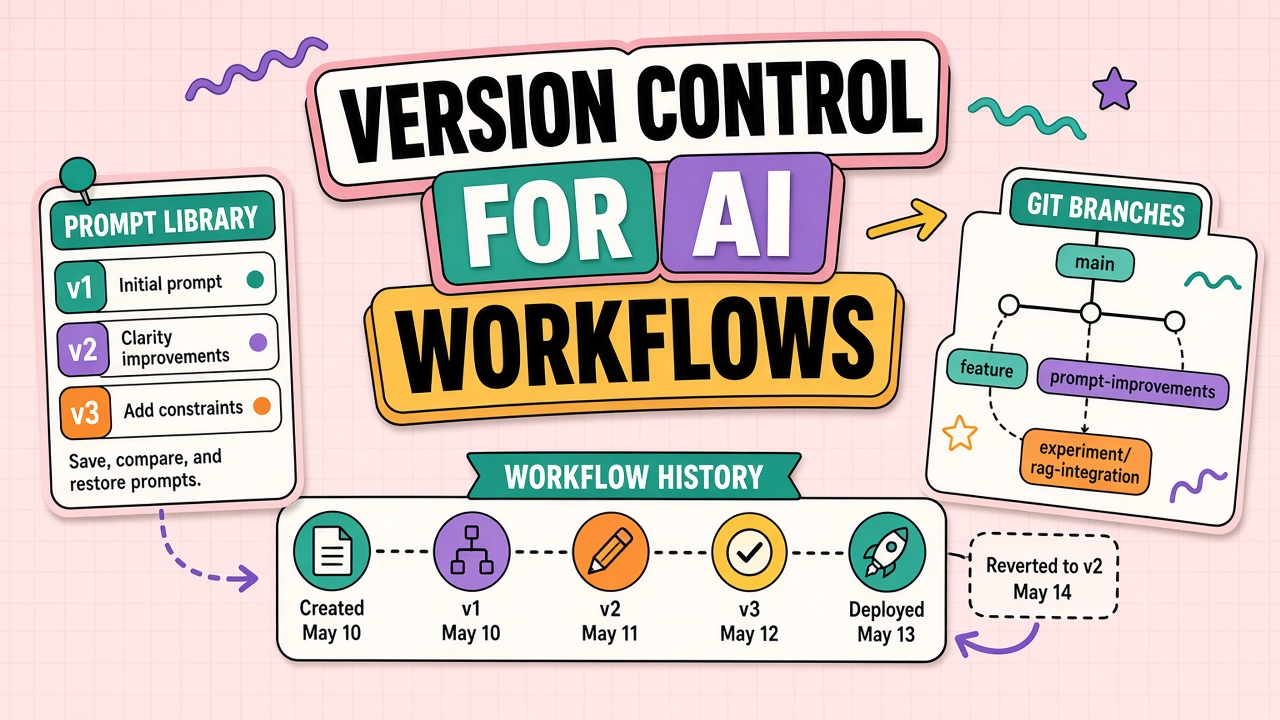
Every production version needs a previous version pinned for instant revert. Rollback triggers include eval score drop beyond threshold, spike in human overrides, and customer complaints tied to a deploy window.
Rollback procedure:
- Identify last known good version ID from changelog
- Redeploy config to that ID in orchestration layer or API gateway
- Disable concurrent prompt experiments
- Notify users that behavior reverted and incident is open
- Root-cause on failed version before attempting forward fix
Teams comparing code assistants should pin model versions the same way they pin dependencies. "Latest" is not a version strategy.
Integrating Eval Sets Into Release Gates
Eval sets turn subjective "looks fine" into merge blockers. Build fifty to two hundred golden inputs per high-risk workflow spanning typical cases, edge cases, and known historical failures. Score with rubric categories: factual accuracy, tone, format validity, policy compliance. Set minimum scores per category before promote to production.
Run evals automatically on pull request or prompt submission ticket. Block merge when scores drop versus previous production version even if average looks acceptable; one catastrophic failure on refunds language outweighs nine perfect summaries.
Coordination With Coding Releases
Prompt releases should not ship in the same change window as unrelated application deploys. When engineering ships parser changes the same hour workflow owners ship prompt v4, regressions become undebuggable. Maintain a shared release calendar; AI workflow changes get their own slot with rollback owner named in advance.
Audit Trail for Regulated Workflows
Regulated workflows need immutable history of who changed what and when. Enable audit logs in prompt platforms or git hosting; retain pull request reviews with approver identity. Link each production version to eval run ID stored alongside. Auditors ask for traceability from customer output back to prompt version and reviewers; build that chain before audit notice, not during.
Export quarterly snapshots to cold storage if vendor retention windows are shorter than your compliance requirement.
Branching Strategies for Prompt Teams
Trunk-based flow works for small teams; release branches work for regulated seasons. Small teams merge prompt fixes daily to main with eval gate. Larger orgs cut weekly release branches; only cherry-picked prompt IDs deploy to production Friday after eval sign-off. Avoid long-lived branches that diverge eval sets; merge or delete branches older than fourteen days.
Tag production releases with semantic versions: major when output schema changes, minor when tone or instruction changes, patch when typo fixes only. Consumers of API outputs parse major bumps carefully.
Tooling Choices: Git vs Prompt SaaS
Pick tooling based on reviewer skills and audit requirements. Git excels when engineers co-own workflows and CI runs evals on pull requests. Prompt SaaS excels when operators need visual diff and role-based publish without git CLI. Hybrid is common: git for high-risk text, SaaS for medium internal libraries with nightly export to git for backup.
Regardless of tool, block production publish without second pair of eyes on high-risk tiers. Single-owner publish is how refund language slips through at scale.
Version Control Rollout Steps
Step one inventory production prompts and configs currently scattered across docs, tabs, and vendor defaults. Step two pick tooling git, SaaS, or hybrid and define risk-tier review rules. Step three migrate top three high-volume workflows first; do not boil the ocean. Step four stand up eval sets and CI or ticket gates before declaring production publish process live. Step five train contributors with submission demo and office hours.
Step six communicate changelog format to all practitioners. Step seven run first rollback drill on pinned version. Step eight expand to remaining workflows over quarters. Teams that skip eval gates get version control theater: pretty history, same regressions.
Working With Citizen Developers
Citizen developers propose changes through tickets with before-and-after samples. Owners run eval batch before merge. Citizens never publish directly to production folders. Monthly show-and-tell invites citizens to present accepted prompts; recognition accelerates governed contributions faster than policy reminders alone.
Changelog Examples That Help Users
Bad changelog entry: "Updated prompt v4." Good entry: "Support macro v4 shortens empathy opener, adds mandatory policy link line, raises eval pass threshold on refund language. Action: refresh saved snippets in Zendesk. Rollback: ping @ops with macro ID." Users adopt changelogs they can execute without opening diff tools.
Publish changelogs in channel where practitioners work and pin for forty-eight hours after production release. Email-only changelogs die unread.
Eval Set Maintenance Cadence
Refresh eval sets monthly for high-risk workflows, quarterly for stable internal workflows. Add new cases from production incidents within one week of closure. Remove obsolete cases that no longer reflect product or policy. Version eval sets alongside prompts so rollback includes eval rollback to matching snapshot.
Stale eval sets give false confidence during release gates. Teams ship prompt v7 that passes tests written for 2024 policy while 2026 policy added mandatory sentences evals never check.
Security Scanning in the Release Pipeline
Scan every prompt submission for API key patterns, email addresses, internal URLs, and customer names from regex libraries updated monthly. Block merge on critical hits; warn on suspicious placeholders. Pair scanning with contributor training on synthetic examples. Security scanning is not paranoia; shared libraries leak secrets faster than private notes because search amplifies reach of one mistake.
Release Notes for Non-Technical Users
Translate semver bumps into workflow impact: "Refund macro now includes mandatory policy link" beats "prompt v3.2.1 merged." Non-technical practitioners ignore git; they read release notes in Slack. Include screenshot of sample output diff when tone or format shifts materially.
Offer office hour thirty minutes after each medium or high risk release for questions. Attendance signals confusion early before customer impact scales.
Aligning With Compliance Audits
Auditors request traceability from output to prompt version and approver identity. Export quarterly report: production prompt versions active, approvers on each merge, eval pass scores, and rollback events. Proactive export faster than scramble when audit notice arrives. Compliance alignment is major selling point for version control investment beyond engineering preference.
Include change log of policy-related prompt edits separate from typo fixes so legal reviews audit trail without reading entire git history.
Handoff Between Prompt and Engineering Teams
When engineering changes parser schema, prompt owners receive ticket before deploy with required output shape diff. Prompt release waits on schema live or feature flag coordination. Uncoordinated handoffs cause version control to blame prompts for engineering breaks and vice versa. Shared release calendar entry mandatory for cross-team workflows.
Frequently Asked Questions
We use no-code automation. Does version control still apply?
Yes. Export flow JSON on each change, name versions, and keep eval screenshots. No-code does not mean no accountability when customer emails misfire.
How do citizen developers participate without git?
Provide a submission form that creates a review ticket. Owners merge into production branch after eval. Citizens propose; owners publish.
Do we need long-lived branches?
Short feature branches per change work better than month-long forks that diverge from production eval sets.
Can prompts live in git if they reference secrets?
Never commit secrets. Reference secret names resolved at runtime from your vault. Scan repos for API keys on every pull request.
The Bottom Line
Version prompts, configs, and eval sets; require reviews scaled to risk; communicate changelogs to users; and keep rollback one click away. Workflow version control is how teams move fast without gambling on silent regressions.