What is Cliprun?
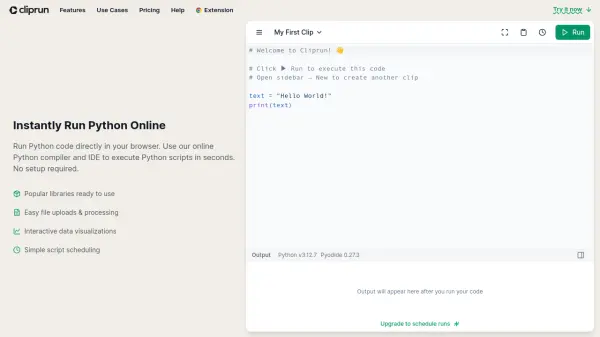
Cliprun provides an online environment to execute Python code instantly within a web browser, eliminating the need for local setup or configuration. Users can utilize a Python sandbox that supports file uploads and downloads, enabling the processing of files directly online without complex environment management.
The platform integrates popular Python libraries such as Requests, pandas, NumPy, Matplotlib, seaborn, and Plotly, automatically installing them as needed. It features an online IDE with syntax highlighting, autocomplete, dark mode, and keyboard shortcuts, facilitating code writing and execution for tasks like web scraping, API integration, data analysis, visualization, and automation. Code snippets can be saved as reusable 'Clips' for quick access.
Features
- Online Python Execution: Run Python code directly in the browser with no setup required.
- Library Support: Automatically installs and uses popular libraries like Requests, pandas, NumPy, Matplotlib, seaborn, Plotly.
- File Handling: Supports file uploads and downloads for processing within the Python sandbox.
- Data Visualization: Create interactive charts and graphs using Plotly, Matplotlib, and seaborn.
- Script Scheduling: Automate Python scripts to run at custom intervals (minutes, hours, days, cron syntax) via paid plans.
- Code Saving: Autosaves work in the browser and allows saving reusable code snippets ('Clips').
- Integrated IDE: Features syntax highlighting, autocomplete, dark mode, and keyboard shortcuts.
- Chrome Extension: Run Python code directly from webpages like ChatGPT, Claude, etc.
Use Cases
- Web Scraping: Extract and structure data from websites.
- API Integration: Build custom workflows between applications like Slack, Airtable, Stripe.
- Data Analysis: Clean datasets, perform statistical analysis, and generate reports using pandas, numpy, polars.
- Data Visualization: Create interactive charts and graphs with matplotlib, seaborn, plotly.
- Automation: Schedule repetitive tasks like price monitoring or change tracking.
- Learning Python: Experiment with Python code and see results instantly.
FAQs
-
How does Cliprun work?
Cliprun uses Pyodide to run Python directly in your browser. Use the Python code runner to execute Python instantly - no environment setup or configuration needed. -
Can I save my code and reuse it?
Yes! Save frequently used code snippets as 'Clips' that you can quickly access and run again. Your Clips are stored locally in your browser. -
What packages are supported?
Many popular packages are built-in, like pandas, numpy, requests, and matplotlib. A partial list of supported packages is available. You can install other pure Python packages with wheels on PyPI. -
Is my code secure?
Yes! When using Cliprun locally, your code runs entirely in your browser's sandboxed web worker, never leaving your device. For paid plans, code is encrypted when stored and runs in isolated cloud environments. -
What's the difference between local and scheduled runs?
Local runs execute instantly in your browser - they're unlimited and free, perfect for interactive coding and one-off scripts. Scheduled runs execute in the cloud at specified times using credits - ideal for automated tasks like scraping and connecting to APIs.