Strong videos underperform when the thumbnail blurs into a feed of open mouths and yellow arrows, or when the title promises something the first minute does not deliver. An ai workflow thumbnail title testing pipeline extracts the core promise from your script, generates title variants using formulas without clickbait drift, drafts thumbnail sketch prompts and composition notes for your design templates, plans A/B or sequential tests, and runs retrospectives on winners and patterns. AI accelerates brainstorming; you enforce brand look, honesty, and analytics interpretation before scaling what worked once.
This guide fits YouTubers, podcast clip channels, and course promo teams. Pair packaging work with AI chatbot tools for variant brainstorming and AI writing assistant tools for title copy within your character limits and platform policies.
Core Promise Extraction From Script
Extract one core promise from the finished script (outcome, curiosity gap, or identity hook) before any title or thumbnail draft, so packaging reflects what the video actually delivers in the first 30 seconds. Packaging disconnected from content trains click-away and hurts session time.
- Read final script; highlight the single transformation or revelation.
- Write promise in plain language: "Viewer will learn X to achieve Y."
- List proof elements available on camera (demo, result, guest, data).
- Reject promise angles you cannot show visually in the thumbnail.
- Check promise against sponsor and policy constraints (health, finance).
| Promise type | Title angle | Thumbnail visual |
|---|---|---|
| Outcome | "How I cut edit time 40%" | Before/after timeline UI |
| Curiosity gap | "The setting YouTube hides" | Blurred setting plus arrow |
| Identity | "For creators under 1K subs" | Relatable creator at desk |
| Mistake warning | "Stop doing this on uploads" | Red X on wrong UI panel |
Title Formulas Without Clickbait Drift
Generate title variants from named formulas (how-to, numbered list, mistake, comparison, story time) with a clickbait drift check that rejects exaggeration beyond script proof. The ai workflow thumbnail title testing title layer outputs 10 to 15 options; you shortlist 3 to 5 for testing or human pick.
- Formula library: how-to, listicle, vs, case study, myth bust, timeline.
- Constraints: max character count, no ALL CAPS spam, primary keyword near front if SEO matters.
- Drift check: each title must map to a script section timestamp.
- Ban misleading superlatives ("best ever," "insane") unless video substantiates.
- Pair each finalist title with one-sentence "first minute payoff" note.
| Formula | Template | Drift risk |
|---|---|---|
| How-to | How to [verb] [outcome] (without [pain]) | Low if steps exist in script |
| Numbered list | [N] [things] that [outcome] | Medium if N is padded |
| Vs | [A] vs [B]: which for [audience] | Low if comparison is fair |
| Shock hook | I quit [X] because [Y] | High if story is thin |
SEO vs Curiosity Balance
When search intent matters, place the primary keyword in the first 40 characters; when browse feed matters, lead with emotional hook but keep keyword in description and chapters. AI can score variants for readability; you choose based on traffic source data from similar past uploads.
Thumbnail Sketch Prompts and Composition Notes
For each title finalist, draft thumbnail sketch prompts: subject, expression, props, background complexity, text overlay (3 words max), and composition notes aligned to your template (face left, object right, brand color bar). AI image tools produce comps; your photographer or designer shoot real faces when trust and recognition drive the channel.
- One focal subject; avoid clutter that dies on mobile width.
- Expression matches promise (concern for mistake, confidence for tutorial).
- Text overlay: high contrast, 3 to 5 words, not duplicating title verbatim.
- Composition notes: rule of thirds, negative space for text, safe zone for Shorts crop.
- Export 3 comps per shortlist title when testing budget allows.
| Element | Guideline | Common mistake |
|---|---|---|
| Face size | 30 to 40 percent of frame on mobile | Tiny face in wide shot |
| Color contrast | Subject pops from background | Muddy mid-tones everywhere |
| Text | Bold sans, stroke or shadow | Full sentence on image |
| Brand | Consistent corner mark or color | Random font each video |
A/B or Sequential Testing Plan
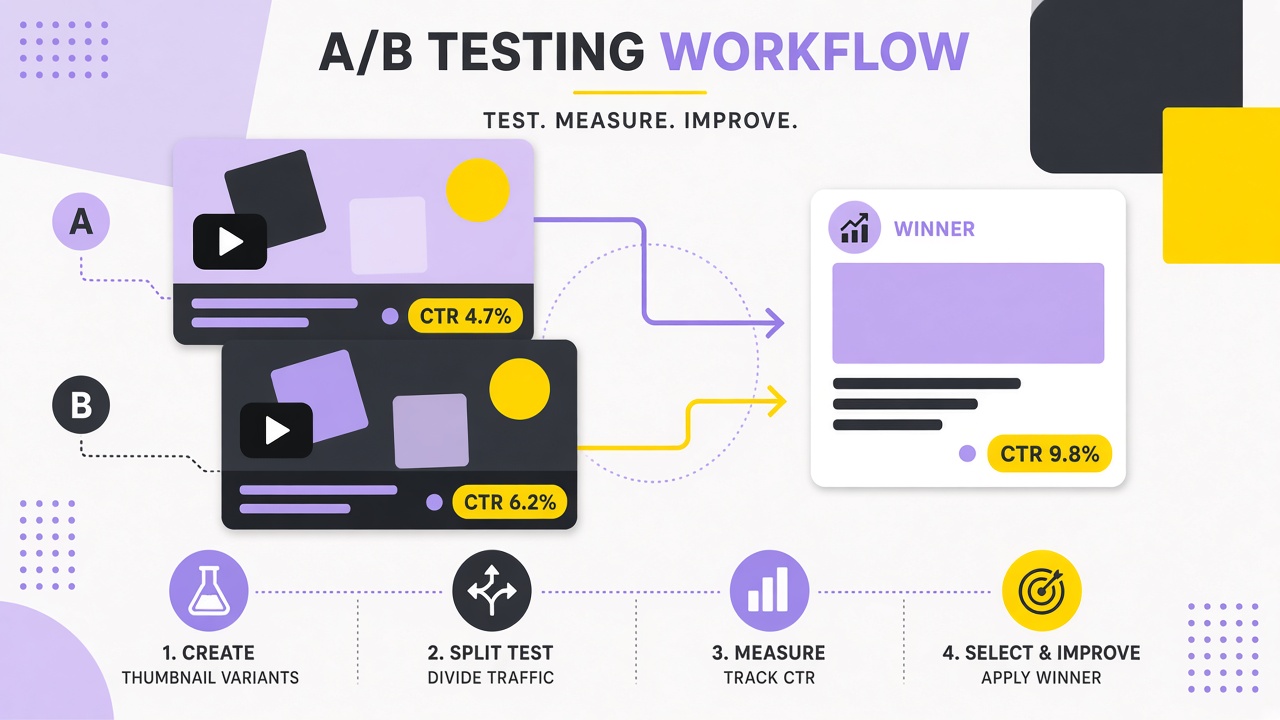
Choose A/B testing when your platform and volume support it (YouTube Test and Compare, some third-party tools); use sequential testing (swap thumbnail after 48 hours) when traffic is low but you still need learning loops. Document hypothesis, metric (CTR, AVP, subs per view), and minimum impressions before calling a winner.
- Hypothesis: "Outcome title plus face left beats curiosity title plus object only."
- Primary metric: impressions-weighted CTR for browse; search may need longer window.
- Secondary: average view duration and subs gained per 1K impressions.
- Run until confidence threshold or 7 days, whichever platform recommends.
- Do not change title and thumbnail simultaneously without noting confound.
| Method | Best when | Caveat |
|---|---|---|
| Platform A/B | Enough daily impressions | Feature availability varies |
| Sequential swap | Small channels, slow data | Time-of-week confounds |
| Community poll | Pre-publish among fans | Biased sample, not CTR |
Pre-Publish Packaging Review
Squint test at phone size, check readability in dark mode feeds, and confirm thumbnail text does not truncate on Shorts shelf before you schedule. AI cannot see your channel feed context; you preview on device.
Retrospective on Winners and Patterns
Monthly, log winning title and thumbnail pairs with topic category, traffic source, and retention curve shape so patterns generalize ("comparison titles win for tool reviews") instead of copying one lucky outlier. Build a swipe file of your own wins, not competitor shock thumbnails you cannot sustain.
- Spreadsheet columns: video ID, title formula, thumb layout, CTR, AVP, topic tag.
- Tag failures too: high CTR with low AVP signals clickbait drift.
- Update formula library prompts with channel-specific winners.
- Share patterns with editor and designer for template updates.
- Retire patterns that aged (visual trends shift every 12 to 18 months).
| Pattern signal | Interpretation | Next action |
|---|---|---|
| High CTR, high AVP | Promise matched delivery | Reuse formula on similar topics |
| High CTR, low AVP | Misleading packaging | Tighten drift check |
| Low CTR, high AVP | Under-marketed good video | Test bolder thumb, honest hook |
Brand Consistency Across Series
Series playlists benefit from repeatable thumbnail frames (episode number badge, consistent font) while still varying the focal prop per episode. AI sketch prompts should include series template tokens so batch production stays recognizable in subscriptions feed.
- Template PSD or Figma with locked layers for brand elements.
- Variable layers: face, prop, 3-word overlay only.
- Title prefix for series SEO: "Creator Lab EP12:" optional.
Collaboration With Editors and Designers
Share the title shortlist and sketch prompts with your designer before filming so pickup shots match thumbnail props you plan to composite later. Editors benefit from a packaging doc noting which title variant is primary and which metrics you will judge after 48 hours, reducing last-minute thumbnail panic after export.
- Packaging brief: promise, 3 title finalists, 2 thumb comps, test hypothesis.
- Designer delivers finals in master PSD plus flattened export sizes.
- Editor avoids cropping talking-head footage in ways that break thumb composition.
- Weekly sync: review retrospective sheet and update templates together.
Frequently Asked Questions
How many title and thumbnail variants should I test?
Shortlist 3 to 5 titles and 2 to 3 thumbnails per important upload; smaller channels may test one alternative after publish instead of full A/B. More variants without traffic yield noise, not insight.
Should I use AI-generated faces in thumbnails?
Channels built on personal trust should use real photos; AI comps can work for faceless or motion-graphic brands if disclosure and consistency match audience expectations. Misleading synthetic faces that imply a person who is not you create policy and trust risk.
When is it safe to change title or thumbnail after publish?
After enough impressions to judge CTR or when retention data shows a packaging mismatch, change one element at a time and log the date. Frequent churn confounds tests and may reset algorithm learning.
Where is the line between curiosity and clickbait?
Curiosity titles pose a question the video answers in the opening minutes; clickbait promises outcomes or drama the content does not deliver. Your drift check mapping title to script timestamp is the practical line.
Package the Promise You Actually Deliver
A practical ai workflow thumbnail title testing practice extracts core promise, drafts formula titles with drift checks, sketches thumbnails to template, runs structured tests, and retrospects winners. AI multiplies variants; your analytics and honesty protect long-term channel health. Run promise extraction on your next script before you open Photoshop or Canva.