Dragging a PDF into an AI chatbot feels like a single action. Behind the interface, your file moves through a multi-step pipeline: upload, parse, chunk, embed, retrieve, and generate. Each stage can store copies, expose content to internal teams, or feed model improvement programs depending on vendor, plan tier, and settings. Understanding how AI tools use uploaded files is the difference between a safe document summary and an accidental disclosure of client contracts or employee records.
This guide maps the upload pipeline from first byte to final answer, explains temporary versus persistent storage, covers who can access your files inside the vendor organization, and gives practical upload rules by data sensitivity. Use it alongside our AI writing tools category when evaluating products that accept document attachments.
The Upload Pipeline: Parse, Chunk, Embed, Generate
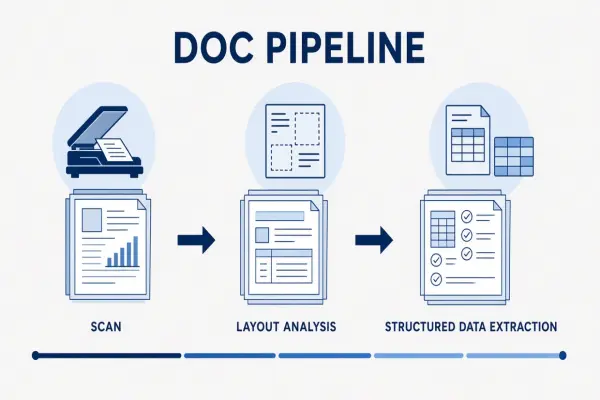
Most AI tools do not send your entire file to the language model in one piece. Large documents are parsed into text, split into chunks, converted into vector embeddings, and stored in a retrieval index. When you ask a question, the system searches those chunks and sends only relevant sections to the model for the final response.
A typical flow looks like this:
- Upload: The file transfers to vendor cloud storage. HTTPS protects transit; storage location depends on region settings.
- Parse: PDF, DOCX, CSV, and image files are converted to plain text. OCR may scan images embedded inside PDFs, including scanned pages and diagrams with text.
- Chunk: Text is split into segments (often 500 to 2,000 tokens) for retrieval. Chunk boundaries affect answer quality and what gets indexed.
- Embed: Each chunk is converted to a numerical vector stored in a vector database for semantic search.
- Retrieve and generate: Your question triggers a search over embeddings; matching chunks plus your prompt go to the model.
| Stage | What is created | Privacy question to ask |
|---|---|---|
| Upload | Original file in object storage | Which region? How long is the original kept? |
| Parse | Extracted text, metadata, OCR output | Does OCR read hidden layers and image text? |
| Chunk and embed | Vector index entries linked to source chunks | Are embeddings deleted when you delete the file? |
| Generate | Prompt, retrieved context, output | Is chat history or RAG context used for training? |
Myth to bust: deleting a chat does not always delete every artifact. The original upload, parsed text, embeddings, and audit logs may persist on different timelines. Ask vendors specifically about each stage, not just "do you store my data."
Temporary vs Persistent Storage
Some uploads exist only for the duration of a single request; others become part of a persistent knowledge base. Consumer chatbots often keep file context for the life of a conversation thread. Enterprise RAG products may index documents into team workspaces that remain searchable for months.
Common storage patterns include:
- Session-scoped: File content is available until you close the tab or the session expires. Lowest long-term risk if deletion is enforced.
- Conversation-scoped: Attachments stay linked to a chat thread until you delete the conversation. Easy to forget over time.
- Workspace-scoped: Team libraries, project folders, or shared knowledge bases persist across users. Highest governance need.
- API ephemeral: Some API tiers offer zero-retention or short TTL processing. Verify whether this applies to file uploads or text-only calls.
Instant-deletion marketing often refers to prompt text, not uploaded files or derived embeddings. Read retention language for each data type separately. If the policy says "we delete prompts within 30 days" but says nothing about uploads, assume uploads last longer.
Who Can Access Uploaded Content Internally
Vendors may access your uploads for abuse detection, support, quality review, and legal compliance. Enterprise tiers sometimes restrict or contractually limit human review. Consumer tiers rarely do.
Ask whether these teams can see full file contents or only metadata:
- Trust and safety reviewers flagging policy violations
- Customer support staff responding to tickets that include attachments
- Engineers debugging retrieval failures on your indexed documents
- Legal teams responding to subpoenas or regulatory requests
Team workspaces add another layer: colleagues with shared project access can often browse every uploaded file in that workspace. Upload permissions and role-based access should match your internal data classification, not just the vendor's external privacy policy.
Training Opt-Out on Uploads Specifically
Training opt-out for chat text does not automatically cover uploaded documents. Some vendors exclude API traffic from training but still use consumer app uploads for improvement. Others treat business workspace files as non-training by default while indexing them for your retrieval only.
Verification checklist for does AI train on uploaded documents:
- Confirm the setting name and default state for your plan tier.
- Ask whether file uploads, parsed text, and embeddings are in scope for training exclusions.
- Check if team workspace content is treated differently from personal chats.
- Request written confirmation for regulated workflows before production use.
Broad license language such as "you grant us rights to use content to improve our services" is a red flag for confidential uploads. Prefer vendors that distinguish processing (required to answer your question) from training (optional model improvement).
Safe Upload Practices by Sensitivity Level
Match upload behavior to data tier. The same tool may be fine for public marketing PDFs and unacceptable for payroll spreadsheets.
| Sensitivity | Examples | Upload rule |
|---|---|---|
| Public | Published whitepapers, marketing one-pagers | Consumer tools acceptable; verify retention anyway |
| Internal | Strategy decks, roadmaps, anonymized reports | Business tier, training off, workspace access controls |
| Regulated | Contracts, PII exports, health records, credentials | Approved vendor list only; DPA; no consumer accounts |
Before any upload, strip hidden metadata from PDFs, remove unnecessary tabs from spreadsheets, and scan archives for .env files or API keys. Redact names and account numbers when testing retrieval quality on sensitive formats.
Frequently Asked Questions
Does OCR scan images inside my PDFs?
Yes, on most document-aware AI tools. Parsing pipelines typically run OCR on scanned pages and may extract text from charts, screenshots, and embedded images. Assume anything visible in the PDF, including handwritten notes in scans, can become indexed text.
Are team workspace uploads visible to all members?
Usually yes, unless the product offers folder-level permissions. Default shared libraries mean any member can query across every indexed document. Configure roles before uploading internal-tier content and audit guest access regularly.
If I delete a file, is it gone everywhere?
Not always. Deletion may remove the UI listing while embeddings, backups, support copies, or abuse logs persist for a defined period. Ask for a data lifecycle diagram or written deletion SLA for uploads, embeddings, and derived indexes separately.
Is uploading safer than pasting text?
Neither is inherently safer. Uploads add parsing and persistent indexing steps that pasted text may skip, but both send content to vendor systems. Risk depends on retention, training policy, and access controls, not on input method alone.
Can I upload zip archives safely?
Zip uploads are high risk for accidental secret leakage. Archives may contain configuration files, credentials, or data you did not intend to share. Extract and review contents manually before upload, or prohibit archive uploads in team policy.
The Bottom Line
How AI tools use uploaded files goes far beyond the chat box. Trace the full pipeline from parse to embed, confirm retention and training rules for each stage, and restrict uploads by sensitivity tier. Browse AI chatbots and AI writing tools with these questions ready before the first real document leaves your network.