What is Annotations?
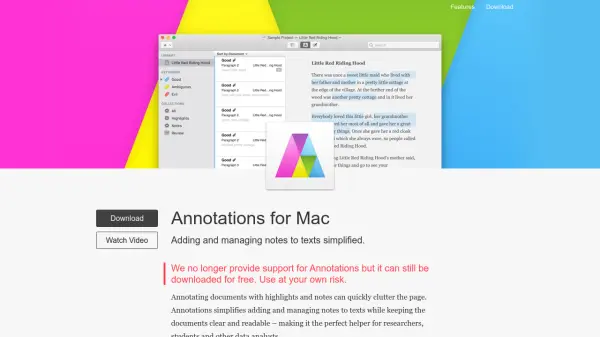
Annotations is a Mac application designed to streamline the process of adding and managing notes to texts. It helps users highlight text with colors, assign custom keywords, and add notes of any size quickly and effortlessly, all while keeping documents clear and readable. The tool includes features like built-in auto-completion for keywords, support for annotating entire paragraphs or specific words, and the ability to organize annotations with custom collections and filters.
Users can add annotations to text or Microsoft® Word documents, edit content directly within the app, and view or export summaries of highlighted sections and notes. The application supports English and German languages and requires OS X 10.12 or later, though it is no longer actively supported and is available for free download at the user's own risk.
Features
- Highlights, Keywords and Notes: Highlight text with colors, assign custom keywords, or add notes of any size quickly and effortlessly.
- Annotate Quickly: Make a text selection with all annotation options available at your fingertips, including built-in auto-completion for existing keywords.
- Collections and Filters: Organize and filter annotations by custom collections, document, type, keywords, or search criteria to focus on specific subsets.
- Related Annotations: Add keywords or notes to other annotations to enhance understanding while keeping the interface clear and easy to navigate.
- Summary and Export: View and export only highlighted sections or notes with simple yet comprehensive formatting options for team discussions or workflow integration.
Use Cases
- Research document analysis with organized highlights and notes
- Academic study and note-taking for students
- Data analysis projects requiring text annotation and summarization
- Team collaboration on documents with shared annotations
- Editing and proofreading texts with inline notes and keywords