What is ActivityStat?
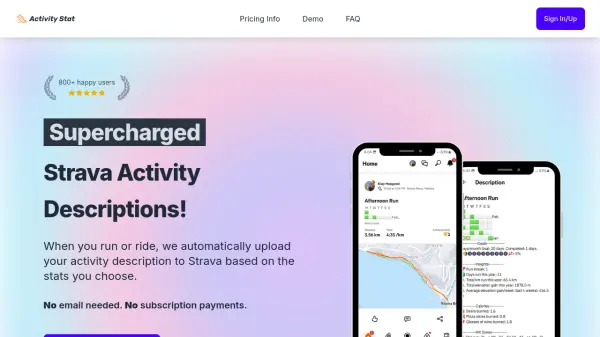
ActivityStat is a powerful AI-driven tool designed to elevate your Strava experience by automating the creation of dynamic, stat-rich activity descriptions for every run or ride. Upon connecting your Strava account, ActivityStat compiles your selected statistics—such as distance, elevation, calories burned, streaks, and personal milestones—and uploads them automatically to your Strava activity feed.
With support for both running and cycling activities, users can easily toggle which stats appear, ensuring that every upload is both informative and entertaining. Features like heat maps, goal tracking, and unique fun metrics such as 'beers burned' make sharing your fitness journey on Strava more engaging. ActivityStat is a pay-once solution, granting lifetime access, seamless integration, and ongoing feature updates without the need for subscriptions or emails.
Features
- Automatic Strava Descriptions: Uploads engaging activity summaries directly to Strava based on user-selected stats.
- Customizable Stats: Toggle which metrics appear in your Strava descriptions, including distance, elevation, calories, streaks, and more.
- Support for Running and Cycling: Enhance both running and cycling activities with detailed insights.
- Lifetime Access: Pay once for permanent, unrestricted use with continuous feature updates.
- Fun Metrics: Includes unique statistics like beers, pizza slices, and wine glasses burned.
- Goal Tracking: Set and track weekly, monthly, or yearly goals for distance, elevation, and activity days.
- Activity Heat Maps: Visualize running and riding frequency and milestones with heat map features.
- Metric and Imperial Support: Easily toggle between metric and imperial units via the dashboard.
- Pause or Disconnect Anytime: Option to turn any stats off, pause uploads, or fully disconnect from Strava.
Use Cases
- Automating Strava activity descriptions for runs and rides.
- Highlighting weekly, monthly, or yearly fitness progress.
- Showcasing fun burned calories equivalents in Strava posts.
- Motivating continued training with streak and milestone visualization.
- Tracking and sharing goal achievements seamlessly.
- Visualizing training history with heat maps.
- Customizing shared activity summaries based on personal preferences.
FAQs
-
Does this work for Runs, Rides and Swims?
ActivityStat currently supports automated descriptions for running and cycling (rides), but not for swims. -
Can I choose which stats are included in my activity description?
Yes, you can toggle any of the available stats on or off at any time from your dashboard. -
Does ActivityStat support both metric and imperial units?
Yes, you can switch between metric and imperial units via a simple toggle in the dashboard. -
Are there any hidden costs or recurring payments?
No, ActivityStat is a pay-once tool with no hidden fees or subscription payments. -
How can I disconnect my account or pause automatic uploads?
You can turn any stat off, pause all uploads with one button, or completely disconnect in your account settings.