What is Strive Workout Log?
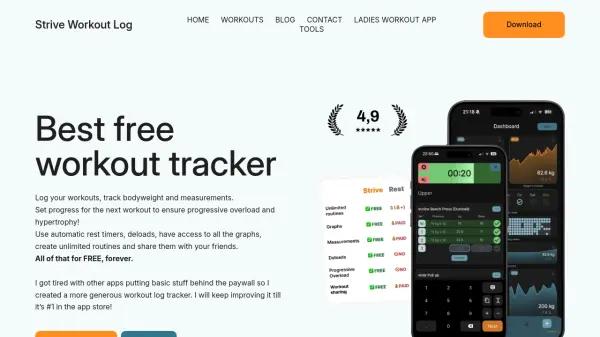
Strive Workout Log provides a comprehensive solution for fitness enthusiasts to monitor their training progress without any cost. The application stores all data locally on the user's device, ensuring privacy and security while offering features like automatic rest timers, deloads, and detailed progress graphs.
Users can create unlimited workout routines and share them with friends, making it a versatile tool for both individual and social fitness tracking. The developer commits to maintaining core functionality free forever, with potential paid features limited to advanced options like themes in the future.
Features
- Automatic Rest Timers: Set timers between exercises to optimize workout efficiency
- Progress Graphs: Visualize training data with charts for bodyweight and measurements
- Unlimited Routines: Create and customize workout plans without restrictions
- Local Data Storage: All user data is stored on-device for enhanced privacy and security
- Free Forever: Core features remain completely free with no ads or data sharing
Use Cases
- Tracking gym workouts and progress over time
- Creating and sharing custom fitness routines with friends
- Monitoring bodyweight and measurement changes for fitness goals
- Using automatic timers to manage rest periods during training sessions
- Analyzing training data through graphs to optimize performance
FAQs
-
Is the app available for both iOS and Android?
Yes, Strive Workout Log is available for both iOS and Android platforms. -
Will there be an Apple Watch or Android Wear app in the future?
Not at the moment, but the developer does not rule out the possibility of adding support for wearable devices in the future. -
Who developed this app?
The app was developed by Artur Fijał, a developer from Poland with over 10 years of training and coding experience, who builds it in his free time. -
How can users request new features for the app?
Users can reach out via the contact section in the app to submit feature requests, which are collected and considered based on demand and usefulness.