What is 8start Launcher?
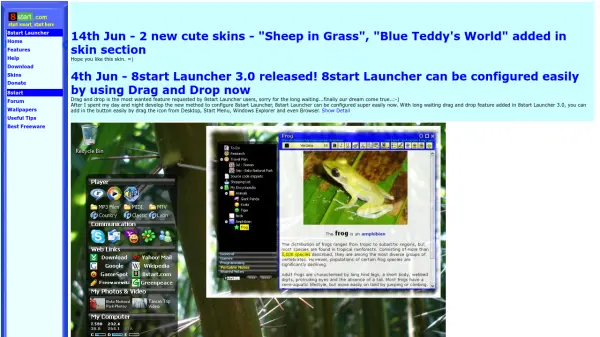
8start Launcher is a free portable application launcher designed to solve the problem of cluttered desktop icons and cumbersome program access through traditional Windows methods. It provides a convenient way to organize shortcuts into categories and groups, allowing users to access applications with a single click while keeping their desktop wallpaper visible and unblocked. The launcher features a skinable design and an intuitive grouping interface that makes program management efficient and visually appealing.
With continuous improvements, 8start Launcher includes additional functionalities such as the Tree Notes feature for fast note-taking and sharing, and a countdown feature that remains visible in the taskbar. The software is completely freeware, portable, and customizable, offering innovation in desktop organization without the need for complex installations or configurations.
Features
- Drag-and-Drop Configuration: Easily add icons from Desktop, Start Menu, Windows Explorer, and Browser by dragging and dropping
- Tree Notes Feature: Fast and easy note-keeping and sharing functionality
- Countdown Feature: Displays a countdown to specific times directly in the taskbar
- Skinable Design: Customizable appearance with various skins available
- Portable and Freeware: No installation required and completely free to use
Use Cases
- Organizing cluttered desktop icons into categorized groups
- Quickly accessing frequently used applications with single-click shortcuts
- Managing notes efficiently with the Tree Notes feature
- Keeping track of important deadlines with the taskbar countdown
- Customizing desktop appearance with different skins
FAQs
-
Is 8start Launcher compatible with all Windows versions?
The content does not specify compatibility details, but it is designed for Windows systems as mentioned in the context of replacing Windows start menus and desktop shortcuts. -
How do I download and install 8start Launcher?
The content mentions a download section on the website, indicating it is available for download, but specific installation steps are not provided. -
Can I use 8start Launcher on multiple computers?
Since it is portable and freeware, it can likely be used on multiple computers without restrictions, but the content does not explicitly state this. -
Are there any system requirements for running 8start Launcher?
The content does not list specific system requirements, but it is implied to work on standard Windows setups. -
How do I customize skins in 8start Launcher?
The content mentions a skins section on the website and skinable design, but detailed customization steps are not provided.