Your accounts payable team receives hundreds of invoice PDFs, scanned receipts, and emailed attachments daily. OCR alone dumps plain text with jumbled columns. Someone still manually keys vendor names, line items, and tax amounts into the ERP. Intelligent Document Processing (IDP) targets that gap: not just reading characters, but understanding document structure, extracting fields with context, validating against business rules, and pushing structured records into downstream systems.
Intelligent Document Processing (IDP) is an end-to-end workflow that ingests unstructured documents, applies OCR, layout analysis, and AI extraction models, then outputs validated structured data for business applications. Vendors like UiPath, ABBYY, Amazon Textract, Google Document AI, Microsoft Azure AI Document Intelligence, and dozens of vertical SaaS tools compete in this space. This guide defines the IDP pipeline stages, contrasts OCR with layout and semantic extraction layers, explains human-in-the-loop roles, covers accuracy metrics buyers should demand, and lists common failure modes before you evaluate AI chatbot add-ons or dedicated capture platforms alongside AI writing assistant workflows that generate documents IDP must later parse.
IDP Definition and Pipeline Stages
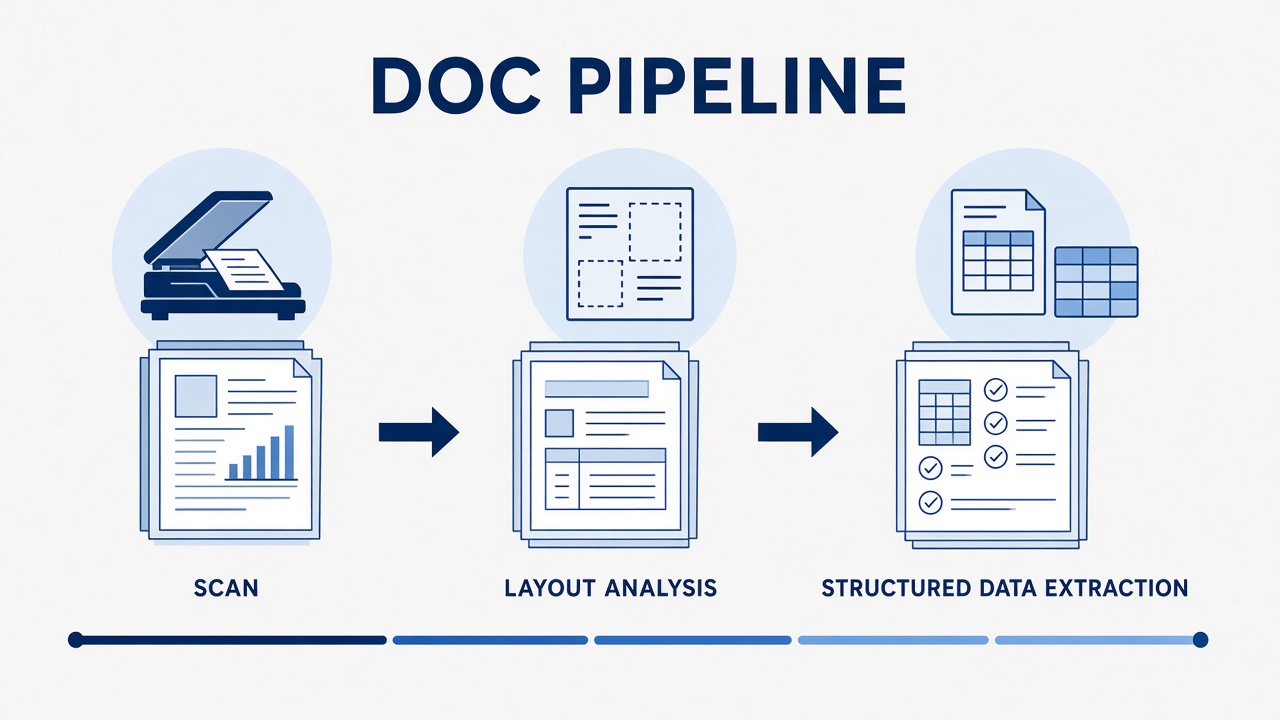
An IDP pipeline typically runs capture, classification, OCR, layout analysis, field extraction, validation, human review, and export in sequence, with feedback loops that improve models over time. Each stage has distinct failure signatures; diagnosing which stage broke prevents misblaming "the AI" when the scanner DPI was too low.
- Capture: Ingest scans, photos, emails, faxes, or born-digital PDFs at sufficient resolution.
- Classification: Route documents to the correct template (invoice vs purchase order vs contract).
- OCR: Convert pixels to machine-readable text with coordinates.
- Layout analysis: Detect tables, headers, checkboxes, stamps, and reading order.
- Field extraction: Pull named entities (invoice number, total, dates) using rules, ML, or LLMs.
- Validation: Apply business rules, cross-field checks, and database lookups.
- Human review: Queue low-confidence extractions for operator correction.
- Export: Push JSON, XML, or API calls into ERP, CRM, or workflow tools.
| Stage | Primary output | Typical owner |
|---|---|---|
| Capture | Normalized image or PDF | Scanning ops, mailroom |
| Classification | Document type label | IDP platform ML model |
| OCR + layout | Text with bounding boxes | OCR engine, layout model |
| Extraction | Key-value field map | Template, transformer, or LLM |
| Validation + HITL | Approved structured record | Rules engine + human operators |
OCR vs Layout vs Semantic Extraction
OCR answers "what characters are present"; layout analysis answers "where blocks and tables sit"; semantic extraction answers "what business fields do these regions represent." Confusing the three leads to buying OCR software when you need IDP, or expecting LLM magic to fix 150 DPI phone photos of crumpled receipts.
OCR Layer
Optical Character Recognition converts images to text. Modern engines handle multiple languages, handwriting in limited domains, and skew correction. OCR output without layout is a flat string: column order may be wrong, headers merge with body text, and footnotes interrupt tables. OCR accuracy is often reported as character error rate (CER) or word error rate (WER).
Layout Layer
Layout models detect regions: titles, paragraphs, tables, figures, signatures. Document AI and specialized transformers like LayoutLM family members use both text and spatial coordinates. Layout unlocks table extraction where cell boundaries matter more than reading order in a single column.
Semantic Extraction Layer
Semantic extraction maps regions to schema fields: invoice_total, ship_to_address,
policy_effective_date. Approaches include zonal templates (coordinates per vendor), few-shot learning on
labeled examples, and LLM prompts over OCR text plus layout JSON. LLM extraction helps on varied layouts but needs
guardrails against hallucinated field values.
| Layer | Question answered | Failure example |
|---|---|---|
| OCR | What text exists? | "O" misread as "0" in account numbers |
| Layout | How is the page structured? | Table rows merged across columns |
| Semantic | What field is this value? | Shipping address stored as billing |
Human-in-the-Loop
Production IDP rarely runs fully unattended; human-in-the-loop (HITL) review queues catch low-confidence extractions and feed corrections back into training data. Confidence thresholds route fields or whole documents to operators. A 95% auto-pass rate sounds impressive until the remaining 5% are high-value invoices. Design HITL UX for speed: highlight bounding boxes, keyboard shortcuts, side-by-side source and fields, and reason codes for overrides.
Corrections should close the loop. Vendors with active learning retrain extraction models on operator fixes. Without feedback integration, accuracy plateaus while document variety grows. Budget ongoing operator time, not only software licenses.
Accuracy Metrics Buyers Should Demand
Request field-level accuracy, document-level straight-through processing (STP) rate, and confidence calibration on your own sample set, not vendor demo documents. Useful metrics:
- Field accuracy: Percent of extracted fields matching ground truth per field type.
- STP rate: Documents processed without human touch.
- Exception rate: Documents routed to HITL and average handling time.
- CER/WER: Character or word error rate on OCR for your scan quality.
- Table extraction F1: Cell-level correctness on line-item tables.
Run a blind pilot: send 200-500 representative documents, compare vendor output to human-labeled gold data, and measure by document subtype. Aggregate "98% accuracy" claims often hide weak performance on handwritten notes or non-English layouts.
Common Failure Modes
IDP failures cluster around input quality, template drift, ambiguous fields, and over-trusting LLM extraction without validation. Specific patterns:
| Failure mode | Root cause | Mitigation |
|---|---|---|
| Garbage OCR | Low DPI, glare, fax artifacts | Capture standards, image preprocessing |
| Vendor template break | Supplier redesigns invoice layout | Layout-agnostic models, monitoring alerts |
| Field ambiguity | Multiple dates or totals on one page | Business rules, positional hints |
| LLM hallucination | Model invents missing tax ID | Require OCR span evidence, validation APIs |
| Integration gaps | Export schema mismatch with ERP | Mapping layer, idempotent retries |
Teams using AI writing assistants to generate contracts or reports should remember downstream IDP: consistent templates parse more reliably than free-form layouts mixing tables and prose without structure.
IDP by Industry Vertical
IDP requirements differ by vertical: finance prioritizes invoice STP and fraud checks; healthcare demands HIPAA controls and clinical form accuracy; legal focuses on clause extraction and privilege review. Vertical SaaS vendors ship pretrained models on industry document corpora. Horizontal platforms offer customizable processors but require more labeled training data from your organization.
| Vertical | Common document types | Critical fields |
|---|---|---|
| Accounts payable | Invoices, POs, credit notes | Vendor, line items, tax, totals |
| Insurance | Claims, policies, medical bills | Policy ID, diagnosis codes, amounts |
| Mortgage / lending | Pay stubs, bank statements, tax returns | Income, employer, account balances |
| Logistics | Bills of lading, customs forms | HS codes, weights, consignee |
IDP Implementation Checklist
Successful IDP rollouts align capture standards, integration contracts, and HITL staffing before selecting a vendor. Use this checklist during procurement:
- Inventory document types, monthly volumes, and current manual handling time per type.
- Collect a representative sample set including worst-case scans and edge layouts.
- Define gold-label fields and validation rules with business owners.
- Run blind vendor pilots measuring field accuracy and STP, not demo slides.
- Map export schema to ERP, CRM, or workflow APIs with idempotent retry design.
- Staff HITL queues and define SLAs for exception resolution.
- Establish retraining cadence when vendor layouts change or new suppliers appear.
- Document retention, encryption, and regional processing requirements in contracts.
Where AI Tools Fit in IDP
Modern IDP stacks mix specialized OCR APIs, layout transformers, rules engines, and optional LLM reasoning for exception handling. AI chatbot interfaces sometimes sit on top of IDP for natural language queries over extracted archives ("show Q3 invoices over $10k from Vendor X"), but chat is not a substitute for structured extraction pipelines. Evaluate whether a vendor sells full IDP or only a document Q&A layer over PDFs someone else must OCR first.
Frequently Asked Questions
How is IDP different from RPA?
RPA automates clicks and keystrokes in existing UIs; IDP understands document content and outputs structured data RPA or APIs can consume. Many deployments combine IDP extraction with RPA for ERP entry when APIs are unavailable.
Can IDP handle handwriting?
Handwriting recognition works in constrained domains (forms, checks) but remains less accurate than printed text; expect higher HITL rates. Pilot on your actual handwriting samples, not vendor clean demos.
Can we skip OCR and use LLMs on PDFs directly?
Vision-language models can read some PDFs natively, but production IDP still relies on OCR plus layout for auditability, confidence scores, and cost control at scale. Hybrid approaches use LLMs for exceptions after deterministic extraction fails.
How long does IDP implementation take?
Pilots run weeks on a single document type; multi-type enterprise rollouts often take months including capture redesign, integration, and HITL staffing. Template-heavy vendors start faster; layout-agnostic ML may need more labeled data upfront.
What security requirements apply?
IDP processes sensitive PII and financial data; require encryption, retention limits, regional processing, and SOC 2 or equivalent attestations. Clarify whether documents train vendor models or stay tenant-isolated.
Can IDP run fully on-premises?
Some vendors offer private cloud or on-prem deployments for regulated industries; confirm GPU requirements, model update mechanics, and support SLAs before choosing air-gapped architectures. Cloud APIs remain common for mid-market buyers with lower compliance overhead.
Does IDP support multilingual documents?
Major OCR and document AI engines support dozens of languages, but field extraction accuracy varies by language and script. Pilot on each language in your inbound document mix, not only English invoices.
LLM Extraction in IDP Pipelines
Large language models increasingly assist IDP on messy layouts, but production systems require grounding: extracted values must cite OCR spans or layout regions, not free-generated text. LLM extraction helps when vendor invoices vary wildly and rule templates break weekly. It hurts when models invent tax IDs or line items that look plausible but never appeared on the page. Best practice: run deterministic extraction first, invoke LLMs only on low-confidence fields, and reject LLM outputs that lack span evidence.
Cost control matters at scale. LLM per-document pricing can exceed dedicated document AI parsers on high-volume invoice streams. Benchmark total cost per straight-through document, not per API list price. Cache extraction results for duplicate document hashes when vendors resend the same PDF.
IDP Vendor Evaluation Criteria
Score IDP vendors on extraction accuracy, integration depth, HITL UX, active learning support, and compliance posture, not demo aesthetics. Weight criteria by your pain: AP teams prioritize invoice line items; legal teams prioritize clause boundaries and redaction. Request customer references in the same vertical with similar scan quality. Insist on contractual SLAs for uptime and support response when IDP feeds time-sensitive payment workflows.
IDP and Downstream Automation
IDP delivers value only when extracted data triggers automated actions: ERP posting, approval workflows, fraud scoring, or customer notifications. Map each extracted field to a downstream system field with transformation rules (date formats, currency normalization, vendor ID lookups). Broken mappings cause silent failures worse than OCR errors because confidence scores look high while ERP rejects the payload. Build monitoring on export success rates and reconciliation exceptions, not only extraction confidence.
Event-driven architectures work well: document ingested, classification complete, extraction complete, validation passed, export queued. Each stage emits metrics for observability dashboards. When STP drops suddenly, operators can pinpoint whether capture quality, a new vendor layout, or an integration change caused the regression.
IDP ROI and Business Case
Finance teams should model IDP ROI using straight-through processing rate, average manual minutes saved per document, exception handling cost, and platform fees including per-page API charges. A common mistake is comparing IDP license cost only to OCR license cost without counting ongoing data entry labor OCR leaves on the table. Include change management: operators need training on review UIs, and IT needs integration maintenance when ERP schemas change.
Pilot ROI on one document type with the highest volume and clearest field schema before expanding to contracts or handwritten forms. Early wins fund broader rollout; starting with the hardest document type invites premature cancellation of promising programs.
Revisit ROI quarterly: STP rates often improve after active learning absorbs operator corrections, while new document types may temporarily increase exception volume. Treat IDP as a continuous operations program, not a one-time software install.
Conclusion
Intelligent document processing explained as a pipeline, not a single OCR checkbox: capture, classify, read, understand layout, extract fields, validate, review, and export. OCR, layout analysis, and semantic extraction solve different problems; human-in-the-loop and honest accuracy metrics separate production systems from demos. Before buying, test on your documents, measure field-level error, and map how AI tools integrate with ERP workflows rather than stopping at text extraction.