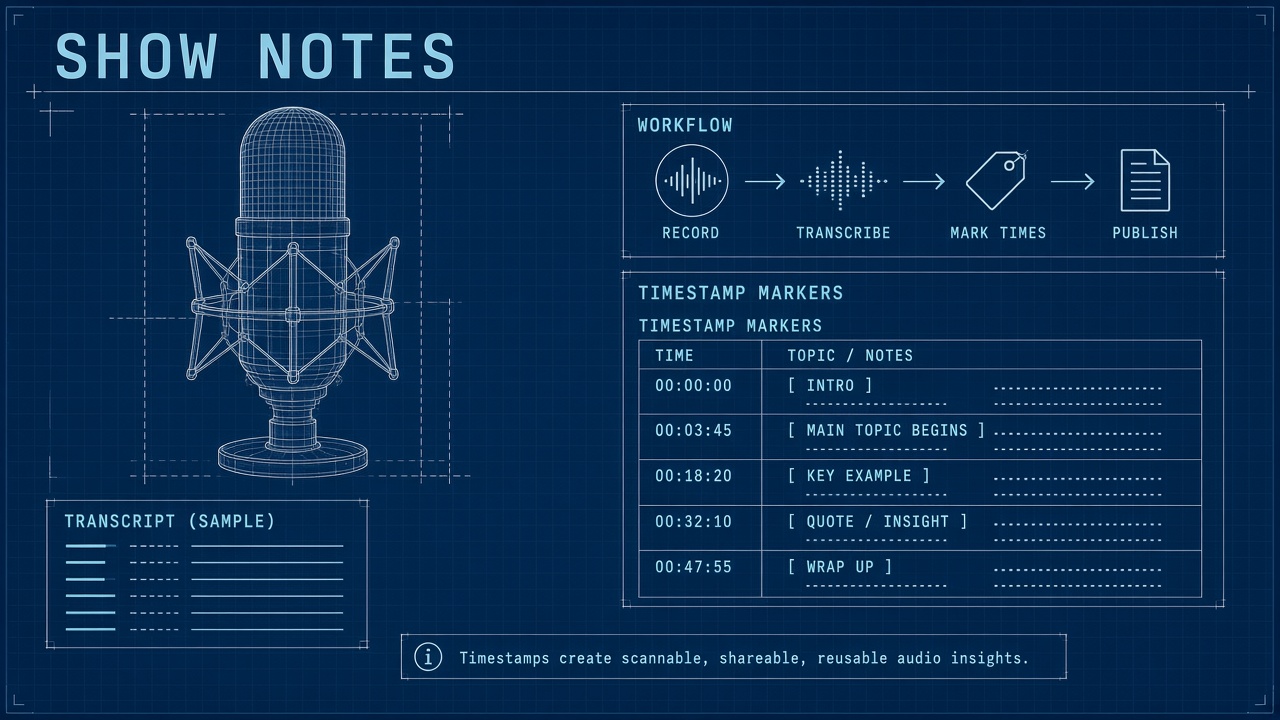
Listeners discover episodes through search, podcast apps, and social clips, but most show notes still ship as a vague paragraph and a broken link. The bottleneck is not recording quality. The bottleneck is turning a long conversation into structured chapters, accurate timestamps, and notes that help both humans and search engines. An ai workflow podcast show notes pipeline records and transcribes with speaker labels, extracts chapter markers, drafts notes with guest links, pulls quote candidates for clips, and runs a human QA pass before publish. AI handles repetition; the host or producer owns factual accuracy.
This guide targets indie podcasters, interview shows, and small production teams who publish weekly without a dedicated post-production department. Pair transcription and drafting with AI chatbot tools for outline iteration and AI code helpers when you automate RSS metadata or custom CMS fields, always with a verification checklist before anything goes live.
Record and Transcribe With Speaker Labels
A reliable show notes workflow begins with a clean recording and a transcript where each speaker is labeled, because chapter extraction and quote pulls depend on knowing who said what. Record in a lossless or high-bitrate format, normalize levels in post, and export a transcript from a service that supports diarization or manual speaker tags. Without labels, AI will attribute quotes to the wrong person and your QA pass becomes a full re-listen.
- Capture separate tracks when possible; merge only after level matching.
- Mark guest legal name and preferred spelling in show prep notes before recording.
- Run transcription with speaker diarization; fix labels in the first five minutes of audio.
- Store raw audio, edited master, and transcript in one episode folder with matching filenames.
- Redact off-the-record segments before pasting transcript text into external AI tools.
| Input quality | Impact on show notes | Fix before AI step |
|---|---|---|
| Clear speaker labels | Accurate quotes and guest attribution | Rename Speaker 1 to host and guest names |
| Low crosstalk | Cleaner chapter boundaries | Edit overlaps or note fuzzy timestamps |
| Consistent mic distance | Fewer transcription errors on names | Correct obvious mishears manually |
| Prep doc with links | Faster link insertion in notes | Attach URLs guest sent pre-interview |
Transcript Hygiene Before Drafting
Search the transcript for proper nouns, product names, and numbers before any summarization prompt, because models copy transcription errors into show notes and chapter titles. Keep a running glossary per season: company spellings, acronyms, and guest titles. One wrong company name in chapter markers propagates to Apple Podcasts, YouTube chapters, and social captions.
Extract Chapters and Key Timestamps
Chapter extraction means identifying topic shifts in the transcript and assigning start times that match the edited master, not the raw recording, so listeners land on the right moment in every app. Feed AI a time-coded transcript and ask for six to twelve chapter titles with HH:MM:SS markers. Reject generic titles like "Discussion continues." Each chapter should answer what changed in the conversation.
- Align transcript timestamps to the published audio file, accounting for intro music and ad inserts.
- Prompt for chapters only after cold open and sponsor reads are placed in the edit.
- Require one-sentence chapter summaries for potential SEO subheadings.
- Spot-check three random timestamps by scrubbing the waveform, not trusting export alone.
- Export chapter list in formats your host supports: ID3 tags, YouTube description, and podcast host chapter fields.
Dynamic ad slots and mid-roll swaps change runtime on some platforms. If your host serves different ads per listener, fixed mid-roll timestamps in public chapter lists may drift. Document which chapters are stable (content segments) versus which sit after variable ad blocks. Some teams publish chapters only for the main interview block and omit ad-adjacent markers.
Timestamp Validation Checklist
Validate chapters at export, upload, and playback: three clicks in Apple Podcasts, Spotify, and YouTube should land within five seconds of the intended topic start. AI proposes boundaries; humans confirm against the final mix. Note any platform that rounds timestamps differently so you do not chase false bugs in analytics.
Draft Show Notes With Links and Guests
Show notes should give a scannable episode summary, guest bio with verified links, resources mentioned on air, and clear calls to action, drafted from the transcript plus your prep doc rather than from memory. An effective template opens with a two-sentence hook, lists three to five takeaways, embeds guest headshot credit if licensed, and links to books, tools, and prior episodes cited in the conversation.
- Pull guest bio from approved press kit or LinkedIn, not AI invention.
- Extract every URL spoken aloud; match against prep doc and fix http versus https.
- Generate takeaway bullets from chapter summaries; cap at one line each.
- Add internal links to related episodes using consistent anchor text.
- Include transcript disclaimer if you publish full text for accessibility.
| Show notes section | AI role | Human must verify |
|---|---|---|
| Episode summary | First draft from transcript | Tone matches show voice; no invented claims |
| Guest bio | Condense approved text | Title, company, pronouns, link targets |
| Resource links | Extract mentions and match URLs | Live link check; affiliate disclosure |
| Timestamps block | Format chapter list | Sync with final audio |
SEO for Podcast Episode Pages
Episode pages rank when titles, descriptions, and show notes share consistent keywords without stuffing, and when the page includes unique text beyond the audio embed. Use the primary topic in the H1 or page title once, mirror language listeners actually used on the episode, and add schema-friendly fields your CMS supports. AI can suggest meta descriptions under character limits; humans confirm they match the episode promise.
Pull Quotes for Social Clips
Quote extraction identifies standalone lines suitable for audiograms and short video, prioritized by clarity, emotional punch, and permission sensitivity, each paired with in-out timestamps for editors. Prompt AI with rules: no quotes that need prior context, no medical or legal advice without disclaimer, favor guest lines only when release allows. Export ten candidates; producers pick three for cutdown.
- Tag quotes with speaker name and approximate duration when read at natural pace.
- Flag quotes that mention competitors, minors, or unreleased products.
- Pair each quote with a suggested on-screen caption under platform character limits.
- Store selected clips in the same folder as chapter markers for editor handoff.
- Track which quote hooks drove saves and replays; feed winners back into future prompts.
Clips and show notes share source material but serve different jobs. Notes explain the full arc; clips tease one idea. Avoid duplicating the entire takeaway list as clip captions. One clip per chapter often outperforms a montage of fragmented sentences for discovery.
Clip Rights and Consent
Guest release forms should cover short promotional clips and quote use on social channels, not only full episode publication. When releases are silent on clips, ask before posting guest-specific quotes externally. AI cannot assess legal permission; producers flag risky lines during QA.
Human QA for Names and Claims
The final QA pass verifies every proper noun, statistic, URL, and sponsor mention against the transcript and prep doc before publish, because AI drafts confidently reproduce transcription errors and invented details. Assign one person who did not generate the draft. Use a printed checklist and listen to disputed segments at 1x speed, not skim reading alone.
- Read every name aloud; compare spelling to guest email signature.
- Highlight numbers in the draft; confirm each on the audio or remove.
- Click every link on mobile and desktop; fix redirects and UTM parameters.
- Match sponsor read copy to approved ad script for regulated categories.
- Sign off with episode number, publish date, and QA initials in internal notes.
| Common AI error | QA action |
|---|---|
| Homophone company names | Cross-check guest website and prep doc |
| Merged speaker attribution | Re-read labeled transcript at quote timestamp |
| Outdated product version | Verify against current vendor page |
| Fabricated study citation | Delete or replace with on-air source only |
Multilingual and Accessibility Notes
Multilingual workflows translate show notes after English QA is locked, using glossaries for names and brands so translations do not transliterate protected trademarks incorrectly. Machine translation of full transcripts helps accessibility; publish human review for languages where your audience is substantial. Chapter timestamps stay identical across language variants when audio is shared.
Frequently Asked Questions
How do dynamic ads affect chapter timestamps?
Dynamic ad insertion can shift mid-roll positions per listener, so chapters tied to ad breaks may not align for every audience member. Publish content-based chapters anchored to interview segments, document ad placement separately for internal use, and avoid marketing critical CTAs only at timestamps immediately after variable ad slots. Some hosts let you lock post-roll positions; check your platform documentation.
Should I machine-translate show notes?
Machine translation is reasonable for supplementary languages when a native speaker reviews names, idioms, and sponsor disclosures before publish. Do not translate before English QA completes or errors multiply. Keep a do-not-translate list for guest names, show titles, and legal lines. Offer translated summaries rather than full transcript mirrors if budget is limited.
Do show notes really help podcast SEO?
Unique episode page text helps web discovery and gives podcast apps richer metadata, especially when titles alone are too vague for search intent. Show notes are not a substitute for audio quality or consistent publishing. Focus on accurate summaries, internal links between episodes, and honest keywords listeners would type. Avoid duplicate boilerplate across every episode page.
Do I need to disclose AI-assisted show notes?
Disclosure depends on platform rules, sponsor contracts, and audience expectations; many shows disclose when AI drafts structure while humans verify facts. Sponsors may require human-written ad copy regardless of AI use elsewhere. Never imply AI listened when only humans approved quotes. Store prompts and outputs internally if a guest disputes attribution later.
Transcript First, Chapters Second, QA Always
An ai workflow podcast show notes practice that scales without embarrassing errors starts with labeled transcripts, extracts chapters against the final mix, drafts notes and links from verified sources, pulls quote candidates for clips, and finishes with a disciplined human QA pass on names and claims. AI removes repetitive formatting work; the show's reputation stays with the producer who signs off.
Pilot the workflow on one back catalog episode before applying it launch day. Measure time saved per stage and error rate after QA. Iterate prompts when the same mistake appears twice. Consistent notes turn casual listeners into subscribers who know what each episode delivers before they press play.