Livestreams fail quietly when hosts wing entire shows without segment goals, overrun giveaways, or miss sponsor beats while chat scrolls past. An ai workflow livestream run of show document gives you timed blocks, talking point bullets, engagement prompts, technical checklists, and post-stream clip notes without killing spontaneity. AI structures the plan; you improvise inside each segment's goal.
This workflow fits Twitch, YouTube Live, LinkedIn Live, and multi-platform simulcasts. Draft run-of-show shells with AI chatbot tools and align promotion timing with AI marketing calendars, then customize every bullet before you go live.
Show Format and Duration Blocks
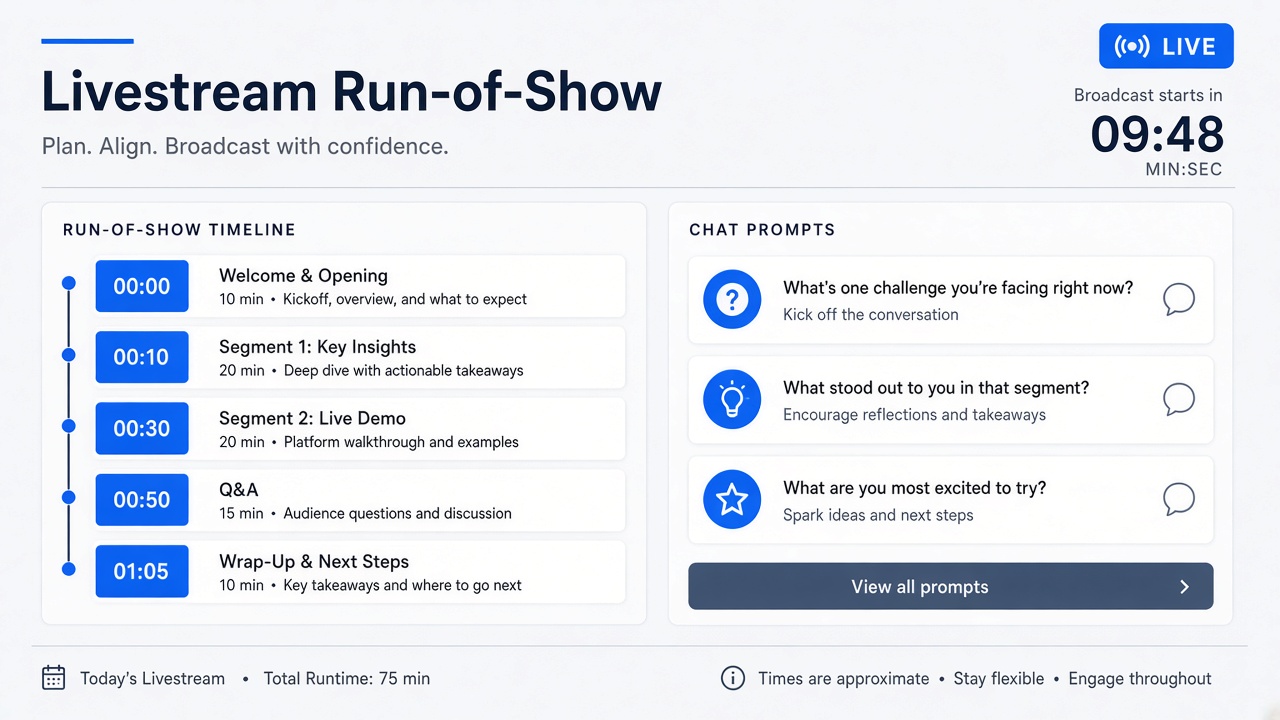
Define total runtime, cold open length, main segments, break placement, and hard end time in duration blocks before writing talking points, so the show fits platform habits and audience attention spans. Blocks are containers; improvisation happens inside each container's goal.
- Pick target runtime (60, 90, 120 minutes) based on past retention data.
- Cold open: 3 to 5 minutes for welcome, agenda, and chat hello.
- Core segments: 15 to 25 minute blocks with one clear topic or activity each.
- Breaks: bio, stretch, mod handoff at predictable intervals.
- Hard stop: final 5 minutes for CTA, next stream date, and graceful sign-off.
| Block | Duration | Primary goal |
|---|---|---|
| Cold open | 0:00 to 0:05 | Set tone, read agenda, mod rules |
| Segment A | 0:05 to 0:30 | Main teaching or gameplay arc |
| Break / chat Q&A | 0:30 to 0:35 | Community engagement reset |
| Segment B | 0:35 to 1:00 | Guest, demo, or deep dive |
| Close | Final 5 min | CTA, schedule, thank mods |
Segment Goals and Talking Point Bullets
Each segment gets one sentence goal and three to five talking point bullets (not full scripts) so hosts know what success looks like while leaving room for chat reactions and tangents. AI drafts bullets from your topic outline; you trim anything that sounds robotic read aloud.
- Goal sentence: "Viewers leave knowing how to set up OBS scenes."
- Bullets: key steps, one story, one mistake to avoid, one resource link.
- Mark optional tangents with time budget ("max 2 min on gear question").
- Sponsor segment: mandatory lines boxed separately with timestamp target.
- Guest segment: question list plus intro bio facts verified with guest.
| Bullet type | Good example | Weak example |
|---|---|---|
| Teaching step | "Show scene collection vs scene switch hotkey" | "Explain OBS in depth" |
| Story beat | "Last stream audio fail and fix" | "Be relatable" |
| CTA | "Discord link in panel; pin at 45 min" | "Promote community" |
Chat Engagement Prompts and Giveaways
Schedule chat prompts and giveaway mechanics with eligibility rules, mod commands, and legal disclaimers in the run-of-show so engagement spikes land during low-energy segments instead of derailing the main topic. An ai workflow livestream run of show doc should list exact mod bot commands.
- Prompt types: poll, "type 1 if...", question of the day, clip request.
- Place prompts after dense segments, not during critical demos.
- Giveaway: prize, entry method, geographic restrictions, winner announcement time.
- Mod script: !giveaway start, spam threshold, timeout policy for entry floods.
- Post-giveaway: screenshot winner confirmation for disputes.
| Engagement type | When to run | Mod action |
|---|---|---|
| Poll | After segment A recap | Pin poll link if platform supports |
| Q&A queue | Scheduled break block | Collect !question submissions |
| Keyword giveaway | Mid-show energy dip | Enable entry window 60 sec |
Technical Checklist and Failover Plan
Pre-stream technical checklist covers audio levels, scene sources, backup internet, guest links, and failover steps (switch to backup stream key, audio-only mode, reschedule message) documented before go-live. Technical failure without a plan costs more viewer trust than a honest five-minute fix with communication.
- Test stream to unlisted endpoint 30 minutes before public start.
- Verify bitrate, keyframe interval, and encoder load on target machine.
- Guest: backup communication channel (phone, Discord) if stream drops.
- Failover A: mobile hotspot ready if primary internet fails.
- Failover B: "technical difficulties" slide and ETA if extended outage.
- Record local ISO audio even when streaming for post recovery.
| Failure mode | First response | Viewer message |
|---|---|---|
| Audio drop | Switch to backup mic source | "Fixing audio, back in 60 seconds" |
| Encoder crash | Restart OBS, reload scene collection | Mods post status in chat |
| Platform outage | Failover to alternate platform if planned | Link in social within 5 minutes |
Mod and Producer Roles
Assign mod and producer responsibilities in the run-of-show (who pins links, who watches bitrate, who times segments) so the host focuses on audience connection instead of dashboard multitasking. AI can format role cards from your team roster.
Post-Stream Clip Selection Notes
During the show, mark timestamp notes for clip candidates (hot takes, tutorial wins, funny chat moments) in the run-of-show doc so editors or Shorts workflows start with a punch list instead of rewatching two hours. Clip notes tie to segment goals for coherent repurposing.
- Column: timestamp, clip hook line, platform target (Shorts, TikTok, LinkedIn).
- Flag sponsor segments: clip only if brief allows and disclosure visible.
- Note music or copyrighted game audio restrictions per clip.
- Mark vertical crop safe zones if host is screen-share heavy.
- Schedule clip publish within 48 hours while stream topic is fresh.
| Clip type | Ideal length | Edit note |
|---|---|---|
| Hot take | 30 to 45 sec | Start on statement, end on reaction |
| Tutorial win | 60 to 90 sec | Include on-screen result |
| Community moment | 15 to 30 sec | Blur usernames if needed |
Sponsor and Partner Segments Live
Sponsor blocks in the run-of-show list mandatory script lines, demo order, disclosure placement, and timestamp targets so hosts hit compliance beats without reading cold from a PDF mid-stream. Live sponsor mistakes are harder to fix than pre-recorded integrations; structure reduces stumble risk.
- Box sponsor copy separately from organic talking bullets.
- Demo checklist: login ready, feature flags on, fallback screenshot if live demo fails.
- Disclosure: verbal line plus on-screen lower third timing in run-of-show.
- Mod prepared to post link and discount code at exact minute marker.
- Post-stream: verify VOD chapter marker and description link match brief.
| Sponsor element | Run-of-show field | Owner |
|---|---|---|
| Verbatim lines | Quoted text block with word count | Creator reads aloud in prep |
| Demo flow | Step list with screen scene names | Host plus producer |
| Chat CTA | Link, code, pin time | Mod |
Template Reuse and Show Series
Save a master run-of-show template per recurring format (weekly office hours, launch day, co-stream) and duplicate with date-specific bullets so AI fills structure while you swap topics. Series viewers appreciate predictable rhythm with fresh content inside blocks.
- Master template: duration blocks, mod roles, technical checklist unchanged.
- Per-episode: segment goals, talking bullets, guest info, giveaway details.
- Archive past run-of-shows with VOD links for what worked timing-wise.
- Adjust block lengths quarterly from average concurrent viewer curves.
VOD and Highlight Handoff Notes
Extend the run-of-show with VOD chapter titles, description bullet drafts, and thumbnail moment timestamps so post-production starts during the live show instead of after a full rewatch. AI can draft YouTube description text from segment goals if you paste the finalized run-of-show after sign-off.
- Chapter markers aligned to duration blocks in run-of-show.
- Description: three bullets plus links mentioned on stream.
- Thumbnail frame: note timestamp of strongest facial expression or demo result.
- Content warnings or sponsor disclosure lines for description compliance.
Pre-Show Rehearsal and Timing
Rehearse cold open, sponsor read, and technical scene switches once with a timer the day before or thirty minutes pre-show so duration blocks reflect real speech pace, not optimistic estimates. Rehearsal catches OBS scene mislabels and sponsor tongue-twisters before thousands watch live.
- Read sponsor block aloud at performance pace; adjust run-of-show word count if over time.
- Click through every scene transition in OBS while recording local backup.
- Test guest join link from guest's actual network if possible.
- Confirm run-of-show timestamps still fit after rehearsal overrun adjustments.
- Producer notes actual vs planned segment durations for next template update.
Solo streamers can rehearse with a phone timer and checklist instead of a full producer; the discipline matters more than team size.
Cross-Platform Run-of-Show Adaptations
When simulcasting to YouTube and Twitch, note platform-specific CTAs, link policies, and chat command differences in the run-of-show so mods do not paste wrong links to the wrong audience. One master timeline with platform columns beats maintaining separate docs that drift out of sync.
- Column per platform: primary CTA, link destination, chat bot command syntax.
- Mark segments where one platform has delay; avoid spoiler-heavy chat prompts early.
- End stream on primary platform first if bandwidth limits require sequential shutdown.
Frequently Asked Questions
Does a run-of-show kill spontaneity?
No: bullets define segment goals and time boxes; hosts still react to chat and guests inside each block. Plans reduce anxiety and overrun; they do not require word-for-word scripts unless compliance demands it.
Can solo streamers use this without a producer?
Yes: use a second monitor or tablet for the doc, automate timers with simple on-screen clocks, and keep mod duties minimal until you scale. Even solo creators benefit from giveaway rules written in advance.
How much can AI generate for live shows?
AI excels at structure, talking point drafts, engagement prompt ideas, and technical checklist reminders; humans must verify sponsor copy, guest facts, and legal giveaway text. Never read AI bullets cold without a personalization pass.
What if a segment runs long?
Pre-mark flexible blocks (Q&A, optional demo) that can shrink before you cut the hard close or sponsor beat. Mod signals "10 minutes to CTA" using agreed chat code or producer voice in ear.
Structure the Show, Keep the Spark
A reliable ai workflow livestream run of show practice sets duration blocks, segment goals with talking bullets, scheduled chat and giveaway mechanics, technical failover steps, and post-stream clip notes. AI builds the skeleton; your live reactions fill it. Duplicate your template for the next stream before you announce the date publicly.