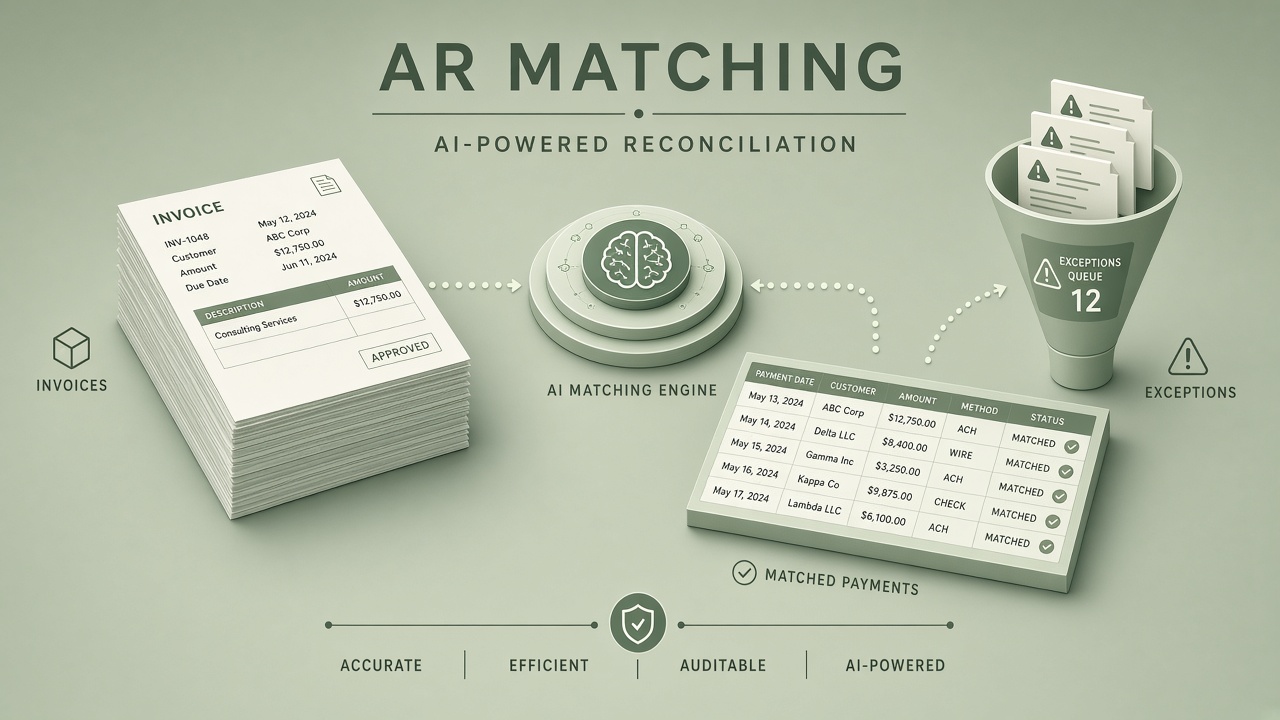
Accounts receivable reconciliation sounds mechanical: payment arrives, apply to invoice, mark closed. Reality is messier. Customers pay net amounts after deductions, combine multiple invoices in one wire, use wrong remittance references, or pay in foreign currency with bank fees stripped out. By month-end, exception piles dwarf the clean matches. Artificial intelligence can suggest pairings, classify deduction reasons, and route ambiguity to the right analyst queue, but finance teams still own sign-off and audit trails. This AI AR reconciliation workflow guide covers the data matching problem, exception queues, confidence thresholds, ERP integration, and month-end controls, with links to AI productivity tools and AI automation for finance ops.
The Data Matching Problem
AR reconciliation matches inbound cash and credits to open receivables using invoice numbers, amounts, customer IDs, purchase order references, and remittance advice text, often when any single field disagrees with the others. Rule engines excel at exact matches; they fail on partial payments, bundled remittances, and unstructured lockbox PDFs. LLMs and embedding-based matchers help interpret "paying inv 4421 and 4423 less 2% co-op" when OCR garbled a digit.
The matching problem scales with customer count and payment channel diversity. B2B manufacturers see EDI 820 remittances; SaaS companies see Stripe payouts netting fees; distributors see check batches scanned at the bank. Each channel needs normalization before AI scoring, or models learn channel-specific noise instead of payment intent.
| Mismatch type | Typical cause | AI assist |
|---|---|---|
| Amount delta | Early pay discount, short pay dispute | Deduction reason classifier |
| Reference typo | Customer transposed digits | Fuzzy invoice ID match |
| One-to-many | Single wire covers multiple invoices | Subset sum suggestion |
| Many-to-one | Partial payments over days | Open balance tracker |
| Unapplied cash | Missing remittance detail | Customer history ranking |
Reconciliation Workflow Stages
A governed AR workflow ingests bank and processor files, normalizes transactions, runs deterministic rules, applies AI suggestions above confidence floors, posts high-confidence matches to ERP, and queues exceptions for analysts with full provenance.
- Ingest: Bank BAI2, lockbox images, ACH detail, card processor payouts, manual wires.
- Normalize: Canonical fields (amount, currency, value date, counterparty, raw remittance text).
- Deterministic match: Exact invoice + amount + customer rules auto-post.
- AI suggest: Rank candidate invoice sets with confidence and feature explanations.
- Analyst review: Exception queue UI with one-click accept, split, or reject.
- ERP post: Write payment application, GL entries, and deduction codes.
- Audit log: Immutable record of model version, inputs, human actor, timestamp.
Exception Queues and Routing
Exception queues group unmatched or low-confidence items by failure mode so specialists resolve them efficiently: deductions team for short pays, credit team for unapplied cash, collections for aged disputes. Routing beats a single FIFO pile that hides high-value wires under small check noise.
Queue priority should consider dollar amount, customer strategic tier, and days to month-end close. AI can suggest queue assignment from remittance language ("quality claim" vs "freight allowance"). Supervisors need dashboards: queue depth, average age, auto-match rate, and reopen rate after posting corrections.
Deduction and Dispute Handling
When payment is short, classify the delta as valid discount, invalid deduction, or pending dispute before closing the invoice. AI classifiers trained on historical reason codes accelerate coding, but analysts confirm before write-offs. Link each deduction to customer master agreements so repeat invalid shorts trigger collections outreach.
Confidence Thresholds and Auto-Posting
Auto-post only when match confidence exceeds a calibrated threshold and no mandatory human triggers fire (amount above cap, new customer, first payment after dispute, multi-currency). Start conservative: many teams begin auto-posting at 98% calibrated accuracy on a narrow customer segment before expanding.
Calibration mirrors insurance triage: bin suggestions by score decile, measure analyst override rate per bin, adjust thresholds quarterly. When override rate spikes after a pricing change, pause auto-post until retrained. Never auto-post across legal entities without explicit cross-entity rules validated by accounting.
ERP Integration and Controls
ERP integration (NetSuite, SAP, Oracle, Microsoft Dynamics) must support idempotent payment application, reversal APIs, and segregation of duties so AI suggestions cannot post without role-based approval where required. Batch posts should be reversible within the close window without manual SQL.
- Read open AR and credit memo balances in real time before suggesting matches
- Write applications with external reconciliation ID for traceability
- Block double-application of the same bank transaction
- Sync GL cash accounts and AR subledger nightly with tie-out reports
- Export audit packages for SOX testing: who approved each AI-suggested match
AI automation middleware should log every API call to ERP with request and response hashes. When ERP is unavailable, queue suggestions locally rather than losing bank file processing windows.
Month-End Close Controls
Month-end close adds time pressure that tempts teams to force-match exceptions; controls include hard freeze rules, tie-out checklists, and AI-assisted aging commentary for material unapplied cash. Finance leadership should see auto-match percentage, exception backlog dollars, and top ten unmatched items daily in the last week of the period.
Standard close checklist items: bank reconciliation complete, unapplied cash below materiality threshold or explained, intercompany AR cleared, FX revaluation posted, deduction accruals reviewed. AI can draft variance narratives for controllers using AI productivity assistants, but numbers come from ERP, not model memory.
Segregation of Duties
The analyst who accepts AI suggestions should not be the same person who configures thresholds or trains deduction classifiers without secondary review. SOX environments require documented approvers for high-dollar auto-posts even when confidence is high.
Cash Application Policies and Write-Off Governance
Cash application policies define how analysts treat immaterial differences, when to post to suspense accounts, and who approves write-offs below versus above materiality thresholds. AI suggestions must respect these policies: a model should not auto-write off a five-dollar variance if policy requires customer contact first. Encode policies as rules that run after AI scoring, not as optional guidance in a prompt.
Suspense accounts accumulate when matching fails; finance leadership should cap suspense aging and force weekly reviews. AI can prioritize suspense items by amount and customer strategic value, but clearing suspense still requires business judgment on whether to refund, re-invoice, or negotiate. Document every suspense resolution with linked bank transaction and analyst notes for auditor replay.
Customer Remittance Portals and Self-Service
Customer payment portals that capture invoice selection at pay time reduce matching ambiguity upstream; AI reconciliation works best when paired with portal discipline. Incentivize customers to select open invoices rather than free-text references. When portals feed structured remittance data, rule engines handle more volume and AI focuses on exceptions that truly need judgment.
Collections and Credit Hold Integration
Reconciliation outcomes should feed collections workflows: unmatched cash on disputed accounts triggers credit hold review before new orders ship. AI matching that closes invoices while disputes remain open creates revenue leakage. Link match decisions to customer master credit status and dispute case IDs. When a short pay closes an invoice incorrectly, collections may stop pursuing valid balance. Exception queues should surface open disputes automatically when payment amount does not equal expected balance.
Reporting for Controller and FP&A
Finance leadership needs daily flash reports during close: auto-match rate, exception dollars, top customers with aging unapplied cash, and deduction trends by reason code. AI can narrate variance drivers for management review using AI productivity tools, but underlying numbers must reconcile to GL. Compare auto-match rate month over month; sudden jumps may indicate threshold drift, not genuine process improvement. Investigate before celebrating.
Implementation Roadmap
- Export 12 months of matched and exception payments as labeled data
- Build normalization layer per payment channel
- Deploy rules engine for exact matches (target 60 to 70% auto on mature books)
- Pilot AI suggestions in shadow mode; measure override rate
- Enable auto-post on highest decile with dollar caps
- Roll out exception queues by failure mode
- Integrate month-end dashboards with controller sign-off
Frequently Asked Questions
Does AI AR reconciliation replace analysts?
AI reduces manual matching on clean transactions; analysts shift to deductions, disputes, and control testing. Headcount often stays flat while transaction volume grows.
What auto-match rate should we expect?
Mature B2B books often reach 70 to 85% straight-through with rules plus AI; highly fragmented retail remittance may stay lower. Measure override rate, not vendor marketing percentages.
How reliable is lockbox OCR for remittance lines?
OCR quality varies by bank; always retain source images and confidence scores per field. Low OCR confidence should force human queue regardless of match score.
What auditors want for AI-assisted matching?
Document model purpose, training data scope, validation results, threshold policies, and samples of human overrides with business rationale. Immutable logs beat screenshot evidence.
Can AI match multi-currency payments?
Yes with explicit FX rate source and tolerance bands; never auto-post when rate deviation exceeds policy without treasury review. Store rate table version in audit log.
When should we freeze auto-posting before close?
Many teams disable auto-post for the final 48 hours of month-end, routing all items through analysts to prevent period misclassification. Configure freeze windows in the orchestration layer and communicate to treasury so bank files still ingest without silent queue backlog.
How do Stripe and payment processor payouts reconcile?
Processor payouts net fees and combine multiple charges; normalization must explode payout lines to individual transactions before invoice matching. Treat processor reports as a separate ingest channel with its own rules and AI features.
How does intercompany AR affect matching?
Intercompany payments need separate matching rules and often prohibit AI auto-post without treasury confirmation. Tag intercompany transactions at ingest to avoid misapplication across legal entities.
How do we avoid vendor lock-in?
Keep normalized payment events and match decisions in your data warehouse; ERP remains system of record. Export model features and scores for internal replay if switching vendors.
Historical Data and Model Drift
AR matching models drift when product mix, discount programs, or customer payment behavior changes; retrain on rolling twelve-month windows and monitor override rates weekly. Acquisitions that bring new customer masters require explicit merge rules before AI suggestions reference obsolete invoice formats. Archive match decisions with enough context that auditors can replay logic years later without depending on a vendor dashboard that may no longer exist.
Security and Access Controls
AR reconciliation systems handle bank files and customer payment data; role-based access, encryption at rest, and segregation between analysts who match and admins who configure thresholds are baseline requirements. AI vendors processing remittance text need DPAs and clear data retention limits. Do not paste full bank files into consumer LLM interfaces. Enterprise tenants with audit logging satisfy SOX and PCI assessor questions better than ad hoc automation scripts on employee laptops.
Conclusion
AI accounts receivable reconciliation works when finance treats suggestions as accelerated analysis, not unsupervised posting. Normalize channels, auto-match exact hits, calibrate confidence before auto-post, route exceptions by type, integrate reversibly with ERP, and tighten month-end controls as auto-match rates climb. Combine AI productivity for close narratives with governed AI automation into your ledger. Clean AR is not about eliminating exceptions; it is about resolving the right exceptions fast with a defensible audit trail.