What is Yarn?
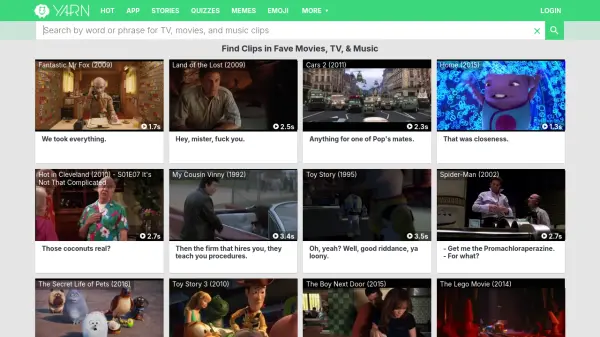
Yarn allows users to search and browse a vast library of video clips from movies, TV shows, and music videos. The platform indexes dialogue and phrases, making it simple to locate specific moments within a wide range of media content. It provides quick access to short clips, which are presented with their associated video and audio.
Yarn's searchable database is constantly updated, covering a diverse range of genres and titles. The service offers an intuitive interface where users can easily input keywords or quotes to find relevant clips.
Features
- Search by Keyword: Find video clips by searching specific words or phrases.
- Extensive Library: Access clips from a wide variety of movies, TV shows, and music videos.
- Precise Clip Identification: Locate exact moments within videos based on dialogue.
- Constantly Updated Database: Regular additions of new content and clips.
- User-Friendly Interface: Simple and intuitive search functionality.
Use Cases
- Finding specific movie quotes.
- Creating content with video references.
- Locating memorable TV show moments.
- Sharing clips on social media.
- Educational reference for film and media studies.
FAQs
-
How do I contact Yarn support?
You can contact support through the 'Support / FAQ' link at the bottom of the Yarn homepage.