What is VivifyScrum?
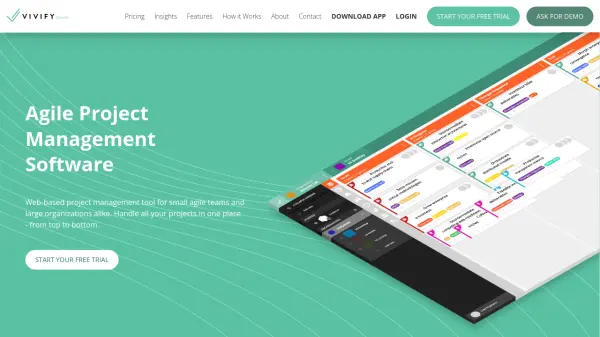
VivifyScrum is a comprehensive agile project management software designed to streamline workflows for teams and organizations. It offers customizable Scrum and Kanban boards, enabling efficient collaboration and project tracking. The platform integrates features like time tracking, team management, and invoicing, providing an all-in-one solution for business operations.
With unlimited boards, tasks, and organizations, VivifyScrum supports scalable project management. It includes tools for creating detailed task cards, generating reports, and integrating with popular apps like Slack, GitHub, and Google Drive. The software focuses on enhancing productivity through visual management and automated processes.
Features
- Customizable Boards: Choose between Scrum or Kanban frameworks with unlimited columns and workflow customization.
- Time Tracking: Use an in-app time tracker to log work hours and generate automatic worklogs for accurate invoicing.
- Team Management: Track team member availability, engagements, and workload with profile cards and time-off tracking.
- Invoicing: Create and send invoices directly from the app with customizable templates and client management.
- Integrations: Connect with tools like Slack, GitHub, BitBucket, GitLab, Zapier, and Google Drive for enhanced functionality.
- Reporting and Analytics: Generate charts, burndown reports, and activity logs to monitor project progress and team performance.
- Task Cards: Detailed task management with descriptions, files, comments, estimates, and custom fields.
- Free Scrum Training: Access online Scrum training through VivifyScrum EDU with your account.
Use Cases
- Managing software development projects with agile methodologies
- Tracking team workloads and availability for resource planning
- Creating and sending invoices based on tracked work hours
- Collaborating on tasks using customizable boards and integrations
- Generating reports on project progress and team performance
FAQs
-
Can I try VivifyScrum for free?
Yes, VivifyScrum offers a free 7-day trial for all new signups without requiring a credit card. -
How much does VivifyScrum cost?
Pricing starts at $10 per month for teams up to 10 members, with per-user pricing for larger teams and annual discounts available. -
How should I choose my plan?
Choose based on your team size; all plans include the same features like unlimited organizations, boards, and tasks. -
Does VivifyScrum offer discounted plans?
Yes, annual plans save 20% compared to monthly billing. -
Do I pay for all users I collaborate with?
You are charged for users with permissions other than 'Read' in your active boards, with no duplicate charges for users across multiple boards.