What is TradeTuning?
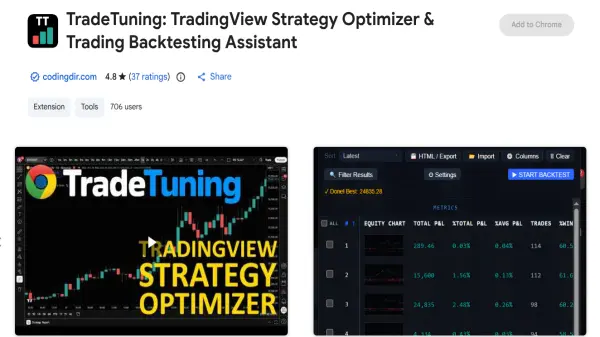
TradeTuning operates as a comprehensive strategy optimizer and backtesting assistant designed specifically for the TradingView platform. It eliminates the need for manual strategy testing by utilizing intelligent automation to evaluate thousands of parameter combinations in a fraction of the time. The extension integrates seamlessly into the user's charts, allowing them to systematically test different settings and instantly view crucial performance metrics such as net profit, win rate, and drawdown.
Furthermore, the tool provides advanced post-optimization analytics to ensure the robustness of the selected strategies. Traders can evaluate overfitting risks, analyze parameter sensitivity, and run Monte Carlo stress tests to validate their trading edge. By offering real-time results and secure local data storage, the extension equips users with professional-grade quantitative analysis capabilities directly within their browser environment.
Features
- Automated Parameter Testing: Systematically tests user-defined parameter ranges to explore every combination automatically.
- Smart Analysis Suite: Provides advanced tools like parameter sensitivity, plateau finder, and overfitting risk scores to ensure strategy robustness.
- Real-Time Results Display: Populates metrics live as backtests complete, allowing for instant data sorting and filtering.
- Monte Carlo Stress Test: Simulates alternative versions of the best results to reveal the true reliability of a trading edge.
- Result Export: Allows users to export complete backtest results and metrics to HTML and CSV for deeper external analysis.
Use Cases
- Optimizing scalping strategies on intraday charts.
- Conducting systematic parameter research and quantitative analysis.
- Fine-tuning entry signals and profit targets for swing trading.
- Validating trading algorithms before publishing scripts on TradingView.
How It Works
Install the Extension
Install the TradeTuning extension directly from the Chrome Web Store.
Open Strategy Settings
Navigate to any TradingView chart with a loaded strategy and click the gear icon to open your strategy settings.
Define Parameters
Use the automatically appearing optimizer interface to set the minimum, maximum, and step values for each parameter you want to test.
Start Backtest
Click 'Start Backtest' and watch the results populate in real-time, then sort and filter to find optimal settings.
FAQs
-
Does this tool work with all TradingView charts?
Yes, it works with stocks, forex, crypto, futures, and indices across all timeframes and for any TradingView PineScript strategy with numeric inputs. -
Is coding required to use the optimizer?
No coding is required beyond having your existing strategy set up in TradingView. -
Are my trading strategies and data secure?
Yes, your data stays private. Results are stored locally in your browser, and there is no tracking of your strategies or trading activity. -
What metrics does the extension capture during backtests?
It captures comprehensive metrics including net profit, profit factor, win rate, drawdown, Sharpe ratio, Sortino ratio, total trades, and more.