

What is TradesViz?
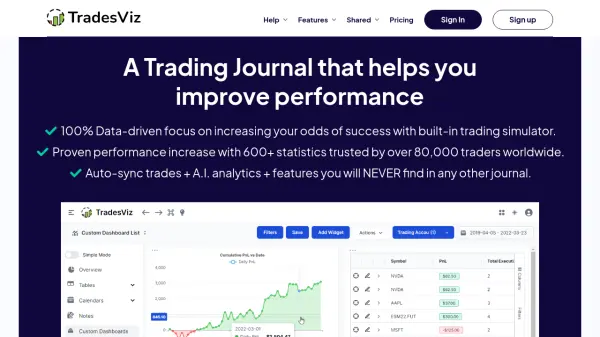
TradesViz provides a comprehensive suite for traders seeking to enhance their performance through meticulous journaling and analysis. It supports a wide range of asset classes including stocks, options, futures, forex, CFDs, and cryptocurrencies, accommodating traders from various global markets like the US, Canada, Australia, and India. The platform streamlines the journaling process by offering automated trade synchronization with over 30 brokers and platforms, alongside options for manual file uploads and direct entry, significantly reducing the time spent on data logging.
Beyond basic journaling, the platform incorporates sophisticated analytical tools and Artificial Intelligence features. Users can leverage over 600 statistics and visualizations, create fully customized dashboards, and utilize an AI Q&A system to query their trading data using natural language. Advanced functionalities include multi-asset trading simulators for risk-free practice, in-depth options flow analysis for market insights, a powerful backtesting engine with numerous indicators, and tools for setting trade/day plans and tracking progress against specific trading goals, making it a versatile toolkit for serious traders.
Features
- AI-Powered Q&A: Ask natural language questions about trading data to get visualized answers and insights.
- Multi-Asset Trading Simulator: Practice trading stocks, options, futures, and forex historically on any timeframe.
- Automated Trade Sync: Connect with over 30 major brokers for automatic trade import and seamless journaling.
- Advanced Analytics & Statistics: Access over 600 performance metrics, visualizations, and customizable reports.
- Options Flow Analysis: Analyze unusual options activity, visualize bullish/bearish flow, and scan for potential trade ideas.
- Customizable Dashboards: Create personalized dashboards displaying preferred statistics, charts, and tables.
- Backtesting Engine: Test trading strategies using over 70 indicators across 35,000+ symbols on various timeframes.
- Trade/Day Planning & Goal Tracking: Set up custom checklists, plans, analyze mistakes, and track progress against defined trading goals.
Use Cases
- Analyzing trading performance across stocks, options, futures, forex, and crypto.
- Identifying profitable patterns and strategy weaknesses through detailed statistics.
- Automating the trade logging process via direct broker connections.
- Practicing trading strategies risk-free using historical data simulators.
- Discovering trading ideas using options flow analysis and seasonality charts.
- Backtesting indicator-based strategies across multiple markets and timeframes.
- Customizing analysis dashboards to fit specific trading styles and needs.
- Tracking trading goals, plans, and mistakes systematically.
FAQs
-
What asset types do you support?
TradesViz supports Stock & Stock options, Future & Future options, Index options, CFDs, Cryptocurrency, and Forex. -
Do you have auto-sync for my broker?
Yes, auto-sync options are available for many brokers. You can check the full list on the TradesViz website. If your broker isn't listed, you can use the Google Drive sync method. -
What exchanges/countries do you support?
Charting is supported for exchanges in Australia, Canada, India, and the United States. However, TradesViz supports journaling trades in any currency from anywhere in the world. -
Can I enter trades manually?
Yes, trades can be added to your journal via manual entry, manual import of files (.csv, .xlsx, .xls, .txt), or through auto-sync with supported brokers. -
How does the Trading simulator work?
The trading simulator allows you to replay historical market data for most US tickers (~10k), futures (80+), and forex on various intraday timeframes (from 5 seconds to 30 minutes). It replicates a live trading environment, allowing practice with features like scaling positions, bracket orders, and visual stop adjustments.