What is Tooliya?
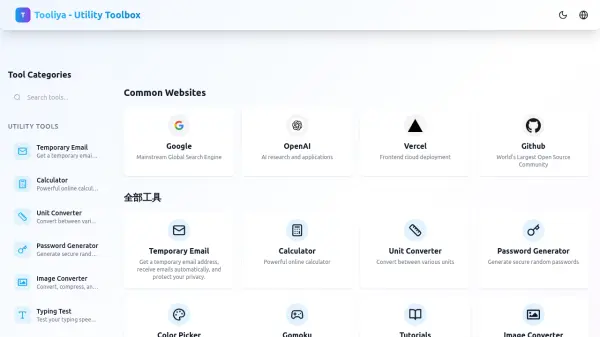
Tooliya is a comprehensive online utility toolbox designed to help users perform everyday tasks quickly and efficiently. The platform offers a wide range of free tools including a temporary email service, a powerful online calculator, a unit converter, a password generator, a color picker, and an image converter that can also generate ICO files. Additionally, Tooliya provides a Gomoku game with a high-level AI opponent and a typing test to measure speed and accuracy. The website also features tutorials and tips for using the tools effectively. Built with care by the Tooliya Team, the platform aims to be a one-stop solution for common online utilities.
Features
- Temporary Email: Generate a disposable email address to receive emails and protect privacy.
- Calculator: Perform calculations with a powerful online calculator.
- Unit Converter: Convert between various units of measurement.
- Password Generator: Create secure, random passwords.
- Color Picker: Select and manage colors with an easy-to-use picker.
- Gomoku AI: Play the Gomoku board game against a high-level artificial intelligence opponent.
- Image Converter: Convert images, compress files, and generate ICO icons.
- Typing Test: Assess typing speed and accuracy with an online test.
Use Cases
- Creating temporary email addresses for sign-ups or privacy protection.
- Quick mathematical calculations without a physical calculator.
- Converting units for travel, cooking, or academic purposes.
- Generating strong passwords for online accounts.
- Selecting and copying color codes for web design or graphic projects.
- Playing a strategic board game against an AI opponent.
- Converting image formats and compressing files for web use.
- Testing and improving typing speed and accuracy.
FAQs
-
Is Tooliya free to use?
Yes, all tools on Tooliya are completely free to use. -
Do I need to create an account to use Tooliya?
No, you can use all tools without creating an account. -
Can I use Tooliya on mobile devices?
Yes, Tooliya is designed to work on both desktop and mobile devices. -
How does the temporary email service work?
You can generate a disposable email address instantly, and any emails sent to that address will appear on the page automatically. The email address is temporary and self-destructs after some time. -
What is the Gomoku AI difficulty level?
The Gomoku AI is designed to provide a challenging experience with high-level gameplay.