What is thetodobot.com?
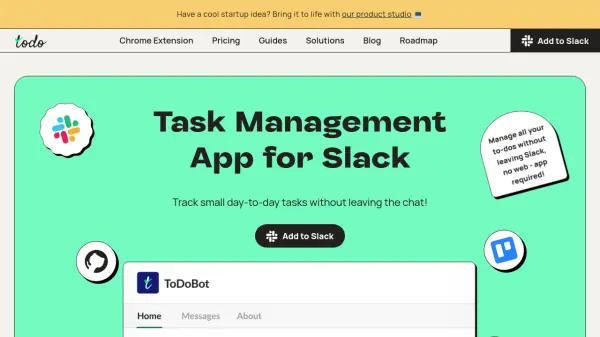
ToDoBot is a productivity and task tracking application designed to streamline workflow management within Slack. It enables users to create, assign, and organize tasks without leaving the chat interface, making it ideal for handling small day-to-day activities that might be overlooked by more complex task management systems. The tool integrates seamlessly with Slack channels and direct messages, allowing for efficient collaboration among team members.
With features like customizable dashboards, shared lists, and integration with Slack Workflows, ToDoBot provides a centralized platform for tracking projects and automating internal processes. It supports work in shared channels, facilitating collaboration with clients and partners, and offers various plans to accommodate different team sizes and needs.
Features
- Task Creation: Create individual tasks for yourself or team members
- Task Assignment: Assign tasks to teammates within Slack channels or direct messages
- Deadline Setting: Set deadlines for tasks to ensure timely completion
- List Organization: Organize tasks into customizable lists for better management
- Checklist Templates: Use pre-defined checklist templates for common workflows
- Slack Integration: Fully integrates with Slack for seamless task tracking without app switching
- Customizable Dashboard: Track projects using lists, pages, filters, and views on the home page
- Shared Channel Support: Collaborate with clients and partners in Slack shared channels
- Workflow Automation: Integrate with Slack Workflows to automate internal processes
- Easy Installation: No registration required; available to all teammates once added to Slack
Use Cases
- Managing small day-to-day tasks for personal productivity
- Tracking customer issues and support requests in shared channels
- Assigning onboarding checklists to new team members
- Collaborating on joint projects with external partners
- Automating internal IT or administrative workflows
- Organizing team tasks and priorities in Slack channels
- Creating shared roadmaps for project management
- Handling routine tasks that are too small for complex systems
FAQs
-
How do I install ToDoBot in Slack?
ToDoBot can be added directly to your Slack workspace without registration; once installed, it is immediately available to all teammates. -
Can I use ToDoBot for personal tasks only?
Yes, ToDoBot is suitable for personal use, allowing you to create and manage individual tasks within Slack. -
What happens if I exceed the 10 open ToDos on the free plan?
On the free plan, you are limited to 10 open ToDos; to create unlimited tasks, you need to upgrade to a paid plan. -
Is ToDoBot secure for handling sensitive data?
ToDoBot follows OWASP best practices, encrypts data at-rest and in transit, and conducts regular audits to ensure data security. -
How can I cancel my paid subscription?
You can cancel your paid subscription at any time; refer to the 'How to cancel ToDoBot subscription' section for guidance.
Related Queries
Helpful for people in the following professions
thetodobot.com Uptime Monitor
Average Uptime
100%
Average Response Time
192.57 ms