What is style2image?
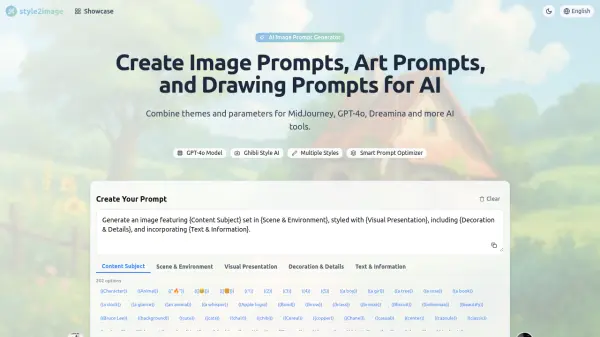
style2image is designed for artists, designers, and creators seeking to craft high-quality visual prompts for leading AI art generators. The platform enables users to combine multiple themes, styles, and parameters, offering deep customization and creative flexibility. With real-time prompt updates, users can select various art styles, scenes, and techniques and adjust parameters like style intensity or color to generate the ideal prompt for their project.
Seamless integration with platforms such as MidJourney, GPT-4o, and Dreamina allows easy transfer or use of prompts, while the community showcase inspires users by providing access to prompt examples and success stories from other creators. style2image helps users optimize their workflow in producing unique, stylized images for projects ranging from animation backgrounds to concept art and character illustration.
Features
- Prompt Customization: Combine tags and parameters to create unique AI image prompts.
- Multiple Art Styles: Supports various visual styles including Ghibli, Q-version, and more.
- Platform Integration: Works directly with MidJourney, GPT-4o, Dreamina, and other AI tools.
- Real-Time Prompt Updates: Prompts adjust instantly as users select options and parameters.
- Community Showcase: Explore and use prompt examples from other creators.
- Prompt Template Control: Customize templates including use of variable tags and placeholders.
Use Cases
- Generating consistent backgrounds for animation using AI.
- Creating concept art prompts for game design.
- Crafting character illustration prompts with specific art styles.
- Customizing drawing or art prompts for social media content.
- Optimizing prompt engineering for AI-generated visual assets.
- Developing unique visual concepts for creative projects.
FAQs
-
How do I use style2image to generate prompts?
Select the desired art style, scene, and technique tags, then adjust parameters such as style intensity and color. The platform updates the prompt automatically based on selections, which can then be copied or sent directly to integrated AI tools. -
How do I use variable tags in the prompt generator?
Variable tags can be included in prompt templates to allow for dynamic customization and flexibility when creating image prompts. -
Why do some parameters appear as {Placeholder} in the prompt template?
Parameters appear as {Placeholder} to indicate that they are dynamically set and can be adjusted or filled based on user input in the prompt creation process. -
What's the purpose of double parentheses ((example)) in prompts?
Double parentheses are used in certain AI prompt syntaxes to emphasize or apply weight to particular elements or styles within the prompt. -
How can I customize the prompt template?
Users can modify the prompt template by adding or editing tags, adjusting placeholders, and tailoring parameters directly within the style2image interface.