What is ShellCheck?
ShellCheck is a sophisticated static analysis tool designed to identify bugs, security vulnerabilities, and portability issues in shell scripts. By leveraging advanced algorithms, it scans shell code to detect common errors such as quoting problems, incorrect variable usage, and compatibility issues across different shell environments. The tool provides detailed feedback and suggestions for fixes, making it an essential resource for developers working with bash, sh, and other shell scripting languages.
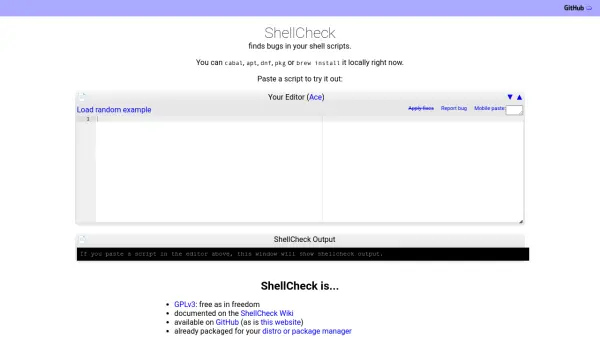
Available as a free, open-source tool under the GPLv3 license, ShellCheck can be installed locally via package managers like apt, dnf, brew, or cabal. It also integrates seamlessly with major code editors and platforms such as GitHub, CodeClimate, Codacy, and CodeFactor, enabling automated code quality checks in development workflows. The web interface allows users to paste scripts directly for instant analysis, with features like applying fixes and loading random examples to demonstrate its capabilities.
Features
- Static Analysis: Automatically detects bugs and security vulnerabilities in shell scripts
- Portability Checks: Identifies compatibility issues across different shell environments like bash and sh
- Error Suggestions: Provides detailed feedback and fix recommendations for common scripting errors
- Editor Integration: Supported as a linter in major code editors for real-time analysis
- Platform Compatibility: Available for installation via package managers and integrates with GitHub, CodeClimate, and other development tools
- Web Interface: Allows pasting scripts directly for instant analysis with features like applying fixes and loading examples
Use Cases
- Debugging shell scripts for errors and security vulnerabilities
- Ensuring portability of scripts across different Unix-like systems
- Improving code quality in development workflows with automated checks
- Learning shell scripting by analyzing example scripts and fixes
- Integrating static analysis into CI/CD pipelines for GitHub repositories
FAQs
-
What types of shell scripts does ShellCheck support?
ShellCheck supports various shell scripting languages, including bash and sh, as demonstrated in the examples on the homepage. -
How can I install ShellCheck on my system?
ShellCheck can be installed locally using package managers such as cabal, apt, dnf, pkg, or brew, as mentioned on the homepage. -
Does ShellCheck integrate with development tools?
Yes, ShellCheck is supported as an integrated linter in major editors and available in platforms like CodeClimate, Codacy, and CodeFactor for auto-checking GitHub repositories. -
Is ShellCheck free to use?
Yes, ShellCheck is free and open-source under the GPLv3 license, allowing unrestricted use and modification. -
Can I use ShellCheck without installing it locally?
Yes, you can paste scripts directly into the web interface on the homepage for instant analysis without local installation.