fsck.ai favicon

fsck.ai
Ship high-quality software faster with AI-powered tools

What is fsck.ai?

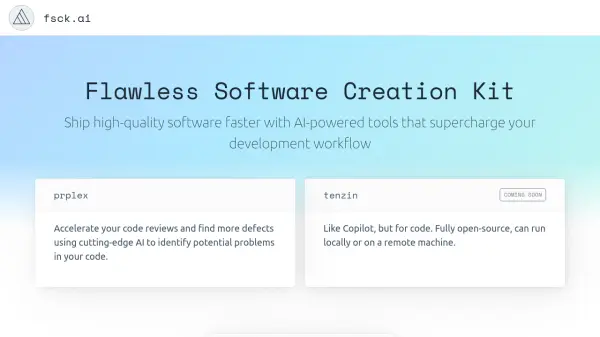
fsck.ai is an innovative AI-powered software development toolkit that aims to revolutionize the coding workflow. The platform combines code review capabilities with AI assistance to help developers identify potential problems and ship higher-quality software faster.

As an open-source alternative to GitHub Copilot, fsck.ai distinguishes itself by offering the flexibility to run either locally on developers' machines or on remote servers, providing greater control over the development environment while maintaining powerful AI-assisted features.

Features

  • AI-Powered Code Review: Automated detection of potential code issues
  • Local Deployment: Ability to run the tool on local machines
  • Remote Deployment: Option to run on remote servers
  • Open Source: Full access to source code and customization options

Use Cases

  • Automated code review and quality assurance
  • Bug detection and prevention
  • Code optimization assistance
  • Development workflow enhancement

FAQs

  • What makes fsck.ai different from GitHub Copilot?
    fsck.ai is fully open-source and offers the flexibility to run either locally on your own machine or on a remote server, giving users more control over their development environment.
  • When will fsck.ai be available?
    fsck.ai is currently in development and accepting early access signups through their waitlist.

Related Queries

Helpful for people in the following professions

Related Tools:

Blogs:

  • Ghibli Art Generator AI tools

    Ghibli Art Generator AI tools

    List of the best AI tools to turn your photos into images that look like Studio Ghibli movies. Easy to use and fun for everyone.

  • AI thumbnail maker tools

    AI thumbnail maker tools

    Automatically generate visually appealing and optimized thumbnails for various digital content, streamlining the design process and enhancing visual engagement

  • Top 6 AI note-taking tools for 2026: in-person, online, and hybrid use cases

    Top 6 AI note-taking tools for 2026: in-person, online, and hybrid use cases

    Most AI note-taking lists are really lists of meeting bots, which join your video call and transcribe it. That's useful, but it's half the picture. Decisions happen in hallway conversations, client dinners, on-site visits, and hybrid rooms where nobody is on a video link. This guide covers different parts of the note-taking workflow: hardware capture for in-person settings, platform-native tools for online calls, and AI layers for organizing and synthesizing what you've captured. It compares six tools by capture context, workflow fit, pricing, and limitations.

Didn't find tool you were looking for?

Be as detailed as possible for better results