What is Rounder?
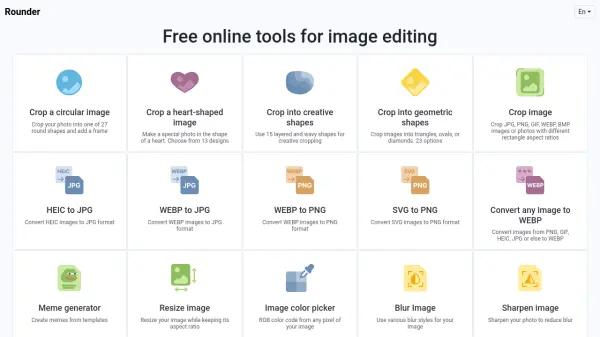
Rounder is a comprehensive online image editing tool that provides a wide range of functionalities for users to manipulate their photos. It enables cropping images into 27 round shapes, 13 heart designs, 15 creative layered shapes, and 23 geometric shapes like triangles and ovals. The platform also supports basic image editing tasks such as resizing, rotating, blurring, and sharpening, along with format conversion capabilities for HEIC, WEBP, SVG, and other image types.
With a user-friendly interface, Rounder simplifies the editing process into three straightforward steps: selecting a tool, uploading an image, and obtaining fast, accurate results. It is designed to help users adjust composition, crop to specific sizes, and enhance photos with minimal effort, making it suitable for various personal and professional applications.
Features
- Crop Circular Images: Crop photos into 27 round shapes with frame options
- Crop Heart-Shaped Images: Create special photos using 13 heart designs
- Crop Creative Shapes: Use 15 layered and wavy shapes for artistic cropping
- Crop Geometric Shapes: Crop images into triangles, ovals, or diamonds with 23 options
- Image Format Conversion: Convert between HEIC, WEBP, SVG, PNG, JPG, and other formats
- Basic Image Editing: Resize, rotate, blur, sharpen, and pick colors from images
- Meme Generator: Create memes from templates
- Fast Processing: Achieve quick and accurate editing results with a simple three-step process
Use Cases
- Cropping profile pictures into circular shapes for social media
- Creating heart-shaped images for special occasions like weddings or anniversaries
- Designing creative graphics for presentations or marketing materials
- Converting image formats for compatibility with different devices or software
- Editing photos to fit specific dimensions for websites or print materials
- Generating memes for social media or entertainment purposes
- Sharpening or blurring images to enhance visual quality
- Picking color codes from images for design projects