What is RoboForm?
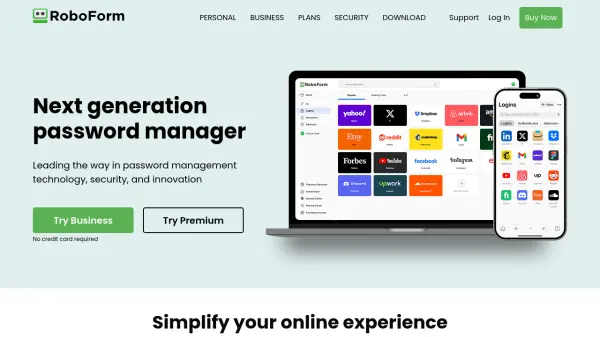
RoboForm offers a comprehensive password management solution that focuses on security, convenience, and cross-platform accessibility. Users benefit from seamless one-click logins, automated form filling, strong password generation, and real-time monitoring for compromised credentials. With secure password sharing, data breach monitoring, and a zero-knowledge security architecture, RoboForm protects user data while enhancing productivity online.
The platform supports a wide range of devices and operating systems, including integrations with web browsers and compatibility across business environments. Dedicated features such as passwordless unlock, centralized management, and custom security policies—along with AES256 encryption—make RoboForm an optimal choice for both personal use and enterprise security needs.
Features
- Password Generator: Creates strong and unique passwords for every site.
- One-Click Login & Form Filling: Instantly logs users into sites and fills online forms automatically.
- Compromised Password Scan: Alerts users when passwords are exposed in data breaches.
- Secure Sharing: Shares passwords securely with trusted contacts.
- Data Breach Monitoring: Monitors multiple email addresses for breaches and notifies the user.
- Passwordless Unlock: Allows unlocking through biometric authentication or hardware security key.
- Multi-Device Support: Access passwords seamlessly across all devices.
- Emergency Access: Appoints trusted contacts for emergency password retrieval.
- Centralized Business Management: Includes admin tools, SSO integration, and role-based control.
- Zero-Knowledge Encryption: Ensures that only the user can access encrypted data.
Use Cases
- Generating and storing strong passwords for all online accounts
- Filling out online forms and credentials efficiently
- Monitoring personal or business credentials for exposure in data breaches
- Securing and sharing sensitive login data with colleagues or family members
- Managing access for teams and employees in business environments
- Setting up emergency access for trusted individuals
- Accessing passwords across multiple devices and platforms
- Enabling passwordless login with biometrics or hardware keys
FAQs
-
Is RoboForm secure?
RoboForm uses AES256 bit encryption with PBKDF2 SHA256 and zero-knowledge architecture, ensuring that only you can access your encrypted data through your master password. -
Can RoboForm see my passwords?
No, all encryption and decryption processes occur locally on your device and RoboForm does not have access to your master password or encrypted data. -
Why should I use RoboForm instead of my browser's password manager?
RoboForm provides comprehensive cross-platform support, one-click logins, thorough password monitoring, secure sharing options, built-in authenticator, and advanced security features not typically available in browser-based managers. -
Can existing passwords be imported into RoboForm?
Yes, users can import passwords from every browser, major password managers, or via CSV files.