What is RenoBrief AI?
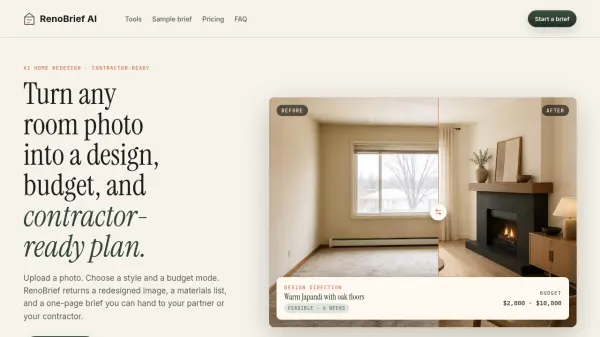
RenoBrief AI is a photo-to-plan artificial intelligence tool built for homeowners and renovation planners who want to move from vague ideas to actionable project briefs. Users simply upload a photo of any room or facade, select a preferred design style from options such as Modern, Japandi, Minimalist, Farmhouse, or Quiet Luxury, and choose a budget mode ranging from a simple refresh to a full renovation. The platform then generates a redesigned concept image alongside a structured one-page brief that includes a clear design direction, a curated materials list, a regional budget range estimate, and specific contractor notes covering layout, lighting, and finish scope.
RenoBrief AI offers three distinct tool paths: Interior Remodel for living rooms, kitchens, bedrooms, and bathrooms; Exterior Remodel for facades, doors, and landscaping; and a Floor Plan Generator that sketches dimensioned layouts from user-defined constraints. Every generated brief is formatted as a shareable, saveable handoff document that can be presented directly to a contractor or used as a discussion tool with collaborators. The platform operates on a credit-based model, with monthly, yearly, and on-demand credit options available, and the first brief is free during the current testing phase.
Features
- Photo-to-Brief Generation: Upload a room or facade photo and receive a full redesign concept with a one-page contractor-ready brief.
- AI Redesign Image: Generates a visual concept image reflecting the chosen style and budget constraints.
- Materials List: Provides a curated list of materials with associated surface or application notes.
- Budget Range Estimation: Calibrates budget estimates to regional remodeling averages based on the selected scope.
- Contractor Notes: Surfaces specific notes on layout, lighting, flooring, and plumbing relevant to the project.
- Multiple Design Styles: Supports five primary styles — Modern, Japandi, Minimalist, Farmhouse, and Quiet Luxury.
- Three Tool Paths: Separate workflows for Interior Remodel, Exterior Remodel, and Floor Plan Generation.
- PDF Export and Brief History: Every saved brief can be exported as a PDF and accessed from account history.
- Credit-Based Pricing: Flexible plans including monthly, yearly, and on-demand credit options with no subscription required for on-demand use.
- Sample Brief Workflow: Interactive demo allows users to explore the tool with a sample room before committing to a full brief.
Use Cases
- Homeowners planning a living room, kitchen, bedroom, or bathroom remodel who need a visual concept and cost estimate before engaging a contractor.
- Renovation planners generating exterior redesign concepts for facades, doors, roof colors, and landscaping.
- Individuals sketching dimensioned floor plan layouts from spatial constraints using the Floor Plan Generator.
- Contractors receiving a one-page brief from clients to use as a quoting and scoping reference.
- Couples or co-owners aligning on a shared design direction and budget before beginning a renovation project.
- Real estate investors assessing renovation scope and estimated budget for a property update.
- Interior design enthusiasts exploring different style directions for a room without hiring a professional designer.
How It Works
Upload a Room Photo
Upload a photo of the room, facade, or space you want to renovate. This serves as the visual input for the AI planning process.
Select a Style and Budget Mode
Choose from five design styles — Modern, Japandi, Minimalist, Farmhouse, or Quiet Luxury — and select a budget mode: Refresh ($500–$2k), Remodel ($2k–$10k), or Renovate ($10k+).
Add Optional Notes
Optionally provide specific instructions such as keeping certain features, avoiding plumbing changes, or adding storage, to guide the AI output.
Generate the Brief
RenoBrief AI processes the inputs and returns a redesigned concept image, a materials list, a budget range estimate, and structured contractor notes in a one-page brief format.
Save, Share, or Export
Save the brief to your account history, export it as a PDF, or share it directly with a contractor or partner as a ready-to-use planning document.
FAQs
-
Is a RenoBrief output a construction drawing?
No. Every RenoBrief is a planning concept — a discussable brief that a contractor can quote against. RenoBrief does not produce code-compliant or stamped construction documents. -
How accurate is the budget range provided in a brief?
Budgets are calibrated to regional remodeling averages and the materials included in the brief. A range is shown rather than a fixed number, as the final cost depends on contractor selection, permits, and material lead times. -
Does RenoBrief store my uploaded photos?
Photos are encrypted in transit and used to create your renovation brief. Saved projects remain accessible in your account history. -
Can I share a brief directly with my contractor?
Yes. Every brief is designed as a one-page handoff document containing the scope, materials, budget range, and contractor notes. -
How does the credit system work?
One completed renovation brief costs one credit. Credits are available through monthly, yearly, or on-demand plans. Subscription credits are spent before permanent one-time credits, and unused subscription credits expire each month.