What is Relyze?
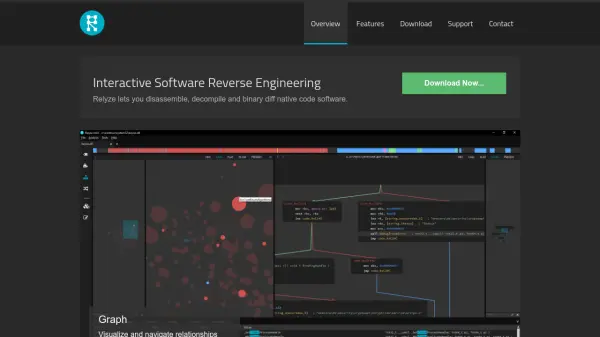
Relyze provides a comprehensive solution for software reverse engineering, allowing users to analyze native code through an intuitive, modern interface. It supports both PE and ELF binaries and equips analysts with tools to disassemble and decompile code, transforming low-level binaries into high-level pseudo code to better understand program behavior.
The platform features interactive analysis workflows, such as graphical representations of code relationships and binary diffing capabilities. Users can extend Relyze's functionalities through a dedicated Ruby plugin framework, ensuring adaptability and customization for complex analysis tasks.
Features
- PE and ELF Binary Support: Analyze both PE and ELF binary formats.
- Decompiler: Convert low-level code to high-level pseudo code for easier understanding.
- Interactive Analysis: Modify and annotate analysis with dynamic control flow, call, and reference graphs.
- Binary Diffing: Compare two binaries to identify similarities and differences.
- Modern Interface: Sleek, flat UI design for seamless analysis.
- Plugin Framework: Extend tool capabilities using a Ruby plugin system.
Use Cases
- Malware analysis for security research.
- Reverse engineering legacy proprietary applications.
- Identifying vulnerabilities in software binaries.
- Comparing different versions of binary files to audit changes.
- Educational purposes for understanding compiled software behavior.