What is Redokun?
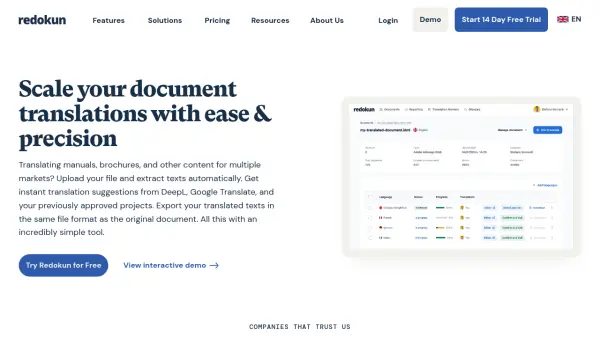
Redokun provides a streamlined solution for managing and executing document translation projects across multiple languages. It automates the text extraction process from various file formats, including InDesign, Word, PowerPoint, and XLIFF, preserving the original layout and formatting upon export. The platform incorporates Computer-Assisted Translation (CAT) tools, such as Translation Memory, which stores previously approved translations for reuse, ensuring consistency and reducing redundant work.
Integrated machine translation engines like DeepL and Google Translate offer instant suggestions, accelerating the creation of initial drafts. Collaboration is facilitated through a web-based editor, allowing team members, including managers, designers, and translators, to work concurrently on documents, track progress, and exchange feedback in real-time. This centralized system aims to significantly reduce manual effort, shorten turnaround times, and improve overall translation quality and consistency for marketing materials, technical documents, and other content types.
Features
- Translation Memory: Automatically stores and suggests previously approved translations to ensure consistency and speed up future projects.
- Machine Translation Integration: Provides instant translation suggestions from DeepL and Google Translate within the editor.
- Automatic File Formatting: Preserves the original layout and styles when exporting translated documents in formats like InDesign, Word, PowerPoint, etc.
- Web Editor: Enables real-time collaboration for translators and reviewers directly in their browser.
- Pre-translate: Quickly generate draft translations using Translation Memory and/or Machine Translation.
- Glossary Management: Maintain consistent terminology across all translations and languages.
- Collaboration Tools: Invite team members, assign tasks, track progress, and exchange feedback within the platform.
Use Cases
- Translating InDesign marketing brochures and layouts.
- Localizing Microsoft Word documents and technical manuals.
- Translating PowerPoint presentations for international audiences.
- Managing XLIFF file translations for software localization.
- Streamlining the translation workflow for multilingual content.
- Collaborating with internal teams or external translation vendors.
- Improving translation consistency across multiple projects.
- Accelerating translation turnaround times using AI and automation.
FAQs
-
Which file formats does Redokun support?
Redokun supports common file formats like InDesign, Word, PowerPoint, Excel, XLIFF, JSON, SRT subtitles, and more. You can upload original documents without prep work. -
How can I collaborate with my translators using Redokun?
You can invite translators via email to create Redokun accounts and work on projects within the platform. If you work with vendors using their own tools, Redokun allows converting your document into a standard translation file format for them. -
Will Redokun translate my documents for me automatically?
Redokun is a workflow automation and collaboration platform. While it integrates machine translation (AI suggestions), it's meant to assist human translators, not replace them. It's recommended to have someone review AI-generated translations. -
Is my data secure in Redokun?
Redokun uses encrypted communication (TLS) and stores data in secure ISO 27001 and SOC-compliant data centers to ensure privacy and safety. -
When are words deducted from my balance and how are they counted?
Words are deducted only when you first export a document in each language. For example, a 100-word document translated into 3 languages deducts 300 words. Generating multiple drafts doesn't increase the word count deducted for that document/language combination. Revised documents count as new documents. For languages like Chinese, Korean, and Japanese, each character counts as one word.