
What is PhotoSweeper?
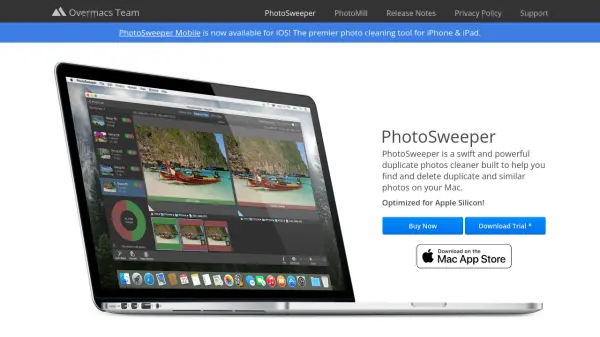
PhotoSweeper is a specialized tool designed to help Mac users efficiently manage their photo collections by identifying and removing duplicate and similar images. It integrates seamlessly with popular photo management applications including Apple Photos, Capture One, and Adobe Lightroom Classic, ensuring a smooth workflow for photographers and enthusiasts. The application supports a wide range of image and video formats, including RAW files, HEIC, PDF, DNG, and WebP, making it versatile for various media types.
With features like adjustable similarity thresholds, automatic marking rules, and batch renaming capabilities, PhotoSweeper provides precise control over the cleaning process. It prioritizes safety by never permanently deleting files; instead, removed photos are sent to the system Trash or designated albums, allowing for easy restoration if needed. The tool is optimized for performance on modern Mac hardware, including Apple Silicon, and offers an intuitive interface with multiple review modes for efficient sorting.
Features
- Auto Mark: Intuitive adjustable rules determine which photo to keep in duplicate groups
- Similar Photos: Powerful search engine isolates similar photos with adjustable similarity threshold
- Series of Shots: Finds series of shots based on time gap to keep best photos
- Auto Lock: Keeps sorted photos safe from removal while allowing comparison
- Movies Support: Supports various video formats including AVI, MKV, and WMV
- Edited Photos Detection: Finds resized, rotated, or filter-enhanced photos from editing apps
- Photo Browser: Modern browser with tools like EXIF Info Panel and Movie Preview
- Batch Renaming: Bulk rename files while copying or moving to another folder
- Safe Removal: Never deletes files permanently; sends to Trash for restoration
- Image Formats Support: Supports popular formats including RAW, HEIC, PDF, DNG, and WebP
Use Cases
- Cleaning duplicate photos from Mac hard drives or external storage
- Organizing photo libraries in Apple Photos by removing duplicates
- Managing images in Capture One or Adobe Lightroom Classic by eliminating similar shots
- Freeing up disk space by deleting unnecessary duplicate photos
- Sorting series of shots to keep only the best images from a photo session
- Renaming batches of photos during import or organization
FAQs
-
What photo formats does PhotoSweeper support?
PhotoSweeper supports all popular image formats including RAW and HEIC, as well as PDF, DNG, and WebP types. -
How does PhotoSweeper handle removed photos to ensure safety?
PhotoSweeper never deletes files permanently; it sends them to the system Trash or designated albums in photo libraries, allowing for restoration if needed. -
Can PhotoSweeper detect edited or resized photos?
Yes, PhotoSweeper can find resized, rotated, and filter-enhanced photos from apps like Photoshop or Pixelmator. -
Does PhotoSweeper work with video files?
Yes, PhotoSweeper supports various video formats, including AVI, MKV, and WMV, even those not natively supported by macOS. -
What is the limitation of the trial version of PhotoSweeper?
The trial application allows you to remove only 10 photos.