What is Papeeria?
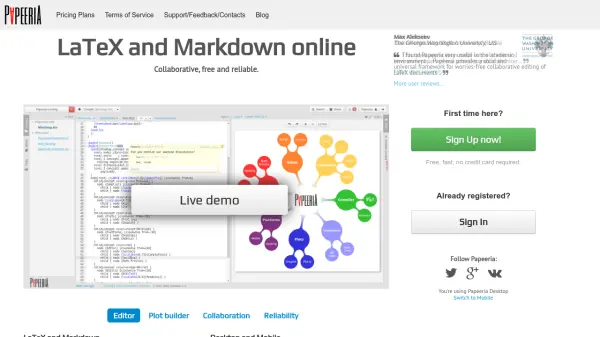
Papeeria delivers a comprehensive platform for seamless creation and editing of LaTeX and Markdown documents online. Featuring real-time collaboration, auto-compilation, and an intuitive editor with autocompletion and spellchecking, the tool is designed to facilitate academic, research, and professional writing.
Users can instantly create documents from a rich template gallery, generate quick and advanced plots, and benefit from automatic synchronization with Git, Google Drive, or Dropbox. Built-in project versioning, effortless document sharing, and high system reliability ensure consistent workflow and secure data accessibility across desktop and mobile devices.
Features
- Real-Time Collaboration: Multiple users can edit documents simultaneously with instant updates and unlimited collaborators.
- LaTeX and Markdown Editing: Supports pure LaTeX, Markdown, or a combination, with continuous background auto-compilation.
- Template Gallery: Access a comprehensive library of templates for academic papers, CVs, and presentations.
- Integrated Plot Builder: Instantly insert plots using built-in gnuplot tools or Plot.ly integration for both simple and complex visualizations.
- Cloud Sync: Sync projects with Git, Google Drive, and Dropbox for seamless collaboration and backup.
- Versioning and History: Per-file edit histories and whole project snapshots for easy rollback and change tracking.
- Cross-Platform Availability: Accessible through all major desktop browsers and mobile devices without additional software.
- Document Sharing and Permissions: Share projects with colleagues and control read/write access rights.
Use Cases
- Collaboratively writing academic papers and technical articles.
- Creating mathematical presentations with real-time input from multiple authors.
- Developing CVs and resumes using professional templates.
- Generating and inserting scientific plots and graphs directly into documents.
- Synchronizing thesis work between different devices and with colleagues or supervisors.