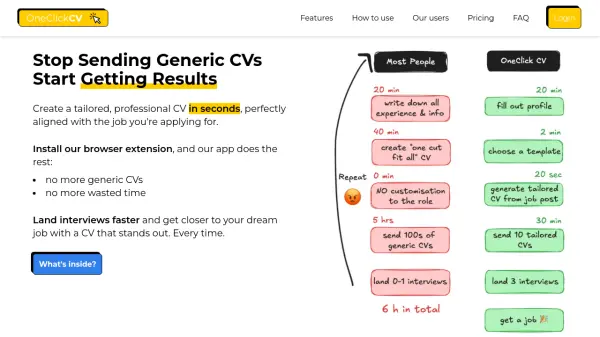
What is OneClickCV?
This platform streamlines the CV creation process, allowing users to quickly generate tailored, professional resumes and cover letters. By utilizing a browser extension, it analyzes job postings and automatically adjusts the CV to match the specific requirements, enhancing the chances of securing an interview.
It addresses common challenges such as time-consuming customization and Application Tracking System (ATS) compatibility. The focus is on making the CV stand out, not only to human recruiters but also to automated screening systems. The platform also allows storing created CVs.
Features
- Custom CV/Cover Letter Builder: Add your data once, then build in seconds.
- OneClickCV Browser Extension: Create perfect CVs for the job post you’re looking at.
- CV templates that “just” work: You only have one chance of making a right impression.
- Optimised for Application Tracking System (ATS): Make sure it’s a human who look at your CV, not robot.
Use Cases
- Creating tailored CVs for different job applications.
- Quickly updating and optimizing existing CVs.
- Generating cover letters customized to specific job descriptions.
- Improving chances of passing ATS scans.
FAQs
-
Are there any additional charges inside the app apart of subscription?
No. All of the costs of using AI are included in the subscription. -
I work in a very specialised industry. Will OneClickCV work for me?
Yes. As long as you provide your experience and link offer, OneClickCV will be able to create a tailored CV and Cover Letter. -
Can I still download my CVs once the premium is over?
Yes. We store all of your CVs indefinitely so you can download them anytime. -
On which browser can I use the OneClickCV browser extension?
Currently it's available for Chrome. We're working on Firefox and Safari next. -
Is the PDF the only format available?
Yes, and it's for the reason. Most of the ATS are PDF based and we want to make sure your CV is compatible with them.