What is Nimbalyst?
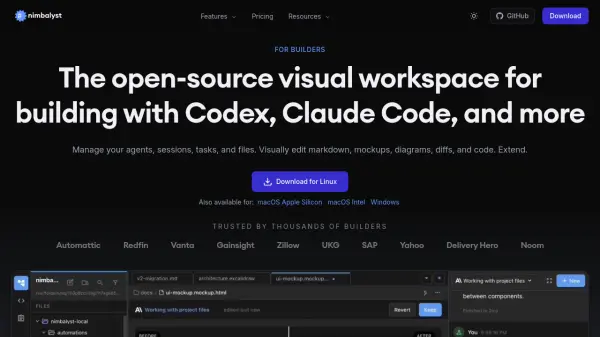
Nimbalyst is a free, open-source visual workspace purpose-built for agentic development using AI coding agents such as Claude Code by Anthropic and Codex by OpenAI. Rather than relying on terminal-based workflows, Nimbalyst provides a rich desktop environment where developers can manage multiple agent sessions on a Kanban board, review every file change as an inline diff, and visually edit markdown, mockups, diagrams, data models, CSV files, and code — all without switching between tools. The platform is MIT licensed and available as a desktop application for macOS (Apple Silicon and Intel), Windows, and Linux, with a companion iOS mobile app for monitoring and managing sessions on the go.
Beyond session management, Nimbalyst integrates task tracking directly into the workspace so that AI agents can read backlogs, pick up context from related items, and automatically update the task board as work progresses. Its extension system allows developers to register custom editors for any file type and browse a community marketplace for additional tools. The platform supports MCP server integration, AI-powered git commit management, worktree isolation for parallel sessions, and Prisma-ready data model exports, making it a comprehensive environment for builders who want full visibility and control over their AI-assisted development workflows.
Features
- Visual File Editing: WYSIWYG editors for markdown, CSV, mockups, code, Excalidraw diagrams, data models, and Mermaid diagrams with full AI agent context.
- Session Kanban Board: Organize and monitor multiple AI agent sessions by phase — backlog, planning, implementing, and complete — in a single view.
- Inline Diff Review: Every AI edit is surfaced as a reviewable diff so developers can inspect, approve, or reject changes before they are applied.
- Integrated Task Management: Tasks live inside the workspace so agents can read the backlog, pick up context, and update the board automatically as work progresses.
- Parallel Agent Sessions: Run multiple Claude Code and Codex sessions simultaneously with optional one-click git worktree isolation per session.
- Extension System: Build or install custom visual editors for any file type via an open architecture and community marketplace.
- Mobile App: Monitor and manage agent sessions remotely from an iPhone, paired with the desktop app in seconds.
- Open Source (MIT): Desktop and iOS apps are MIT licensed with source available on GitHub, supporting local files and open formats.
- AI Git Management: AI-assisted git commit, staging, and worktree management built directly into the workspace.
- MCP Server Support: Native support for Model Context Protocol servers and workspace extensions.
Use Cases
- Managing multiple Claude Code or Codex sessions in parallel across a software project
- Reviewing and approving AI-generated code changes as inline diffs before they are committed
- Designing UI wireframes and mockups visually and generating matching frontend code
- Editing and transforming CSV data with AI-powered filters, sorts, and reshaping
- Designing database schemas visually and exporting Prisma-ready schema files
- Creating and updating Mermaid diagrams and Excalidraw drawings with natural language
- Tracking development tasks, bugs, and feature specs in an agent-aware task board
- Writing and editing technical documentation in a WYSIWYG markdown editor with AI assistance
- Monitoring running agent sessions remotely via the iOS mobile app
- Building custom visual editors for proprietary file types using the extension system
How It Works
Download and Install
Download the Nimbalyst desktop app for your platform — macOS (Apple Silicon or Intel), Windows, or Linux — and install it. No credit card is required.
Connect Your AI Agent
Connect your existing Claude Code or Codex subscription by providing your API access. Nimbalyst uses your own agent credentials to power all AI features within the workspace.
Create and Manage Sessions
Start new agent sessions and organize them on the Kanban board by phase. Run multiple sessions in parallel, optionally enabling git worktree isolation per session with a single click.
Edit Files Visually with AI
Open any supported file — markdown, CSV, mockup, code, Excalidraw, data model, or Mermaid diagram — in the appropriate visual editor. Your agent works alongside you with full project context.
Review, Approve, and Ship
Every AI-generated change is presented as an inline diff. Inspect, approve, or reject each edit, manage git commits with AI assistance, and track task progress — all from within one unified workspace.
FAQs
-
Does Nimbalyst require its own API key or subscription for AI features?
Yes. Nimbalyst connects to your own Claude Code or Codex subscription. You bring your own API access, and Nimbalyst provides the workspace and visual tools to make it more productive. -
What AI agents does Nimbalyst support?
Nimbalyst supports Claude Code (by Anthropic) and Codex (by OpenAI) as primary agents, with OpenCode, Copilot, and Codex via ACP currently in Alpha. -
What platforms does Nimbalyst run on?
Nimbalyst is available as a desktop app for macOS (Apple Silicon and Intel), Windows, and Linux. There is also an iOS mobile app for managing agent sessions remotely. -
What is included in the free Individual plan?
The free Individual plan includes the full Nimbalyst editor, session manager, Claude Code and Codex AI integration, MCP server support, extensions, file link sharing, mockups, diagrams, data models, and git worktrees — with no feature limits and no trial period. -
When will Team plan pricing be available?
The Team plan is coming soon. It will add real-time collaboration features such as shared sessions, multi-player markdown editing, and team task management. You can join the waitlist on the pricing page to be notified first.