
What is Maccy?
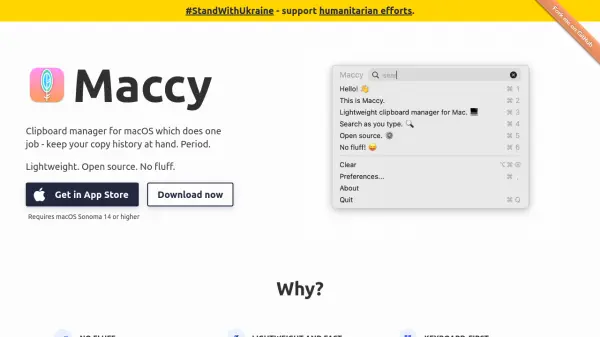
Maccy is a clipboard manager built exclusively for macOS, focusing on simplicity and efficiency by storing your copy history and enabling quick access without distractions. It is designed with privacy and speed in mind, storing all data locally and using the native macOS user interface for seamless integration. The application employs a keyboard-first approach, allowing users to quickly search and select clipboard items, ensuring maximum productivity without the need to use a mouse.
Open source under the MIT license, Maccy is free to use and its code is fully accessible, making it a trusted choice for users who value transparency and control. It ensures data security by mirroring the actions of your password manager, removing sensitive data from the clipboard when needed. With its minimalistic design, Maccy offers essential clipboard management functions, avoiding unnecessary complexity or bloat.
Features
- Copy History: Stores your entire clipboard history for quick access.
- Lightweight Design: Minimal system footprint and fast performance.
- Keyboard-First Interface: Search and select history entirely via keyboard.
- Privacy Focused: Clipboard data is stored locally, respecting privacy.
- Password Integration: Automatically removes sensitive clipboard data when needed.
- Native macOS UI: Seamless user experience with macOS look and feel.
- Open Source: Fully open codebase under MIT license.
- Free Forever: No cost to use or modify.
Use Cases
- Efficiently retrieving previously copied text or images on macOS.
- Managing repetitive copy-paste tasks in writing or programming.
- Accessing clipboard history securely for password management.
- Boosting productivity by using keyboard shortcuts to manage clipboard data.
- Maintaining a minimal, distraction-free clipboard workflow.
FAQs
-
Is Maccy free to use?
Yes, Maccy is completely free and open source under the MIT license. -
Does Maccy store clipboard data in the cloud?
No, all clipboard data is stored locally on your Mac for privacy and security. -
What version of macOS is required to use Maccy?
Maccy requires macOS Sonoma 14 or higher. -
Can I access Maccy using keyboard shortcuts?
Yes, Maccy is designed for keyboard-first operation, making it quick to access and search your clipboard history. -
Is the source code of Maccy available to the public?
Yes, Maccy's full source code is available on GitHub, enabling users to inspect or modify it as needed.