What is Lynote AI Detector?
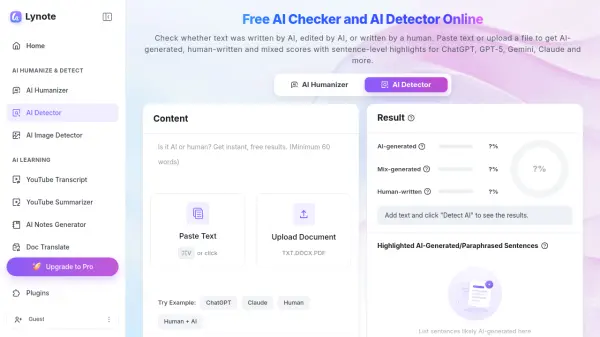
Designed for clear and practical content verification, Lynote AI Detector analyzes writing patterns such as word choice, repetition, sentence rhythm, predictability, and structure. It returns separate scores for AI-generated, mixed, and human-written content, while highlighting specific sentences that may require closer review.
The detector supports more than 50 languages and recognizes writing patterns associated with major models, including ChatGPT, GPT-5, Gemini, Claude, LLaMA, and Mistral. It can also identify text that may have been paraphrased, refined, or humanized with AI. Submitted content is processed confidentially and is not used to train Lynote's detection models.
Features
- Three-Way Detection Scores: Reports AI-generated, mixed, and human-written likelihood scores.
- Sentence-Level Highlights: Flags specific sentences that appear AI-generated, AI-edited, paraphrased, or mixed.
- Multi-Model Coverage: Detects writing patterns associated with ChatGPT, GPT-5, Gemini, Claude, LLaMA, Mistral, and other AI tools.
- Paraphrase Detection: Identifies content that may have been refined, rewritten, or humanized using AI.
- Multilingual Analysis: Supports AI content detection in more than 50 languages, including English, Spanish, French, German, Portuguese, Chinese, and Arabic.
- Document Uploads: Accepts PDF, DOCX, and TXT files in addition to pasted text.
- Confidential Processing: Does not use submitted text to train its detection models.
Use Cases
- Review essays, assignments, and research drafts for signs of AI-assisted writing.
- Check blog posts, landing pages, product copy, and SEO content before publication.
- Analyze reports, applications, client documents, and other professional writing.
- Screen cover letters, written assessments, and candidate responses with human oversight.
- Identify AI-heavy sentences in newsletters, articles, scripts, and freelance work.
- Recheck edited content after revising sentences flagged by the detector.
How It Works
Paste Text or Upload a File
Enter text directly or upload a supported PDF, DOCX, or TXT document.
Run the AI Detection Check
Select Detect AI to analyze sentence patterns, word choice, predictability, repetition, and other signals associated with AI writing.
Review the Detection Report
Examine the AI-generated, mixed, and human-written scores, then review highlighted sentences that may need closer analysis or revision.
FAQs
-
Can human-written text be incorrectly flagged as AI-generated?
Yes. False positives can occur, especially with short, formal, technical, or highly structured writing. Users should review highlighted sentences, compare earlier drafts, and consider the context rather than relying on one score alone. -
How does an AI detector differ from a plagiarism checker?
An AI detector estimates whether text was written or edited using AI, while a plagiarism checker searches for copied or closely matched source material. The tools address different content review needs. -
Does Lynote save submitted text for model training?
Lynote states that submitted content is processed securely and is not used to train its detection models. -
Can flagged text be rewritten within the Lynote platform?
Yes. Lynote provides an AI Humanizer that can rewrite AI-heavy sentences in a clearer and more natural voice. Users are advised to review the final result before publishing or submitting it. -
Should an AI detection score be treated as definitive proof?
No. Lynote recommends reviewing the overall score, mixed-writing score, highlighted sentences, drafts, citations, and relevant context before making a decision.