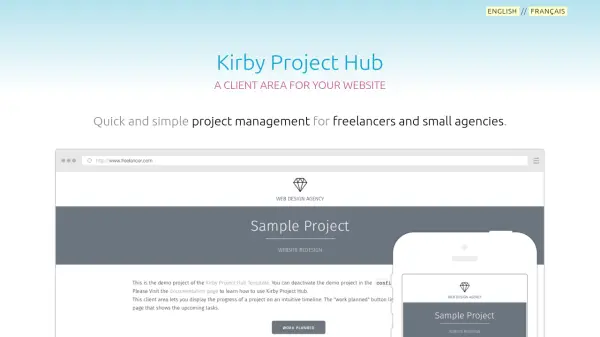
What is Kirby Project Hub?
Kirby Project Hub is an advanced implementation of Brad Frost's project hub concept, designed to streamline project management for freelancers and small agencies. It provides a centralized online space where all key project information is consolidated onto a single webpage in reverse chronological order, allowing clients to easily follow project progress without needing to learn complex collaborative software.
The tool offers a responsive timeline interface optimized for desktop, tablet, and mobile devices, with password-protected project pages and multi-client management capabilities. Built on the Kirby CMS platform, it can function as a stand-alone website or be integrated into existing websites, featuring multilingual support with English and French included by default and easy translation for other languages.
Features
- Responsive Timeline: Design beautiful timelines for projects optimized for desktop, tablet, and mobile devices
- Secure Area: Password-protect project pages with client accounts managed through an admin panel
- Multi-client & Multilingual: Manage multiple clients with preferred language selection and easy translation capabilities
- Web-based Interface: Fast and powerful interface for managing client areas without requiring Kirby expertise
Use Cases
- Tracking progress of freelance projects for client visibility
- Managing multiple client projects with secure access controls
- Creating visual project timelines for team collaboration
- Integrating project updates with other tools via RSS feeds
FAQs
-
What is Kirby Project Hub?
Kirby Project Hub is a project management tool that creates a client area for websites, allowing freelancers and small agencies to track project progress with responsive timelines. -
Do I need to be a Kirby expert to use Kirby Project Hub?
No, you don't need to be a Kirby expert. The tool can be used as a stand-alone website or added to an existing website without deep Kirby knowledge. -
Is Kirby Project Hub free to use?
Kirby Project Hub itself may have its own pricing, but note that Kirby CMS is not free. If used for public release, a Kirby license must be purchased separately. -
What are the system requirements for Kirby Project Hub?
Requirements include Apache 2 with URL rewriting (mod_rewrite) or nginx, PHP 5.4+, PHP mbstring extension for UTF-8 support, and compatibility with modern browsers like IE 9+, Chrome 19+, Safari 5.1+, Firefox 14+, and Opera 15+. -
Can Kirby Project Hub be integrated with other tools?
Yes, it can be integrated with other online tools and services using the RSS feature, allowing updates to be displayed on WordPress sites, sent via email, or posted to platforms like Twitter, Campfire, or Slack.