What is IceBuddha?
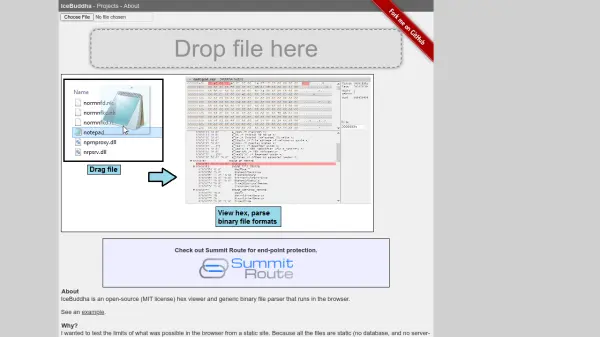
IceBuddha is an open-source hex viewer and generic binary file parser that runs entirely in the browser. It operates as a static site with no server-side functionality, ensuring that all file processing happens locally on the user's device. This approach provides enhanced security and privacy, as files are never uploaded to external servers.
The tool uses Python scripts converted to JavaScript via the Skulpt library to parse binary files. Users can view and edit these parse scripts directly in the browser, with immediate updates to file parsing. IceBuddha supports parsing various file types, including PE files, GIF images, and Mach-O files, and allows users to expand functionality by creating custom parse scripts.
Features
- Local Processing: All file parsing occurs in the browser without uploading data to servers
- Open-Source: Available under MIT license with full access to source code on GitHub
- Custom Parsing: Users can edit and create Python parse scripts to define file structures
- Multiple File Support: Parses PE files, GIF images, Mach-O files, and other binary formats
- Browser-Based: Runs entirely in the browser as a static site with no server requirements
Use Cases
- Analyzing binary file structures for security research
- Reverse engineering executable files and libraries
- Examining image file formats at the binary level
- Developing custom file parsers for proprietary formats
- Teaching binary file analysis concepts in educational settings
FAQs
-
How does IceBuddha ensure file privacy and security?
IceBuddha processes all files locally in your browser without uploading them to any servers, ensuring complete privacy and security. -
What file formats can IceBuddha parse?
IceBuddha can parse PE files (.exe, .dll, .sys), GIF image files, Mach-O files, and supports custom parsing for other binary formats. -
Can I use IceBuddha without an internet connection?
Yes, you can clone the repository and run IceBuddha locally using a simple web server, allowing offline use. -
How do I create custom parsers for new file types?
You can write Python scripts that define file structures, which IceBuddha converts to JavaScript for parsing in the browser. -
Is IceBuddha still actively maintained?
The project is mostly abandoned with the last update in 2014, but remains functional as an open-source tool.