What is GFX Forge?
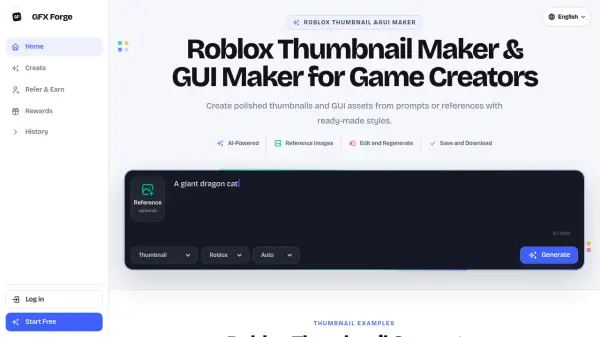
<p>GFX Forge is a specialized AI workspace designed to help game creators generate polished thumbnails and GUI assets quickly and efficiently. By combining text prompts with optional reference images, it produces bold, mobile-friendly visuals tailored to the distinct art styles of popular gaming platforms including Roblox, Minecraft, Unity, and Fortnite. Creators can choose from a range of themed presets such as Horror, Anime, Cartoony, Survival, and more, allowing them to test multiple visual directions before committing to a final design.</p> <p>The platform supports a connected editing workflow where generated images can be refined through additional instructions or reference uploads, with results saved to a personal history for easy retrieval and high-resolution download. GFX Forge is built for solo developers, indie studios, and content creators who need to maintain a consistent visual output without relying on custom artwork for every iteration. A referral program and daily credit rewards further lower the barrier to entry for new users exploring the tool.</p>
Features
- Platform Style Presets: Generate thumbnails matching Roblox, Minecraft, Unity, and Fortnite visual styles with one click.
- Prompt-Based Generation: Describe any game scene in plain text and receive multiple platform-ready thumbnail directions.
- Reference Image Support: Upload optional reference images to guide the AI output toward a specific visual style or composition.
- GUI Asset Creation: Generate in-game GUI elements alongside thumbnails using the same prompt-driven workflow.
- Connected Editing: Refine generated images with follow-up instructions or new references without starting from scratch.
- Save and Download: Store generation history and export final images in high resolution for immediate commercial use.
- Theme Presets: Choose from Horror, Cartoony, Anime, Survival, and Auto themes to control the mood of the output.
- Referral and Rewards System: Earn bonus credits by inviting friends and completing in-platform reward milestones.
Use Cases
- Creating eye-catching Roblox game thumbnails to improve click-through rates on the platform.
- Generating Minecraft server and mini-game artwork in a voxel-inspired style.
- Producing GUI assets for in-game menus, HUDs, and interface elements.
- Testing multiple thumbnail concepts quickly before committing to a final visual direction.
- Generating pitch-ready visuals for indie game prototypes without hiring custom artists.
- Creating horror, anime, tycoon, or survival-themed thumbnails for niche game genres.
- Producing mobile-optimized 16:9 thumbnail compositions for small-screen visibility.
- Accelerating visual production during game updates without waiting on external designers.
How It Works
Choose a Platform and Style
Select from Roblox, Minecraft, Unity, or Fortnite-style visuals, then pick a theme such as Horror, Anime, Survival, or Cartoony to define the mood of your output.
Describe Your Scene
Write a simple text prompt describing the game scene you want, such as 'a dragon catching a scared player' or 'two players running from a smile monster in the backrooms.'
Generate, Edit, and Save
Receive your generated thumbnail or GUI asset, refine it further using additional instructions or reference images, then save the result to your history or download it in high resolution.
FAQs
-
What is a Roblox thumbnail maker?
A Roblox thumbnail maker is a focused workspace for creating game thumbnails from prompts and references. GFX Forge adds platform-ready composition guidance, one to four independent outputs, connected edits, saved history, and high-resolution downloads. -
Which game platforms and styles are supported?
GFX Forge supports Roblox, Minecraft, Unity, and Fortnite-style visuals, along with theme presets including Horror, Cartoony, Anime, Survival, and Auto. -
Is GFX Forge free to start?
Yes, GFX Forge offers a 7-day free trial. Users can also earn additional credits by inviting friends through the referral program. -
How long does generation take?
Generation speed depends on the selected plan. Starter plan users are placed in the standard generation queue, while Pro and Studio plan users receive priority queue access for faster results. -
What can the Roblox GUI maker create?
The GUI maker generates in-game interface assets such as menus, HUDs, and other UI elements using the same prompt-driven workflow as the thumbnail generator.