What is Flowith?
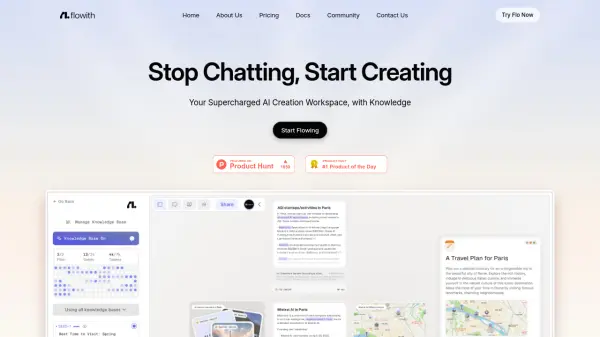
Flowith is a sophisticated productivity platform designed to streamline complex creative processes through the use of intelligent AI agents. The tool provides a dynamic workspace known as a Flow, where users can interact with advanced models such as GPT 4.1 to develop ideas and execute tasks. By integrating a specialized Agent Mode, the platform allows autonomous entities to take charge of specific project components, providing a high degree of automation and creative support for users looking to manifest detailed visions.
The platform incorporates a robust Knowledge Garden and Knowledge Base system, ensuring that information is not only processed but effectively organized and retrieved. This structured approach to information management enables users to maintain context across various projects and explore popular cases within the community. With seamless login options via Google, X, and GitHub, the interface is built for professional accessibility, offering a focused environment for deep-work and agent-led exploration.
Features
- Agent Mode: Enables autonomous AI agents to execute tasks and bring user visions to life.
- Knowledge Garden: Provides a structured environment for organizing and exploring project-related information.
- GPT 4.1 Integration: Utilizes advanced natural language processing models for high-quality content generation.
- New Flow Workspace: Offers a dedicated environment for starting and managing new creative projects.
- Knowledge Base: Allows for the integration of specific data sets to inform AI agent actions.
Use Cases
- Automating creative project workflows using autonomous AI agents.
- Organizing complex research and data within a Knowledge Garden.
- Developing detailed project visions through agent-led exploration.
- Managing knowledge-intensive tasks with integrated AI models.
How It Works
Account Creation
Sign up or sign in to the platform using Google, X, GitHub, or your email address to get started.
Initiate a Flow
Select the 'New Flow' option to create a dedicated workspace for your project or vision.
Activate Agent Mode
Toggle the Agent Mode to have autonomous agents assist in your creative process and explore specific cases.
Manage Knowledge
Use the Knowledge Garden and Knowledge Base to organize your information and provide context for the AI agents.
FAQs
-
What is Agent Mode in Flowith?
Agent Mode is a specialized feature that allows autonomous AI agents to assist in bringing a user's vision to life by executing tasks and providing insights. -
Is Nanobanana Pro free to use?
Yes, based on the current platform information, Nanobanana Pro is available for free. -
Which AI models does Flowith support?
Flowith supports integration with OpenAI and specifically mentions the use of GPT 4.1.