What is Feed Image Editor?
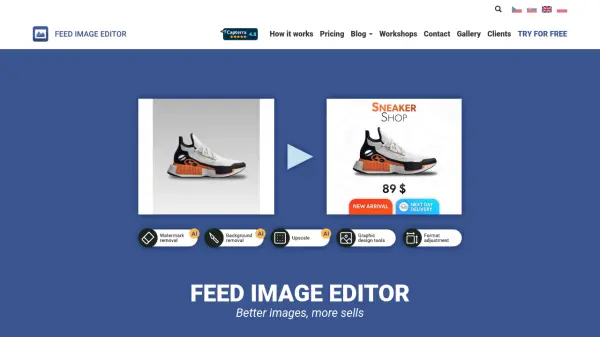
Feed Image Editor is an online application designed for bulk and automatic improvement of product images to enhance e-commerce advertising and increase click-through rates. It helps users create custom graphic templates, schedule them in campaigns, and export them to various ad systems while adhering to the specific rules of comparison engines and social networks.
The tool offers features such as background removal and improved image resolution, enabling users to process an unlimited number of products without additional costs per image. It operates through Mergado and includes online technical support and regular updates to ensure optimal performance for e-shop owners.
Features
- Background Removal: Automatically remove backgrounds from product images
- Improved Resolution: Enhance image quality for better visual appeal
- Custom Graphic Templates: Create and apply custom templates for branding
- Bulk Editing: Process unlimited product images in bulk operations
- Advertising Automation: Schedule campaigns and export to ad systems
- Product Image Audit: Review and optimize images for compliance
- Pre-set Formats: Use templates designed for advertising channels
- Online Technical Support: Access support for troubleshooting and guidance
Use Cases
- Improving product images for e-commerce stores to increase sales
- Automating image editing for bulk product listings on comparison engines
- Creating branded graphic templates for social media advertising campaigns
- Enhancing image resolution and removing backgrounds for better ad performance
- Scheduling and exporting images to various ad systems for streamlined marketing
FAQs
-
What is the cost of Feed Image Editor?
Feed Image Editor costs $89.00 per month per project, excluding VAT, with a yearly option at $71.20 per month. The first 30 days are free for new clients, and the price does not depend on the number of processed images. -
How does Feed Image Editor integrate with other systems?
Feed Image Editor requires using Mergado and allows users to export improved images to various ad systems, facilitating seamless advertising automation. -
What features are included in the subscription?
The subscription includes wide bulk editing options, pre-set advertising channel formats, custom logos and images, unlimited product processing, advertising automation, product image audit, online technical support, and regular updates.