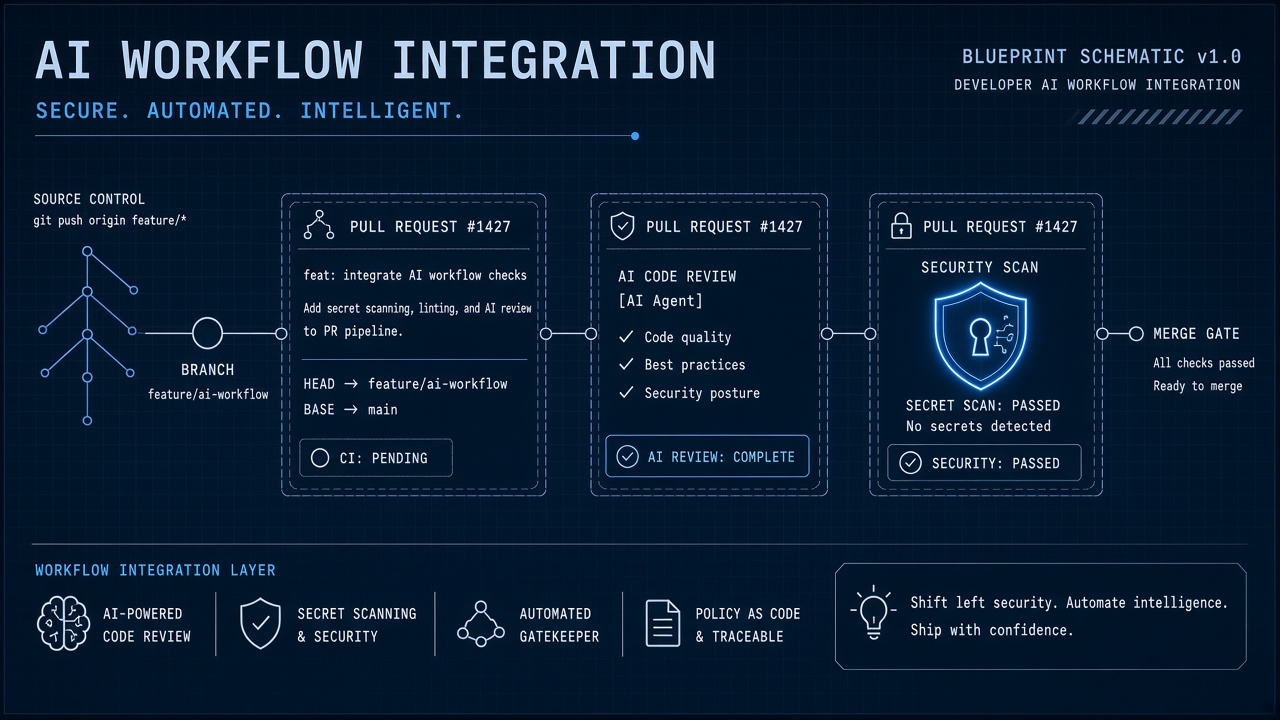
Engineering teams adopt AI for pull request summaries, issue triage, and code review assistance because GitHub is where source code, discussions, and CI/CD already live. Without integration architecture, personal access tokens with org-wide scope leak into shared prompts, Actions workflows echo secrets to model APIs, and unapproved bots gain read access to every private repository.
Integrating AI tools with GitHub developer workflows requires GitHub Apps with repo-scoped installation, deliberate choices between Apps and personal access tokens, secure Actions patterns for external AI APIs, and secret scanning discipline before content reaches model providers. This guide covers platform engineers deploying AI alongside AI coding assistants and AI writing assistant tools for documentation. The goal is faster reviews without credentials in chat logs.
GitHub App vs PAT Tradeoffs
Prefer GitHub Apps over personal access tokens for production AI integrations because Apps support fine-grained permissions, short-lived installation tokens, and org-level governance. PATs bind to a human user account, inherit that user's repository access, and remain valid until manually revoked. When an employee leaves or a token leaks, every repository the user could reach is exposed. GitHub Apps install per organization or account with explicit permission tiers reviewed by admins.
| Credential type | Best for | Main risk |
|---|---|---|
| GitHub App | PR bots, issue triage, org-wide automation | Misconfigured permission tiers at install |
| Fine-grained PAT | Individual developer experiments | Long-lived tokens in local config files |
| Classic PAT | Legacy scripts (migrate away) | Broad repo and org access |
| GITHUB_TOKEN in Actions | Workflow-scoped CI operations | Fork PR attacks if permissions too open |
App Permission Tiers
Request read-only Contents and Pull requests permissions for summarization bots; add Issues write only when triage automation creates labels or comments. GitHub documents permission tiers per resource. Document each permission in your internal app registry with the data classes the AI feature touches. Org owners should review installs through GitHub's app approval workflow on GitHub Enterprise Cloud.
Repo Installation Boundaries
Install GitHub Apps on specific repositories rather than entire organizations unless the AI feature genuinely requires org-wide code visibility. Repo-scoped installation limits blast radius when a vendor is compromised or a prompt accidentally includes proprietary source. Monorepos may need a single install, but microservice repositories should receive separate installs per sensitivity tier.
- Classify repositories: public OSS, internal tools, customer data services, infrastructure secrets.
- Block AI app installs on repos containing key material, payment code, or regulated data schemas.
- Use GitHub organization rulesets to require admin approval for new app installations.
- Audit installed apps quarterly; remove unused integrations.
- Map each install to an owning team and escalation contact.
Monorepo Considerations
Large monorepos challenge repo-scoped AI because a single install grants access to all packages inside the tree. Mitigate with path-filtered workflows, subdirectory-aware prompt context, and internal middleware that strips files outside the pull request diff before sending content to external models. Never send entire repository snapshots when a diff summary suffices for review assistance.
Actions Calling External AI APIs
GitHub Actions workflows that call OpenAI, Anthropic, or self-hosted inference endpoints must store API keys in encrypted secrets, pin action versions, and avoid echoing prompts in public workflow logs. Actions is the most common integration path for PR summary bots and automated release notes. Treat workflow YAML as production code subject to security review.
- Store model API keys in GitHub Actions secrets or OIDC-fed vaults, never in repository files.
- Use
if:conditions to skip AI steps on fork pull requests. - Set
permissions:blocks to minimum required scopes per job. - Mask secret values in logs; disable debug logging in production workflows.
- Rate-limit AI calls per PR to control token spend on busy repositories.
| Pattern | Use case | Security note |
|---|---|---|
| pull_request trigger | PR description and diff summaries | Restrict on forks; validate event origin |
| workflow_dispatch | On-demand doc generation | Limit to maintainers via environment protection |
| Self-hosted runner | Air-gapped model inference | Harden runner VM; isolate network egress |
| Reusable workflow | Standardized AI steps across repos | Centralize secret access in caller workflow |
Connecting to AI Coding Tools
Many AI coding assistants integrate via IDE plugins separately from GitHub server-side bots. Align policy so local assistant context rules match what PR bots may read from the remote repository. Developers should not paste CI logs containing secrets into either channel.
Preventing Secret Leakage in Prompts
Enable GitHub secret scanning and push protection, then add a pre-prompt sanitization layer that strips API keys, tokens, and private keys before diff content reaches external AI APIs. Secret scanning alerts when credentials appear in commits; push protection blocks merges. AI integrations add a new leakage path because prompts may include file contents from pull requests that contain accidentally committed secrets.
- Run secret scanning on repositories before enabling AI PR review bots.
- Scan diff text with regex and entropy detectors before model calls.
- Reject prompts containing patterns matching AWS keys, GitHub tokens, and PEM headers.
- Log blocked prompt attempts for security review without storing the secret value.
- Train developers that AI chat in PR threads is not a safe place for credential debugging.
Secret Scanning and AI Vendors
GitHub partners with cloud providers for secret scanning; AI vendors do not automatically participate in that ecosystem. Assume any secret sent to an external model may be retained in vendor logs unless a zero-data-retention agreement exists. Combine GitHub native scanning with your own outbound DLP on Actions workflow output and bot comment text.
Enterprise Server Considerations
GitHub Enterprise Server deployments require self-hosted or air-gapped AI endpoints because SaaS model providers cannot receive code from isolated instances without explicit network paths. GHEC (Enterprise Cloud) supports the same GitHub Apps model as github.com with added audit log and SAML features. GHES admins must plan egress firewalls, internal model hosting, and update cadence for GitHub App webhooks behind corporate proxies.
- GHEC: use marketplace apps with org approval; verify vendor SOC 2 and data processing terms.
- GHES: deploy AI inference inside the corporate network; disable external API calls from Actions runners.
- Both: export audit logs to SIEM when AI apps access repository contents.
- Both: test webhook delivery through load balancers with correct TLS termination.
Documentation and Release Notes
AI-generated release notes and README updates benefit from an AI writing assistant workflow with human editorial review. Automate draft generation in Actions, post results as PR comments, and require maintainer approval before merging doc changes. Generated text should cite linked issues and avoid inventing feature claims.
Frequently Asked Questions
How does GitHub Enterprise Server change AI integrations?
GHES instances cannot use cloud AI APIs by default without approved egress; plan internal model hosting or approved SaaS gateways. GitHub Apps still install on GHES repositories, but webhook targets must resolve inside your network. Coordinate with network security before enabling any bot that reads private code.
How should AI bots handle large monorepos?
Send only pull request diffs and changed file paths to the model, not full repository trees. Use path filters in Actions workflows and cap token context windows. For cross-cutting changes, summarize per package rather than loading the entire monorepo into one prompt.
How do custom AI apps relate to GitHub Copilot?
GitHub Copilot is a separate product with its own data handling terms; custom Apps and Actions workflows require independent security review. Organizations may allow Copilot while blocking third-party PR bots. Document each AI integration in your software inventory with distinct owners and data flows.
Are fork pull requests safe for AI Actions?
Fork PRs can exfiltrate secrets if workflows run with elevated permissions on untrusted code.
Use pull_request_target carefully or restrict AI jobs to internal branches. GitHub documents safe
patterns for workflows that comment on external contributions.
Issue Triage and Code Review Bots
Issue triage bots label new GitHub issues by component and severity; code review bots comment on pull request diffs with security and style suggestions. Both patterns need repo-scoped GitHub App installs and clear policies on when bot comments are advisory versus blocking. Developers should dismiss false positives without guilt; security teams track dismissal rates to tune prompts.
Webhook Security
Verify GitHub webhook signatures with the app secret on every delivery; reject replayed payloads outside a short time window. AI middleware that processes push and pull_request events must handle duplicate deliveries idempotently. Store GitHub delivery GUIDs to debug double summaries on force-pushed branches.
Rollout and Developer Enablement
Enable AI PR bots on one low-risk repository before org-wide rollout; measure comment acceptance rate and time-to-merge impact. Developer enablement sessions should demonstrate safe prompt practices, fork PR risks, and how to report a bot that surfaced internal credentials. Platform engineering publishes golden-path workflow templates in an internal repository so teams copy vetted Actions YAML instead of inventing integrations from blog posts.
Org-Wide Governance
GitHub organization owners should publish an approved AI integration list, block unapproved OAuth apps, and export audit logs to SIEM when bots access private repository contents. Align GitHub policy with IDE plugin rules so local assistants and server-side bots follow the same data classification standards.
Repo-Scoped Apps, Sanitized Prompts
GitHub AI integrations succeed when GitHub Apps replace long-lived PATs, installations stay repo-scoped, Actions workflows protect secrets, and pre-prompt scanning blocks credentials from reaching model providers. Enterprise Server teams plan internal inference paths. Engineering owns the boundary between source code and external AI.