Expense Sorted favicon

Expense Sorted
Automate Expense Categorization with AI

What is Expense Sorted?

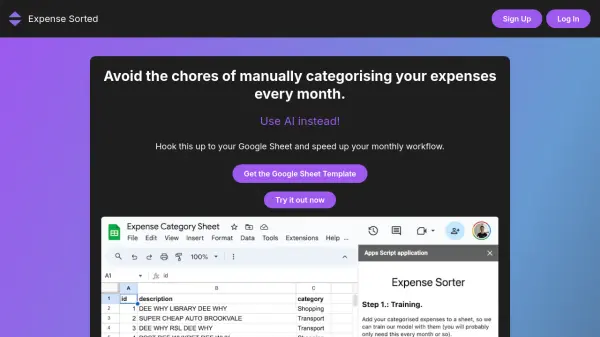
Expense Sorted simplifies expense management by automating the categorization of transactions. This tool integrates directly with Google Sheets, using advanced AI algorithms to accurately classify expenses, significantly reducing the need for manual input.

It offers a secure and user-friendly experience, ensuring data privacy through OAuth 2.0 authentication. Users benefit from customizable categories tailored to individual or business needs, promoting enhanced financial oversight and efficiency.

Features

  • Automatic Categorization: Advanced AI algorithms automatically classify expenses.
  • Secure Google Sheets Integration: Ensures privacy and data protection via OAuth 2.0.
  • Streamlined Interface: Provides a seamless user experience.
  • Accurate Transaction Identification: Reduces manual oversight through precise identification.
  • Customizable Categories: Allows tailoring to personal or business financial needs.

Use Cases

  • Bank Transactions Expense Classification
  • Expense Tracking
  • Google Sheet Expense Tracking

Related Tools:

Blogs:

  • Best AI tools for recruiters

    Best AI tools for recruiters

    These tools use advanced algorithms and machine learning to automate tasks such as resume screening, candidate matching, and predictive analytics. By analyzing vast amounts of data quickly and efficiently, AI tools help recruiters make data-driven decisions, save time, and identify the best candidates for open positions.

  • Top 6 AI note-taking tools for 2026: in-person, online, and hybrid use cases

    Top 6 AI note-taking tools for 2026: in-person, online, and hybrid use cases

    Most AI note-taking lists are really lists of meeting bots, which join your video call and transcribe it. That's useful, but it's half the picture. Decisions happen in hallway conversations, client dinners, on-site visits, and hybrid rooms where nobody is on a video link. This guide covers different parts of the note-taking workflow: hardware capture for in-person settings, platform-native tools for online calls, and AI layers for organizing and synthesizing what you've captured. It compares six tools by capture context, workflow fit, pricing, and limitations.

  • Chat with PDF AI Tools

    Chat with PDF AI Tools

    Easily interact with your PDF documents using our advanced AI-powered tool. Whether you're reading lengthy reports, research papers, contracts, or eBooks, our platform lets you chat directly with your PDF files, ask questions, extract insights, and get summaries in real-time.

Didn't find tool you were looking for?

Be as detailed as possible for better results